
Agent Harnesses vs. Agent Loops vs. Agent Graphs: Which Architecture Should You Build?
Most people are building agents in the wrong order. They start with prompts. Then tools. Then five subagents. Then a dashboard. Then a “memory layer.” And two weeks later they have an expensive
Article
Job breakdowns
Most people are building agents in the wrong order.
They start with prompts.
Then tools.
Then five subagents.
Then a dashboard.
Then a “memory layer.”
And two weeks later they have an expensive chatbot that sometimes opens the right tab.
The real question is not:
which model should I use?
It is:
what architecture should control the model when things go wrong?
Because every serious agent eventually has to deal with the same problems:
-
a tool fails
-
the model loses the task
-
context becomes stale
-
an action needs approval
-
a retry makes the situation worse
-
two tasks should run in parallel
-
a long workflow survives a restart
-
nobody knows why the final answer was accepted
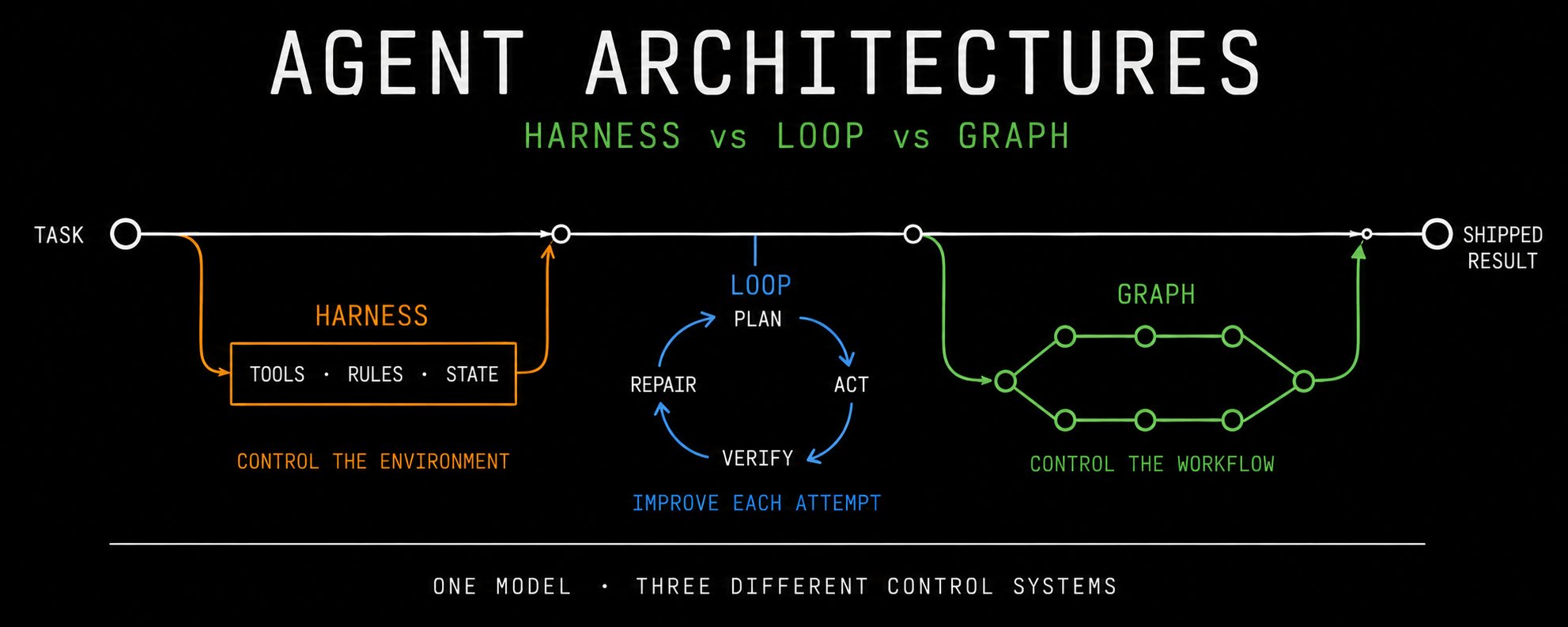
There are three useful answers:
-
Agent Harnesses
-
Agent Loops
-
Agent Graphs
They are not competitors.
They solve different layers of the same system.
The Short Answer
Use an Agent Harness when you need a reliable execution environment around one capable agent.
Use an Agent Loop when the task is iterative and success can be checked after every attempt.
Use an Agent Graph when the workflow has branching paths, parallel work, durable state, approvals, or multiple possible routes.
The mistake is treating a graph as a smarter prompt.
Or treating a loop as a production system.
Or treating a harness as “just a system prompt.”
First: What Is An Agent Harness?
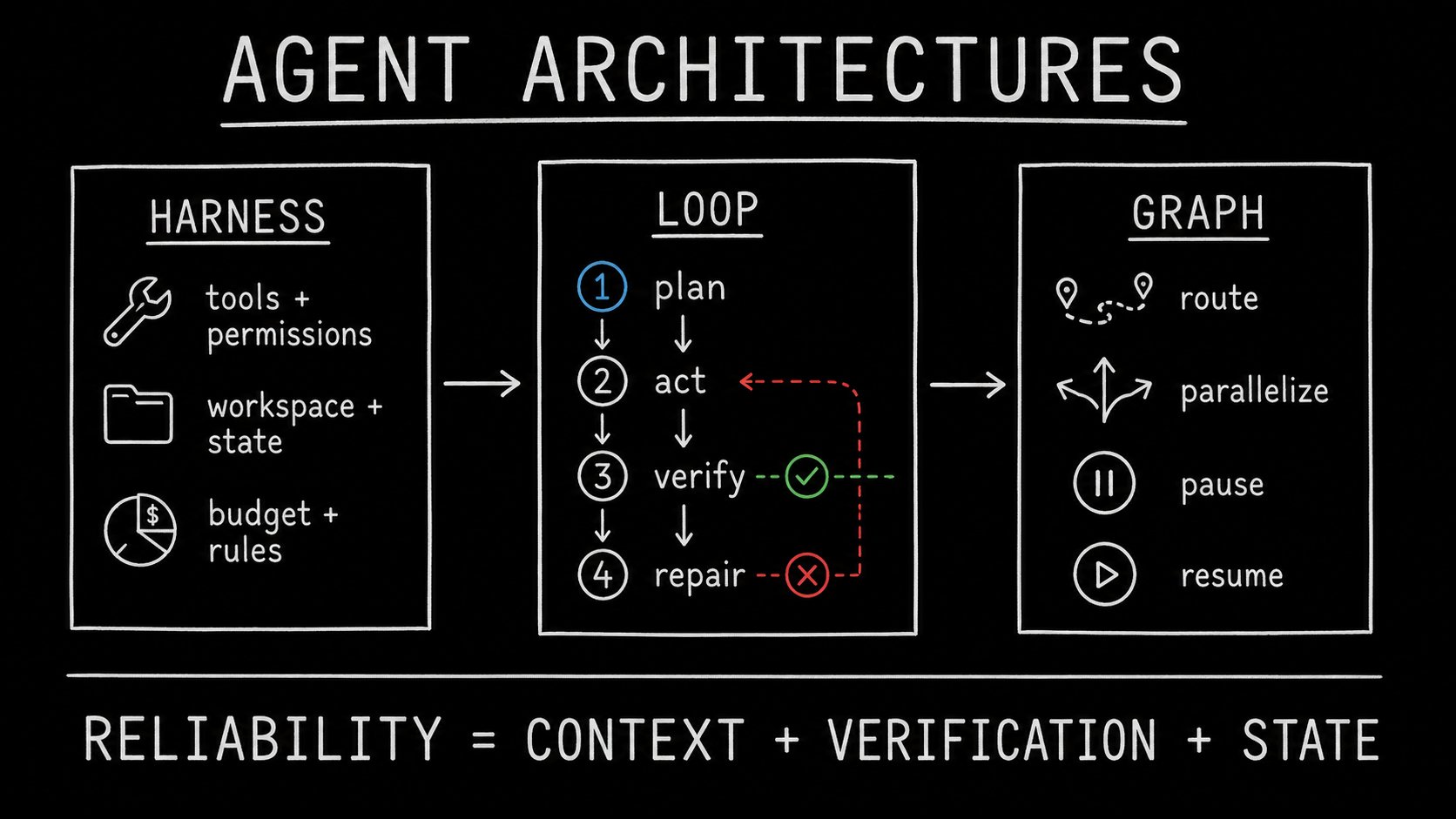
An agent harness is the operating environment around the model.
The model is not the agent.
The model is the reasoning engine.
The harness decides:
-
what tools exist
-
what the agent is allowed to do
-
where its files and state live
-
what counts as success
-
what gets logged
-
when to stop
-
when to retry
-
when a human must approve an action
Claude Code, Codex-style coding agents, browser agents, research agents, and autonomous workers all need a harness.
Without one, you are basically giving a very smart intern terminal access and hoping it reads the README.
A good harness turns a model from:
“Here are some suggestions”
into:
“Here is the exact task, environment, tool contract, verification rule, budget, and final artifact.”
The Harness Pattern
The important part is the task contract.
A task contract should define:
This sounds obvious.
But most “agent systems” still give the model one giant vague prompt and then wonder why it edits unrelated files.
When A Harness Is The Right Choice
Build a harness when:
-
one agent can do most of the work
-
tools are more important than multi-agent coordination
-
you need reliable logs and artifacts
-
the agent touches files, browsers, APIs, or money
-
the task has a clear success condition
-
you need limits on tokens, time, permissions, or retries
Examples:
-
coding agent inside a repository
-
research agent that must cite sources
-
support agent that can query internal tools
-
content agent that must verify product claims before writing
-
local AI worker that manages files, models, and GPU jobs
The Main Benefit
A harness makes behavior repeatable.
The same model can look dramatically smarter when it has:
-
a clean workspace
-
narrow tool permissions
-
a clear definition of done
-
structured feedback from tests
-
a durable record of previous attempts
The prompt matters.
But the environment matters more.
The Harness Failure Mode
The common failure is building a “god harness.”
One agent gets:
-
30 tools
-
every repository file
-
all company documents
-
unlimited context
-
no cost ceiling
-
no explicit stop rule
-
no verifier
It does not become autonomous.
It becomes confused at scale.
A harness should reduce choices, not create more of them.
Give the agent the smallest environment that can complete the task.
Second: What Is An Agent Loop?
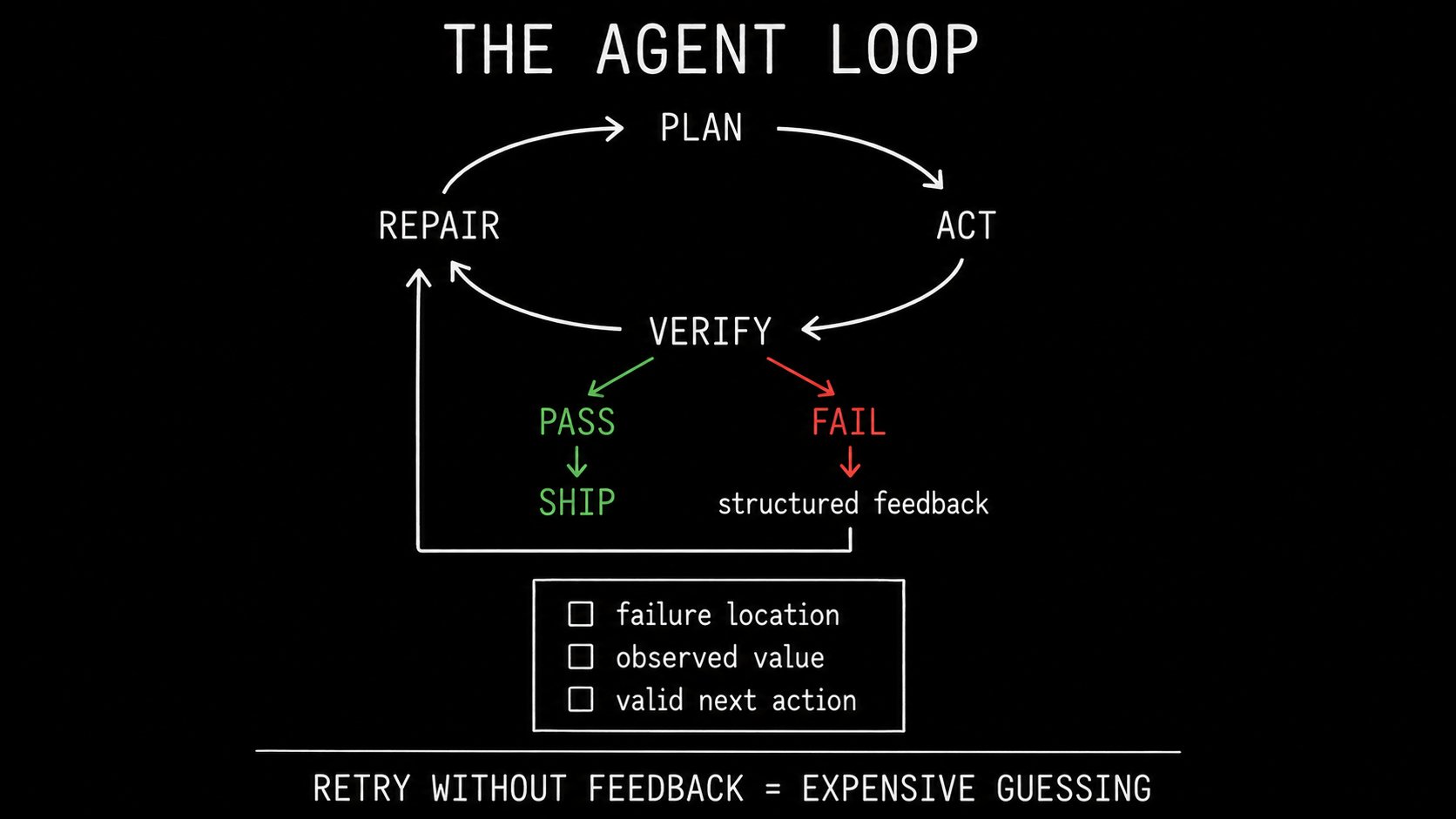
An agent loop is a repeated cycle:
-
attempt the task
-
observe the result
-
verify it
-
turn the failure into useful feedback
-
retry or stop
The basic form is simple:
This is the architecture behind most good coding agents.
The model writes code.
Tests fail.
The harness returns the failure.
The model repairs the relevant part.
Tests run again.
The important part is not the retry.
The important part is the quality of feedback.
The Bad Loop
This is not self-improvement.
This is expensive panic.
The Good Loop
A loop needs a verifier that is independent from the model.
For code:
-
tests
-
type checks
-
linting
-
build output
-
screenshot comparison
-
API contract tests
For research:
-
source links
-
quote extraction
-
freshness checks
-
claim-to-source matching
For content:
-
facts verified against docs
-
hook matches actual evidence
-
no unsupported numbers
-
no duplicated angle from prior posts
For operations:
-
database record changed
-
API returned expected payload
-
job completed
-
human approved the irreversible step
When A Loop Is The Right Choice
Use an agent loop when:
-
the task can be checked repeatedly
-
the agent needs more than one attempt
-
each attempt creates new evidence
-
the workflow is mostly linear
-
there is one core objective
Examples:
-
fix a bug until the test passes
-
research a claim until two sources confirm it
-
generate a post until factual gates pass
-
extract a table from a PDF until schema validation succeeds
-
optimize a prompt against a known evaluation set
The Main Benefit
A loop gives the model consequences.
Without a loop, the model produces text.
With a loop, the model operates against reality.
That difference is everything.
The Loop Failure Mode
A loop becomes dangerous when it has no hard boundaries.
You need:
Never let an agent retry forever because “it might figure it out.”
If the verifier says the same thing three times, the system needs a different strategy, not a fourth apology from the model.
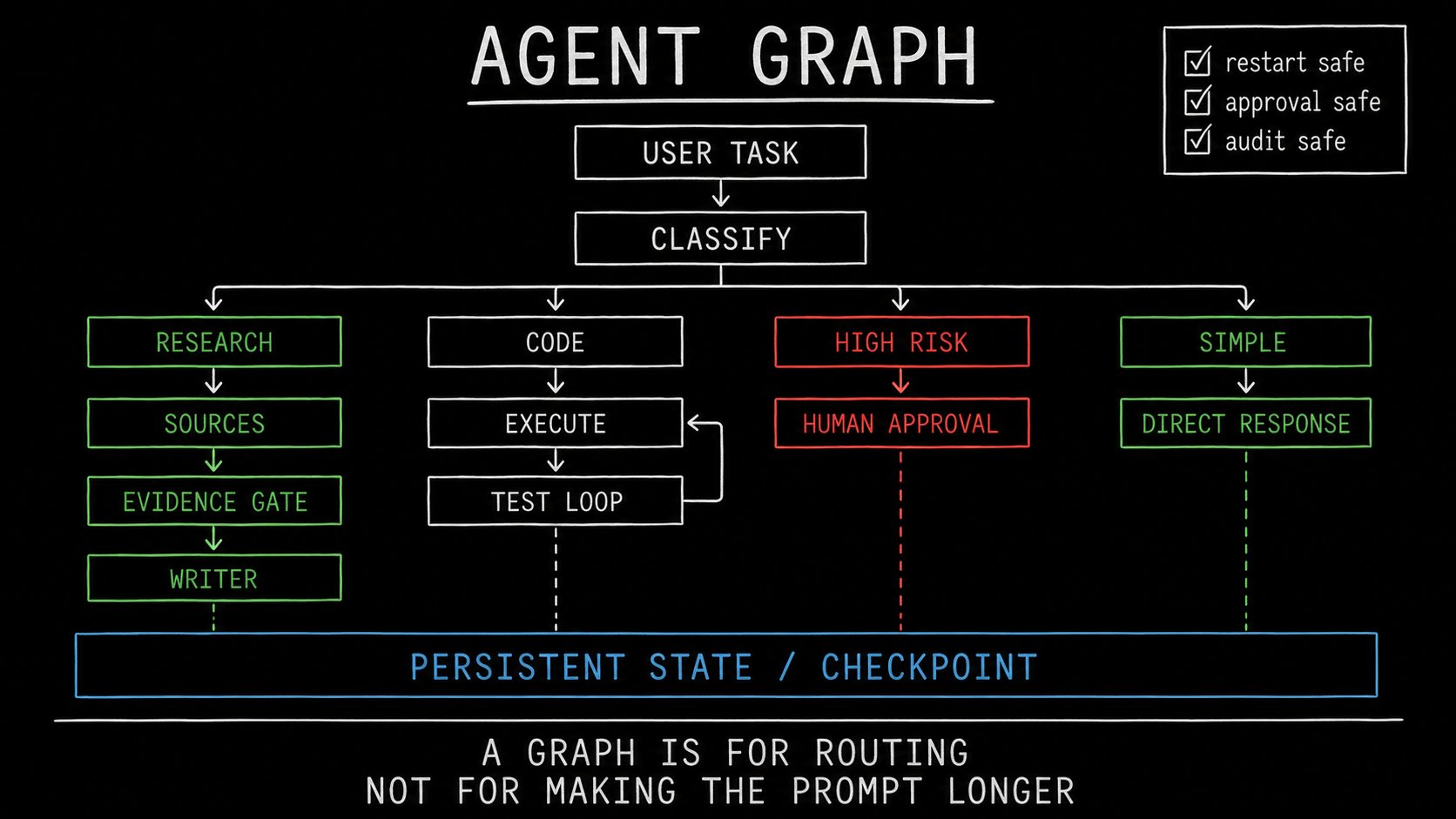
Third: What Is An Agent Graph?
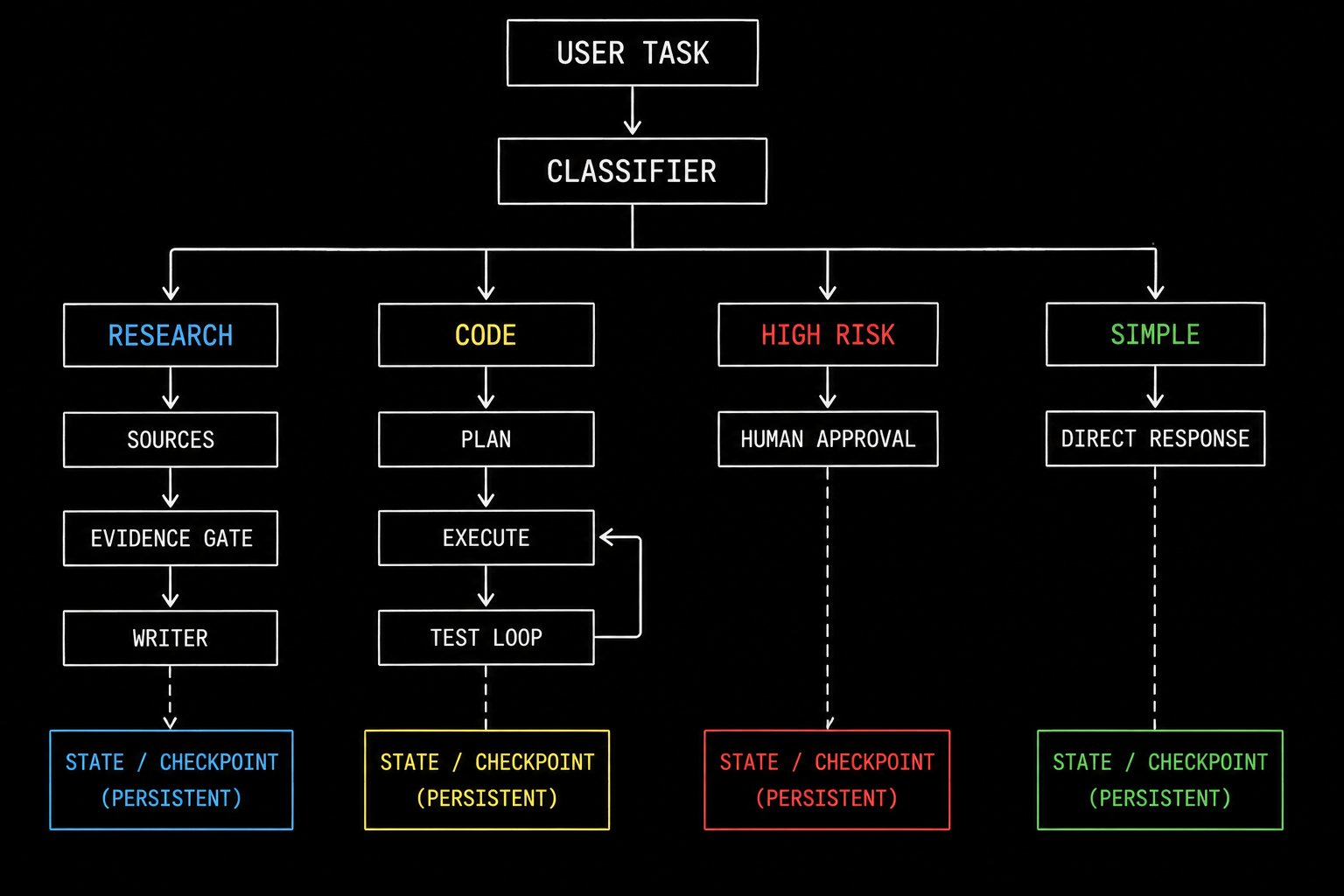
An agent graph is a workflow with explicit states and routes.
Instead of:
you can define:
A graph is useful when the workflow is no longer one linear loop.
It is not about using more agents.
It is about making the system’s possible paths explicit.
A Real Graph Has State
The key idea is not nodes.
It is state.
A production agent needs to know:
-
what task it is working on
-
which sources it has already checked
-
what tools it called
-
which steps succeeded
-
what failed
-
what needs approval
-
where to resume after a restart
-
which branch it took and why
This is why graphs become useful for long-running agents.
You can pause them.
Resume them.
Replay them.
Audit them.
When A Graph Is The Right Choice
Use an agent graph when you have:
-
multiple task types
-
conditional routes
-
parallel research or execution
-
approval checkpoints
-
durable jobs
-
multiple agents with clearly separated roles
-
retries that need different strategies
-
long-running tasks that survive restarts
Examples:
-
customer-support operations agent
-
content engine with research, verification, writing, and media stages
-
coding platform with planner, executor, test loop, reviewer, and deployment gates
-
finance workflow with risk checks and human approval
-
multi-source intelligence system
The Main Benefit
A graph makes failure visible.
Instead of saying:
“The agent failed.”
You can say:
“The source-verification node failed because no primary documentation confirmed the claim. The writer never ran.”
That is how production systems should fail.
The Graph Failure Mode
The usual mistake is graphing everything too early.
People build:
-
a planner agent
-
a researcher agent
-
a critic agent
-
a summarizer agent
-
a judge agent
-
a supervisor agent
-
a memory agent
-
a graph of 18 nodes
…for a task that could have been handled by one model, two tools, and a verifier.
A graph is not sophistication.
A graph is operational complexity.
Every node adds:
-
latency
-
token cost
-
state to maintain
-
another failure point
-
another place for context to drift
Use it only when routing or durability gives you a real advantage.
The Architecture Comparison
What Should You Actually Build?
Build A Harness If You Are Here
You have one agent.
It needs tools.
It needs a clear workspace.
It needs guardrails.
It needs a definition of done.
Examples:
-
“Fix this issue in my repository.”
-
“Research this product and draft a verified post.”
-
“Turn these notes into an article.”
-
“Review this PR against the specification.”
Add A Loop If You Are Here
Your agent can act, but it does not reliably finish on the first attempt.
Examples:
-
test-driven coding
-
screenshot-to-UI implementation
-
claim verification
-
structured extraction
-
browser workflows with known expected outcomes
Add A Graph If You Are Here
Your workflow now has multiple legitimate paths.
Examples:
-
a production content engine
-
autonomous customer operations
-
research plus publishing workflow
-
multi-repository coding system
-
financial or compliance workflow
The Best Architecture Is Usually A Stack
The strongest systems do not choose one.
They layer them.
For example, a content engine could work like this:
That is much stronger than one massive prompt saying:
“Research this deeply, find sources, verify everything, write a viral post, choose a video, remember my style, and do not hallucinate.”
Use a technical chalkboard style with no UI mockups.
A Practical Decision Framework
Before adding another agent, ask these five questions:
If you cannot answer what verifies success, you are not ready for more agents.
If you cannot explain why a route exists, you are not ready for a graph.
If you cannot define tool permissions, you are not ready for autonomy.
The Real Takeaway
Most agents do not fail because the model is too weak.
They fail because the system gives the model:
-
vague objectives
-
unlimited context
-
no reliable state
-
weak feedback
-
no stop condition
-
no proof that the task is complete
Start with a harness.
Add a loop when you can verify work.
Add a graph only when the workflow genuinely branches.
That is how you move from a chatbot that “sometimes does things” to an agent system you can actually trust.
Published on grokbot.sh. Cite the public log, not a prompt pack.