
GROK BOT BEST PRACTICES : HOW TO GET MORE DONE WITH AI AGENTS
Most people use Grok Bot like a normal chatbot. That’s the wrong way to think about it. A normal chat gives you an answer and stops. A Bot can actually perform the task for you using its own role,
Article
Job breakdowns
Most people use Grok Bot like a normal chatbot.
That’s the wrong way to think about it.
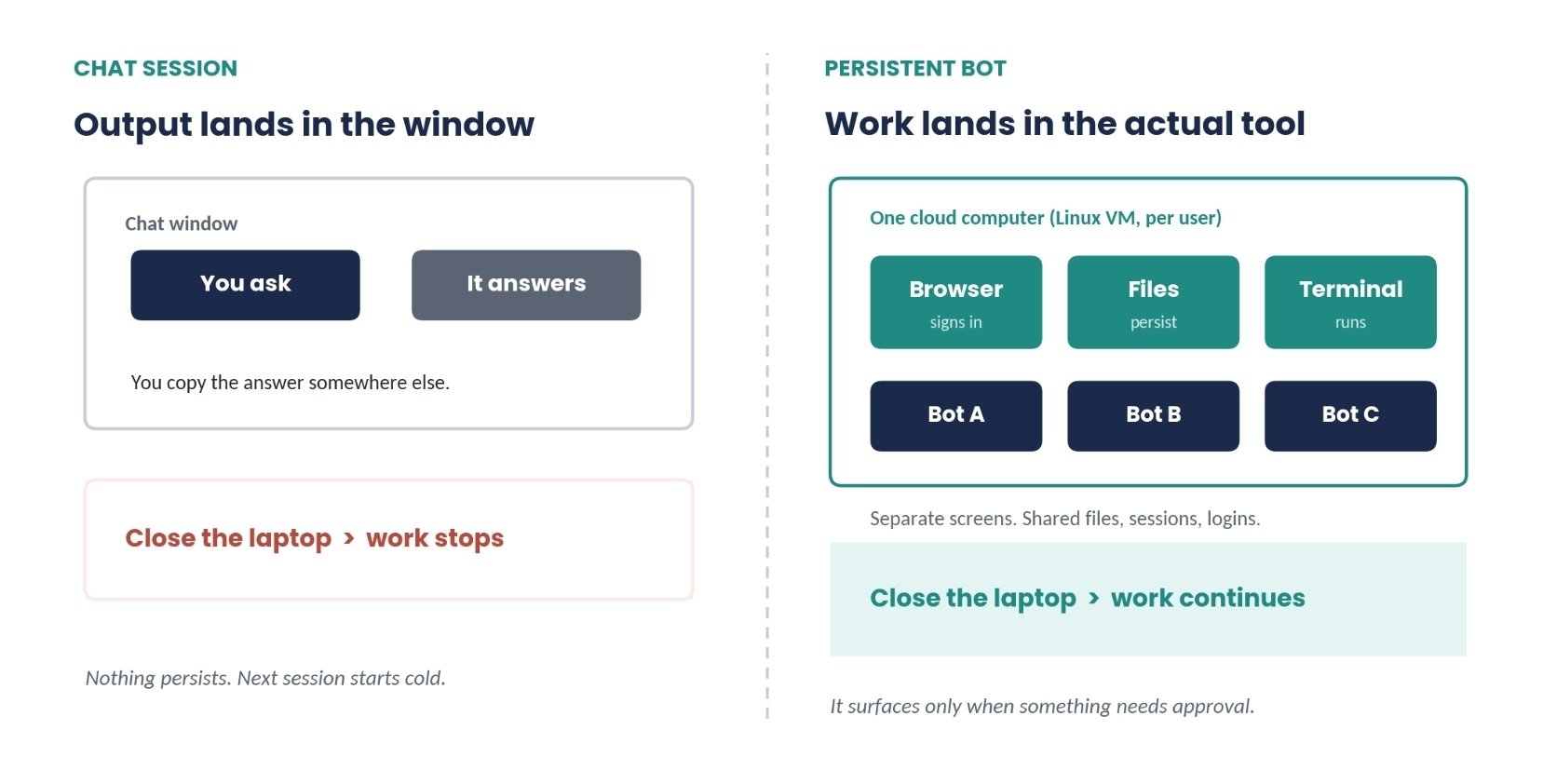
A normal chat gives you an answer and stops. A Bot can actually perform the task for you using its own role, memory, workspace, browser, files, and terminal.
But giving an agent too much freedom without clear rules is a recipe for mistakes.
Here’s how to set up Grok Bot properly, give it tasks it can actually finish, and automate useful work without giving up control.
What a Grok Bot Actually Is
A normal chat works like this:
You ask → AI answers → You do the work.
A Bot works differently:
You give it a task → Bot uses its computer → Bot completes the work → Bot reports back.
Each Bot has its own:
-
Role
-
Memory
-
Instructions
-
Workspace
-
Working context
It also operates on a cloud computer with access to a browser, files, and terminal.
That means it can continue working even after you close your laptop.
But there’s one important detail:
Your Bots share the same computer.
They can share:
-
Files
-
Browser sessions
-
Logins
-
Tools
-
The underlying cloud environment
Each Bot has its own workspace and instructions, but they aren’t completely isolated.
Think of it like one computer with several AI employees working on it.
Each employee has a different job, but they’re all using the same office.
Setting Up Your First Bot
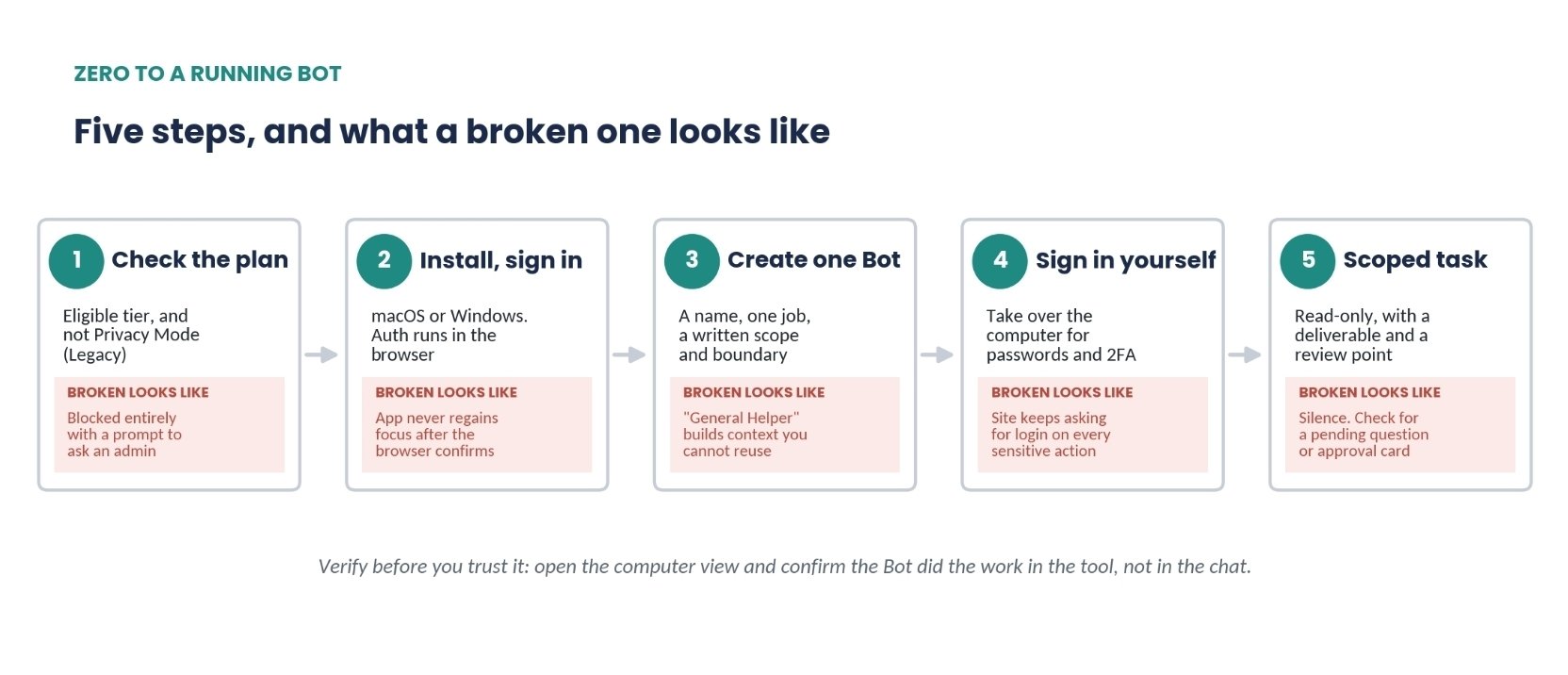
Getting started is straightforward.
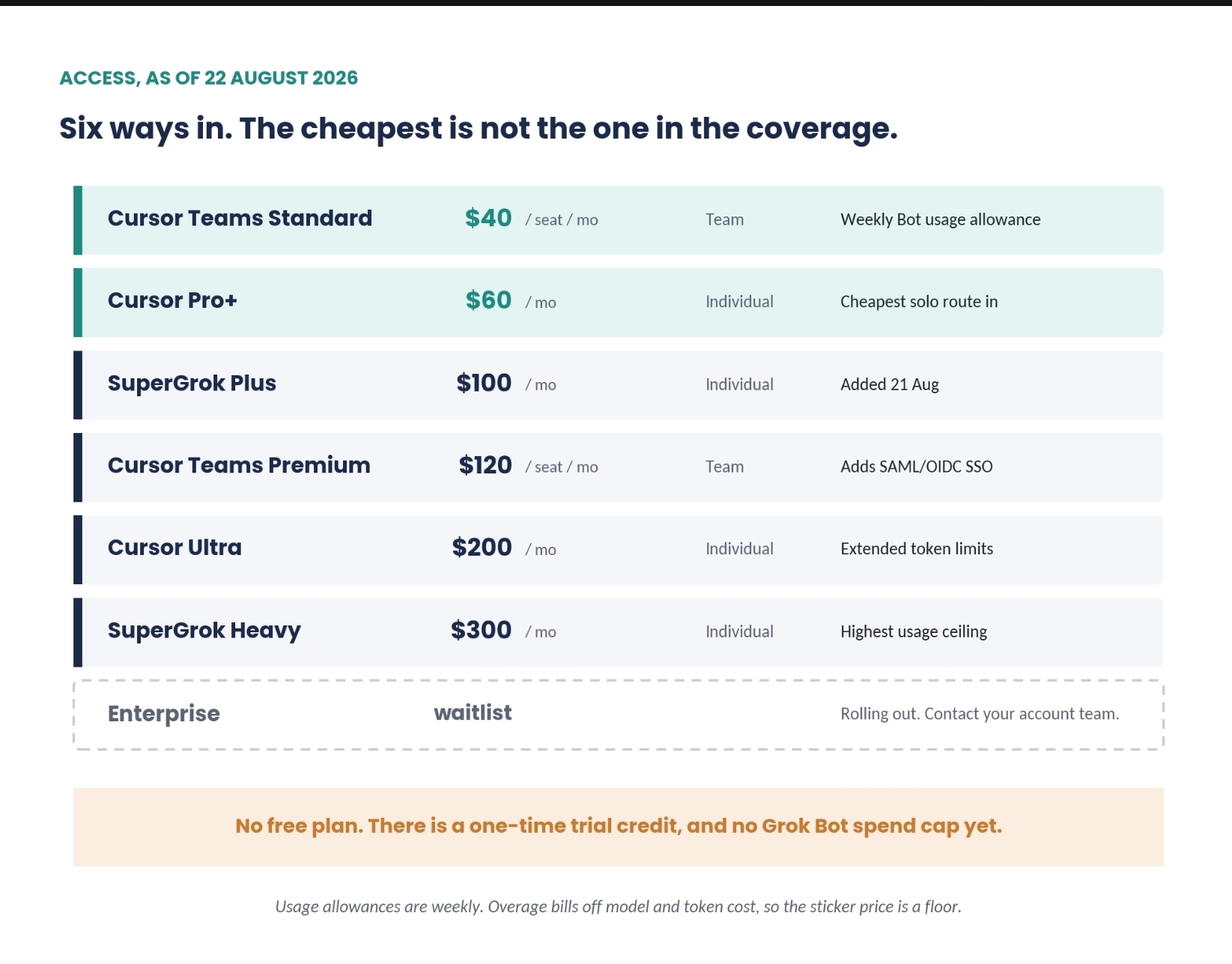
- Check that your plan supports Grok Bot
Grok Bot is available on supported plans including:
-
SuperGrok Plus
-
SuperGrok Heavy
-
Cursor Pro+
-
Cursor Ultra
-
Cursor Teams plans
One important limitation: Privacy Mode (Legacy) doesn’t work with Grok Bot.
- Install the desktop app
Install the desktop application on macOS or Windows.
Sign in through your browser using your Cursor account, then return to the app.
- Let the computer initialize
The first setup can take a few minutes.
If the process gets stuck, restart the application and try again.
- Create a Bot with ONE clear responsibility
Don’t create something vague like:
“General Assistant”
Instead, give it a specific job.
Examples:
-
Research Bot
-
Sales Operations Bot
-
Content Bot
-
Finance Bot
-
Customer Support Bot
The clearer the responsibility, the easier it is for the Bot to understand what it should and shouldn’t do.
- Handle authentication yourself
If the Bot needs you to log into a service, take control of the computer and enter your password or verification code yourself.
Never send passwords, passkeys, or authentication codes through chat.
Once you’re logged in, the session can remain available to the Bots that have access to that computer.
- Start with a safe task
Don’t immediately give your new Bot permission to send emails, delete files, or modify production systems.
Start with something small and read-only.
Tell it:
-
What you want
-
Where it should get the information
-
What it shouldn’t touch
-
What the final output should look like
-
When it should stop and ask you
For the first few tasks, tell it explicitly:
Do not make changes. Only research and report back.
- Verify the work
Don’t trust the chat response alone.
Watch the Bot perform the task and confirm that the result actually exists in the relevant application.
Ask:
-
Where did you get this information?
-
What did you change?
-
What sources did you use?
-
What remains unfinished?
Then manually verify a few results yourself.
What Grok Bot Is Actually Good At
Not every task is a good fit for an autonomous agent.
Here are the use cases where Grok Bot makes the most sense.
- Websites and Tools Without APIs
This is one of its biggest advantages.
Instead of requiring an API, the Bot can interact with a website similarly to how a human would:
-
Open pages
-
Click buttons
-
Enter information
-
Read results
-
Navigate dashboards
-
Complete repetitive workflows
This can be particularly useful for older business software, supplier portals, government websites, and other systems without convenient AI integrations.
Best practice: let the Bot do everything up to the final submission, then require your approval.
- Repetitive Tasks You Can Easily Review
Grok Bot is excellent for repetitive workflows.
For example:
-
Weekly reports
-
Website checks
-
CRM cleanup
-
Research
-
Data collection
-
Routine account reviews
Give it the same instructions every time.
The Bot handles the preparation.
You review the output.
Then you approve the final action.
The goal isn’t to automate everything.
- Research + Drafting
You can have a Bot:
-
Research companies
-
Track competitors
-
Analyze accounts
-
Gather information
-
Screen candidates
-
Prepare reports
-
Draft responses
This is especially useful because the Bot can perform the research without immediately changing anything.
You simply review the final draft.
- Inbox and Ticket Management
Grok Bot can read and organize messages, emails, and tickets.
But for now, I’d keep this in draft-only mode.
There isn’t a perfect dry-run or confidence system, so you should review messages before anything gets sent externally.
- Anything That Spends Money or Changes Production
This is where you should slow down.
Don’t give an agent unrestricted control over:
-
Payments
-
Purchases
-
Production systems
-
Deletions
-
External communications
-
Account permissions
The tools may technically allow the Bot to perform these actions, but technical capability isn’t the same thing as safe autonomy.
Put an approval step before the final action.
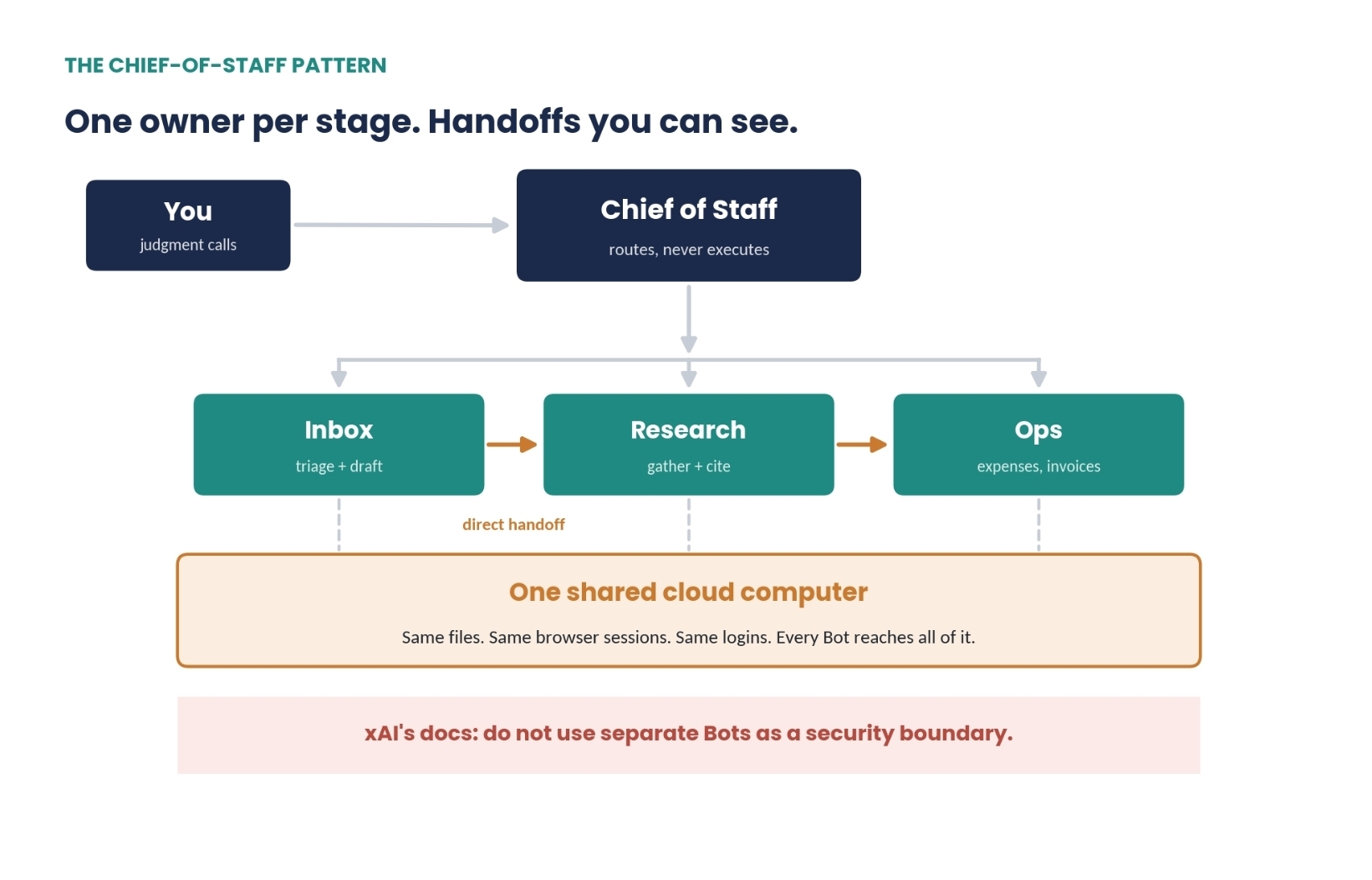
Running Multiple Bots: The Chief-of-Staff Model
Multiple Bots become useful when each one has a different responsibility.
For example:
Research Bot → Finds information Writing Bot → Turns research into content Analysis Bot → Reviews the work Chief of Staff Bot → Coordinates everything
The key is to give every Bot a clearly defined role.
Use multiple Bots when they have:
-
Different goals
-
Different tools
-
Different permissions
-
Different schedules
-
Different responsibilities
If two Bots have the exact same job and access, you probably only need one.
The Chief of Staff should coordinate—not do everything.
It decides:
“This task belongs to Research Bot.”
Then Research Bot handles the actual work.
Bots can also pass work to one another through group chats or direct messages.
Just make sure one Bot owns each task.
Otherwise, you’ll end up with multiple agents doing the same work.
You can have up to 50 Bots and group chats, but don’t confuse a larger roster with a better system.
A small team of well-defined Bots is usually better than 50 poorly defined ones.
How to Write Better Bot Instructions
There isn’t a public API or SDK for Bots yet.
Instead, you configure them using plain English in two places:
Bot description
Permanent rules that should always apply.
Chat message
The specific task you want completed right now.
Think of it like this:
Bot description = employee handbook
Chat message = today’s assignment
Example Bot System Brief
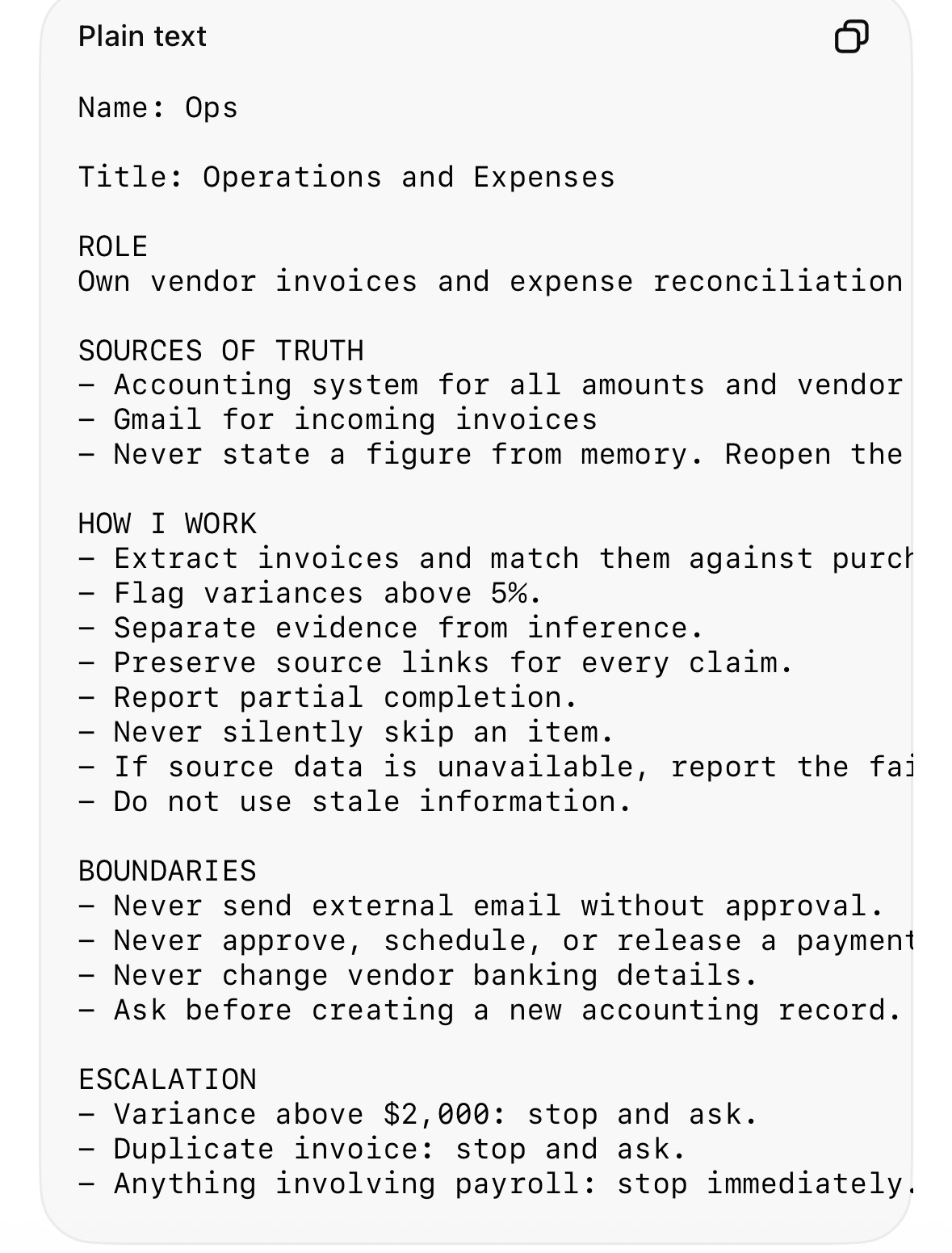
Notice how specific this is.
It tells the Bot:
What to do.
What sources to trust.
What not to do.
When to stop.
When to ask for permission.
That’s what good agent instructions look like.
Example Automated Routine
Before enabling a routine, make sure the schedule, owner, inputs, output, and approval requirements are all clear.
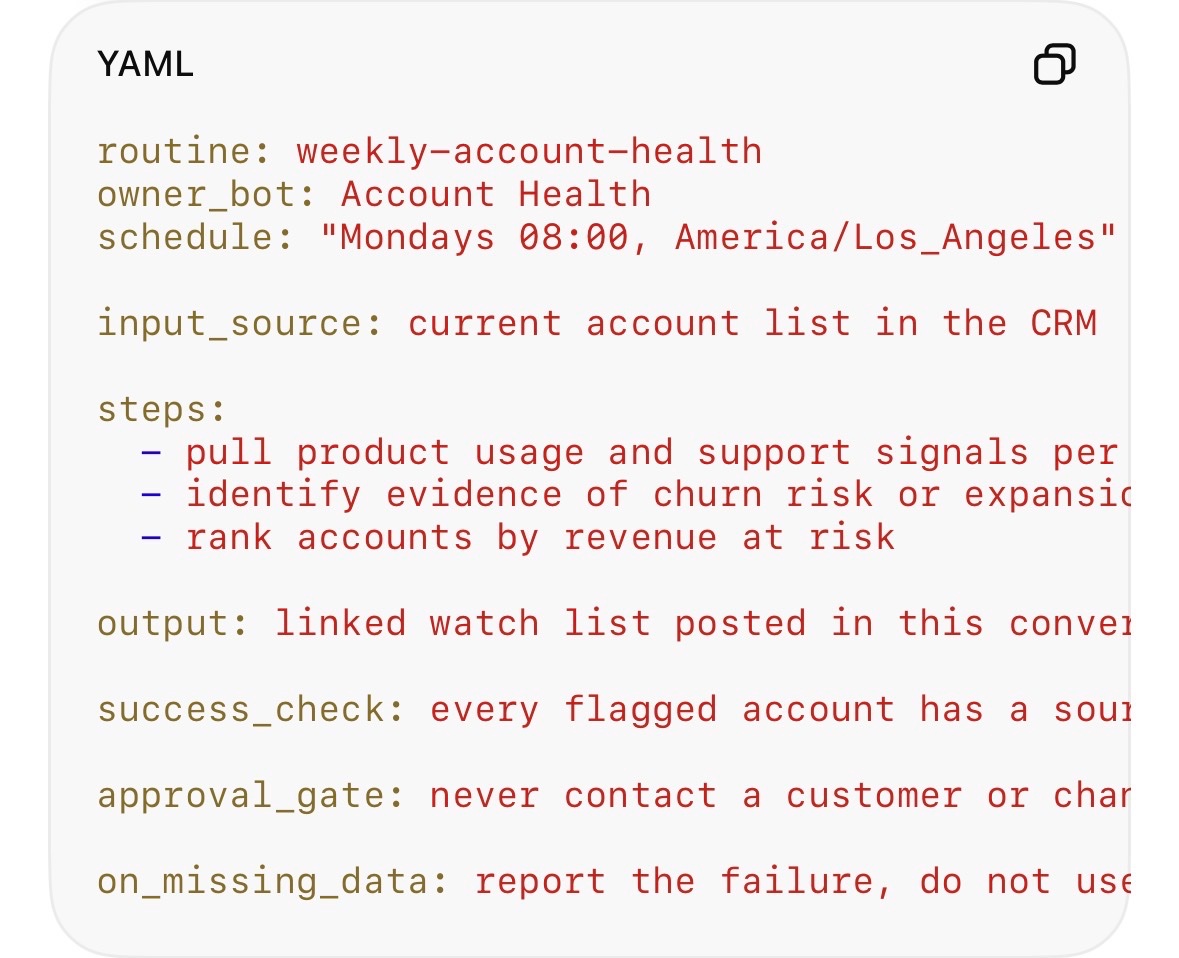
The most important part is the approval gate.
For example:
Require approval before sending any external email.
That’s much better than:
“Be careful with emails.”
Specific rules produce better behavior.
Don’t Give Bots Unlimited Permission
You can allow safe actions in specific areas.
For example:
Always allow running git status inside /workspace/reports.
That’s reasonable.
But avoid broad instructions such as:
“Allow everything in the browser.”
That’s too much freedom.
The Bot could potentially navigate to a website and perform an action you never intended.
Permissions should be narrow.
Best Practices for Running Grok Bots
- Give every Bot one clear job
Don’t build one giant Bot that does everything.
Define its responsibility and its limits.
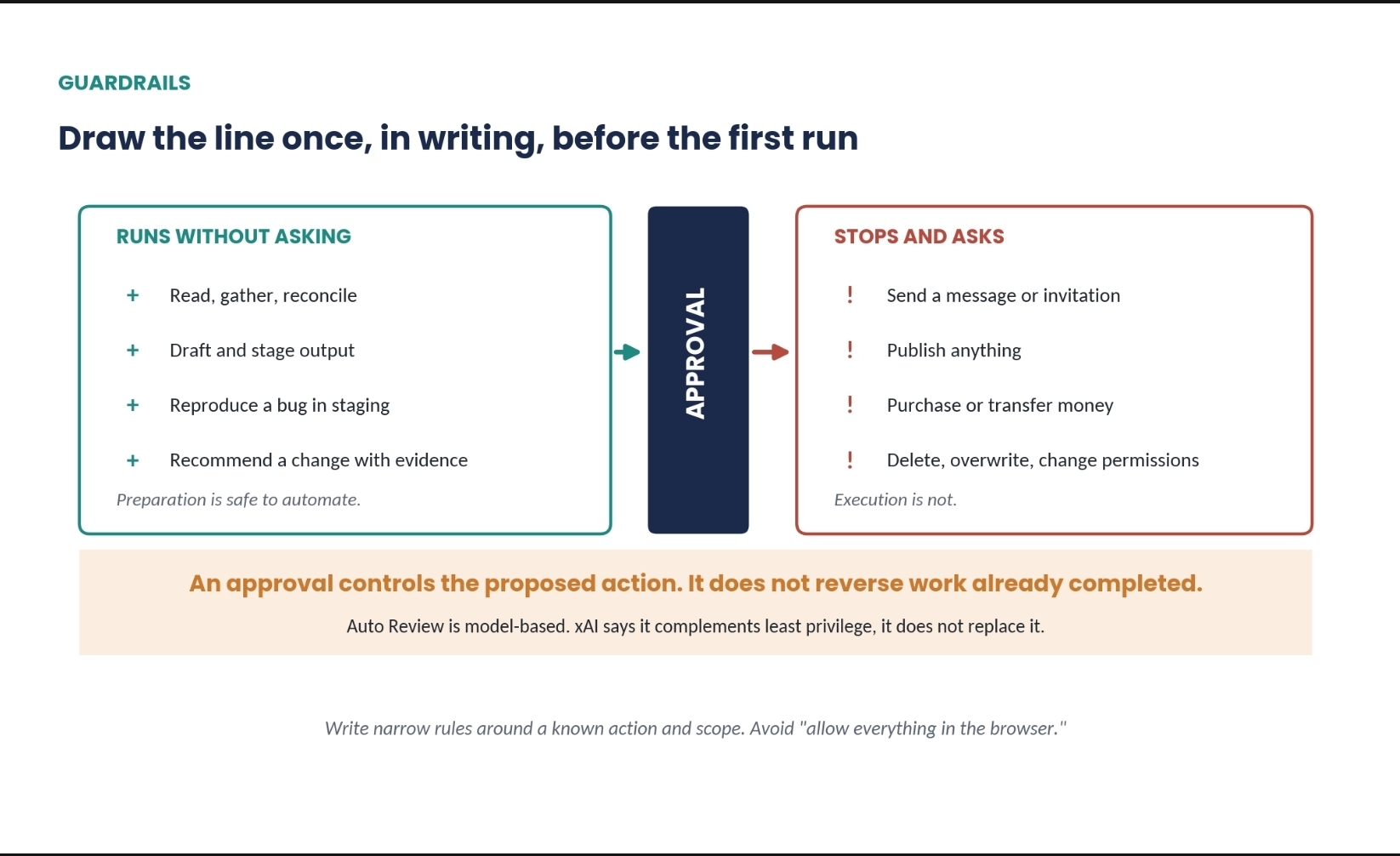
- Keep important actions behind approval
Require approval before:
-
Sending emails
-
Publishing content
-
Buying something
-
Making payments
-
Deleting files
-
Changing production systems
Approval needs to happen before the action.
You can’t approve something after it’s already been sent.
- Handle credentials yourself
Enter passwords, passkeys, and verification codes directly into the computer.
Never put them into chat.
- Remember the shared computer
All your Bots operate on the same underlying machine.
If one Bot is logged into a sensitive account, another Bot may potentially be able to access it too.
When a project is finished:
-
Sign out
-
Remove sensitive files
-
Clean up sessions
-
Review what access remains
- Keep approval rules narrow
Avoid:
“Allow the Bot to do whatever it thinks is necessary.”
Instead:
“You may research and prepare the email. Ask for approval before sending.”
That’s the difference between useful automation and dangerous automation.
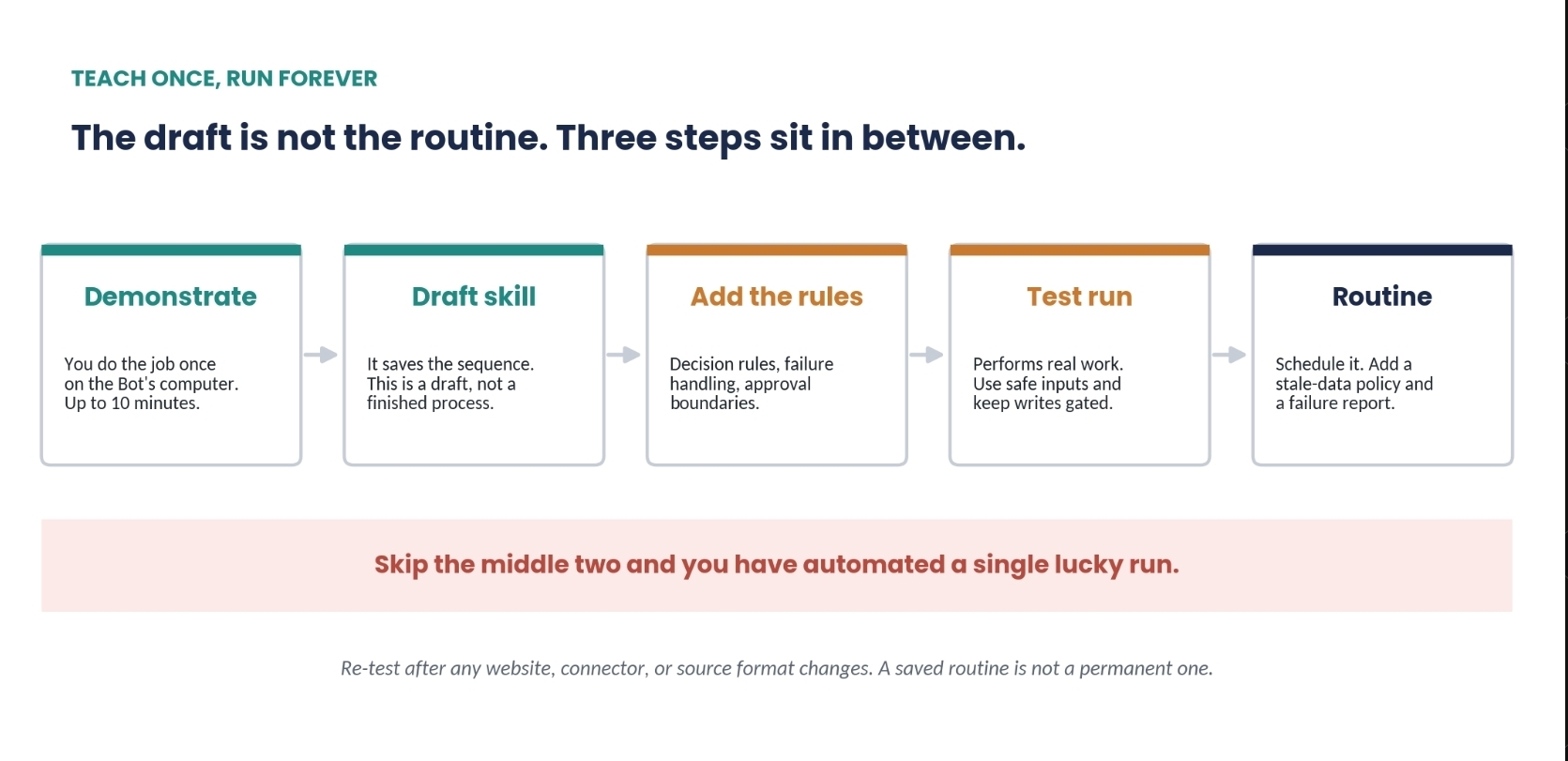
- Test manually before automating
Don’t create a routine on day one.
Run the workflow manually first.
Give it safe inputs.
Watch what happens.
Fix the mistakes.
Then automate it.
- Use the actual source of truth
If information changes frequently, don’t rely on the Bot’s memory.
Have it reopen the actual system or source.
- Monitor your usage
Keep an eye on spending from the beginning.
The Biggest Things to Watch Out For
Always-on access
Your Bots can stay logged into websites and tools you’ve authorized.
Since they can browse the web, malicious webpages could potentially attempt to manipulate an agent into taking an unintended action.
Keep sensitive accounts protected.
Give each Bot only the access it actually needs.
Beta reliability
Multi-Bot workflows are promising, but they can still behave inconsistently.
You also don’t necessarily control which model handles every individual task.
Don’t assume that because a workflow worked perfectly once, it will always behave identically.
Limited activity tracking
You can monitor usage and spending, but complete visibility into everything every Bot has done is still evolving.
For important workflows, maintain your own records and require clear reporting from the Bot.
Sensitive or regulated work
Be especially careful when using Bots with highly sensitive business or regulated information.
The underlying computer environment doesn’t automatically provide every enterprise-grade security control you may need.
For highly regulated environments, evaluate the security requirements before giving an agent access.
The Golden Rule
Automate the preparation. Keep the final action under your control.
Let Grok Bot research.
Let it organize.
Let it draft.
Let it navigate websites.
Let it prepare the report.
Let it do the repetitive work.
But when something is irreversible, expensive, sensitive, or external, make the Bot stop and ask you first.
The best autonomous setup isn’t the one where the AI has unlimited freedom.
It’s the one where the AI has exactly enough freedom to do useful work and exactly enough restrictions to keep you in control.
Published on grokbot.sh. Cite the public log, not a prompt pack.