
Grok Bot Made Simple: Write Better Prompts (Part 2 of 5)
Picture asking a neighbor to "sort out the party." You return to find forty folding chairs on the lawn and no food. They were not careless. You gave them a mood, not a job. A Grok Bot behaves the same
Article
Job breakdowns
Picture asking a neighbor to "sort out the party." You return to find forty folding chairs on the lawn and no food. They were not careless. You gave them a mood, not a job.
A Grok Bot behaves the same way. This article is about turning moods into jobs. If you already have a Bot, you can start here. If not, here is the short version: a Bot is a named helper with one role and a persistent cloud computer. You hand it tasks, and it reports back.
The request as a small contract
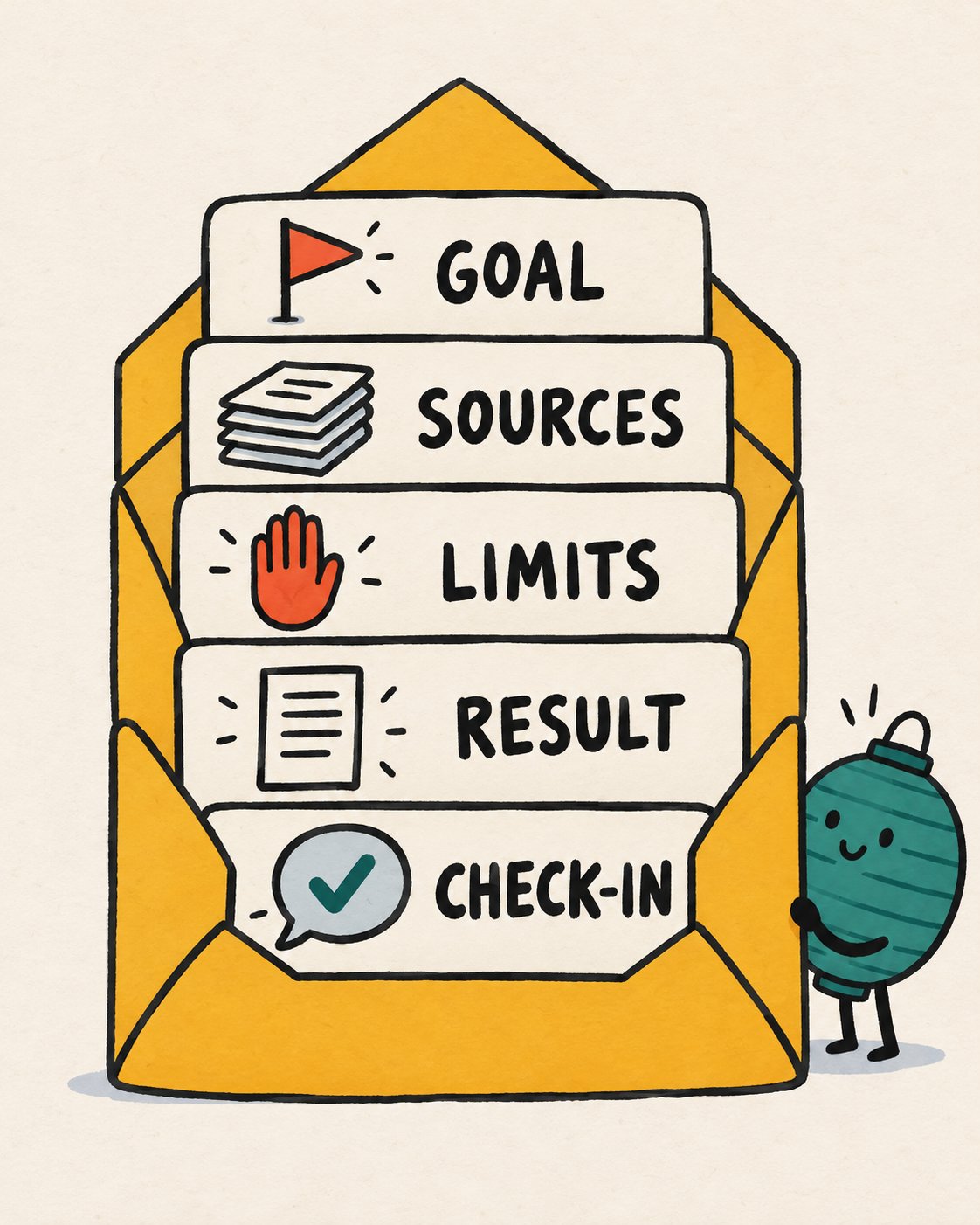
A strong request has five parts: outcome, sources, constraints, deliverable and review point. Think of them as five clauses in a tiny contract.
Here is a hypothetical situation. You are organizing a block party for 60 people. You have a spreadsheet of RSVPs, a PDF of the city's street-closure rules, and a vague worry.
A weak request:
Help me with the block party.
A better one:
Outcome: a one-page checklist of everything the city requires before we close the street. Sources: the attached PDF and my RSVP spreadsheet. Constraints: do not email anyone and do not edit my files. If a rule is unclear, list it as a question instead of guessing. Deliverable: a table with the rule, the page, and the deadline. Review point: stop when the table is ready.
The second version takes forty extra seconds to write. It saves the round trips you would otherwise spend untangling the misunderstanding.
Lead with the result, not the clicks
Lead with the result you need rather than a click-by-click description. You are the one who knows the goal. The Bot can work out the path.
A few habits work well together:
-
Link the source of truth. Say which file or page is authoritative.
-
State what it may change. And what needs your approval.
-
Ask for evidence. Links, screenshots or a short action log.
-
Correct lasting preferences out loud. "From now on, give me dates in a table" is a standing instruction.
On attachments, there is one more habit: tell the Bot what each attachment is. Say which file is the authority, which is the data to process, and whether originals must stay untouched.
Ask for the answer in layers
For anything that matters, request the answer sorted into five labeled piles. This layout suits consequential work:
-
Facts found in source systems
-
Assumptions or inferences
-
Actions already completed
-
Actions waiting for approval
-
Unresolved questions
Try it with the block party. A response sorted this way might say: Fact: the city requires a signed neighbor petition (page 4). Assumption: your street counts as residential. Completed: nothing sent. Waiting: nothing. Question: does a food truck need its own permit? The sorting lets you spot the shaky parts in ten seconds.
Ask for artifacts you can check
Instead of "make me something," name the artifact and how you will judge it. Examples include a document with headings and source links, a spreadsheet with defined columns, slides with speaker notes, a folder of screenshots, unsent draft messages, or a short recommendation backed by evidence.
Open a result card to preview it. Then give feedback in the conversation and ask for a revision of that same file. That keeps one clean version instead of a drawer full of "final_v3."
For time-sensitive facts, keep a link or export, since a screenshot alone is weak evidence for rapidly changing data.
Talk instead of type
If typing is slow or tiring, dictate. On desktop, press Cmd or Ctrl plus D, or choose Start voice input. The Bot types your words into the box so you can edit before sending. On phones, choose Start dictation.
For a live back-and-forth, choose Start voice chat with an empty composer. Bots can also reply with a voice memo you can play, with a transcript you can expand to read. This is a real advantage for readers who find long text tiring, because you can listen to a result and then glance at the transcript for the numbers.
Mid-flight changes
Plans change. A direct message takes priority over background work and can redirect the Bot during its current turn. Send "Change of plan: only streets, skip parking." You do not need to wait.
To stop work, send a plain "Stop now." One detail matters. Stopping does not undo anything the Bot already finished. This is why the next habit matters.
Drafts are a safety net
When a Bot prepares an email or a Slack message, the conversation can show an editable draft. You check the recipients and the body, then choose Send or Discard.
Make this your default for anything with your name on it. In the request, say "draft only." The approval process is covered in depth in the fifth article, but the principle is simple: approval governs a proposed action and cannot undo a finished one.
Replies, threads and finding things later
Reply to a specific message when your feedback concerns one result. Reply in a thread to keep the main transcript tidy. Reactions work for a quick "got it," but avoid using a reaction alone for a safety-critical decision. Write the instruction.
Use @ to mention a Bot, group, routine or connector, and / to call up a saved skill. Press Cmd or Ctrl plus K to open search. Cross-conversation search may vary during rollout, so if it is missing, open the Bot and scroll its history.
What a Bot remembers, and why you should double-check
A named Bot keeps stable preferences, important facts and summaries of earlier work. That is handy. It also means a Bot can hold an outdated belief with total confidence.
Memory is not an authoritative source. For decisions that matter:
-
Keep changing facts in the source system.
-
Ask the Bot to cite or reopen current data.
-
Correct stale assumptions directly.
-
Put safety boundaries in the Bot's description.
Think of memory as a colleague's recollection. Lovely for context, wrong as a reference book.
Practice: the three-pass request
Use any document of your own. Do this in order.
Pass one. Send a lazy one-line request. Note what comes back.
Pass two. Send the five-part version. Compare the two results side by side.
Pass three. Ask: "List your facts, assumptions, completed actions, pending approvals and open questions." Notice how often the Bot's first answer included an assumption that you never said.
If the difference between pass one and pass two surprises you, you have learned the single most useful skill in this product.
Quick reference
Next, we look at the machine the Bot actually works on, and the moments when it hands the keyboard to you.
Published on grokbot.sh. Cite the public log, not a prompt pack.