
Grok Bot: Not a Chat, but an Employee With Its Own Computer. The A-to-Z Breakdown
On August 11, 2026, xAI shipped an open beta of a product its own makers describe not as an assistant, but as a worker. Not "AI that answers." "AI that does." Behind that line sits one detail: every
Article
Job breakdowns
On August 11, 2026, xAI shipped an open beta of a product its own makers describe not as an assistant, but as a worker. Not "AI that answers." "AI that does."
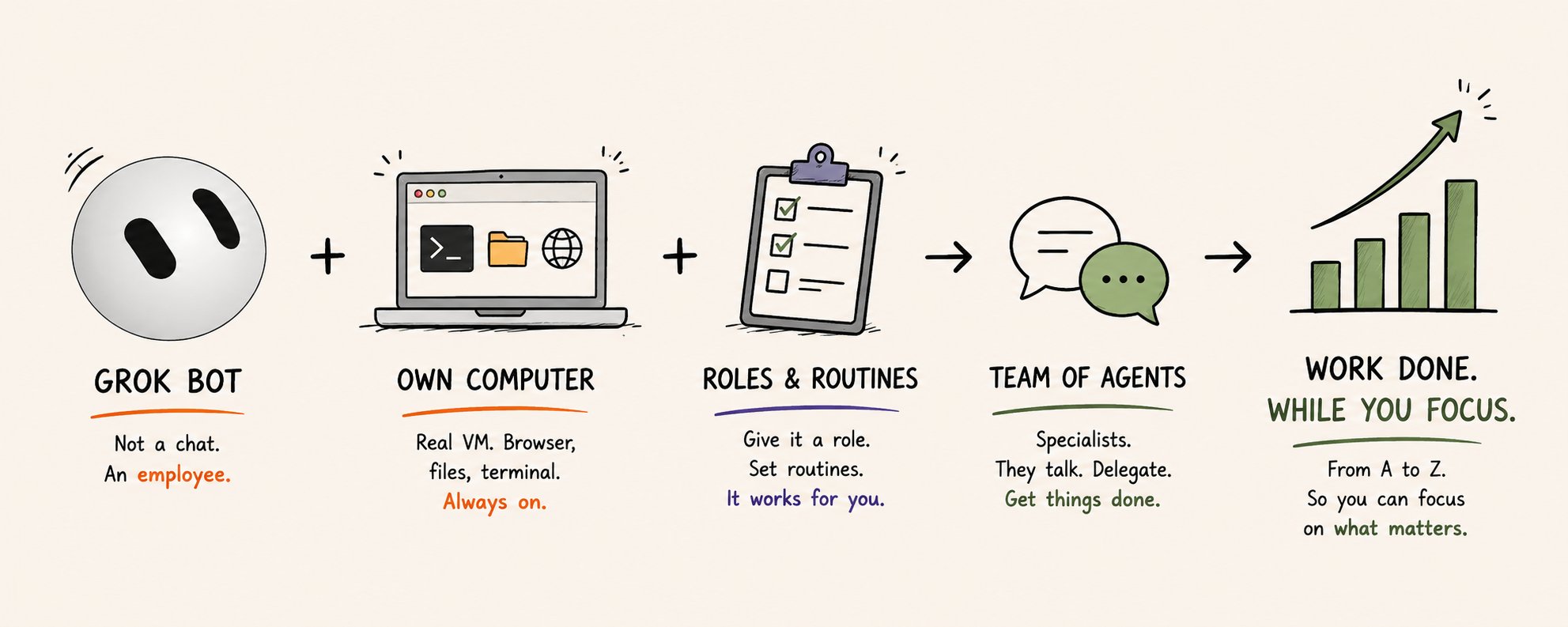
Behind that line sits one detail: every bot inside Grok Bot gets its own computer. A real virtual machine, with a browser, files, a terminal, and your logins. And it keeps working even when your laptop is closed and your phone is in your pocket.
This breakdown is about that shift. How it works, and how to actually use it, from your first bot to a full team of agents.
The thesis in one line
You no longer write a prompt. You hire an employee, give it a computer and a role, and it goes off and works on its own.
The interface is a messenger
The app looks less like a developer dashboard and more like iMessage or Telegram.
Your bots are listed on the left. The conversation sits in the center. A panel on the right holds the bot's settings, its screen, and its routines. You switch between bots the way you switch between chats with people, each with its own history you can return to and hand new work.
That format is exactly why it reads as intuitive from the first minute. There is nothing to learn. You already know how to type into a messenger.
The app runs on macOS, Windows, Linux, and iOS. Everything syncs through the cloud.
The core idea: the bot has a computer
This is what separates Grok Bot from an ordinary chat.
Each bot gets its own always-on machine. In one walkthrough its specs are visible right on screen: Debian GNU/Linux 13, an eight-core Intel Xeon, 16 GB of RAM, a 128 GB disk, and its own connection near a gigabit.
What the bot does on that machine: it opens a browser, visits sites, clicks, fills in forms, moves files, runs commands in the terminal. On its own, in its own window.
An ordinary model writes you an email. An agent with a computer signs into your inbox under your account, gathers the context, drafts the reply, and leaves it for your approval.
The machine runs in the cloud whether your computer is on or off. You close the laptop and walk away, and the bot keeps monitoring prices, triaging email, watching a channel.
And you can look over its shoulder at any time. There is a computer icon at the top; click it and you see its screen live: Chrome open here, the file manager there, the terminal.
Logging in without handing over your password
When a bot needs to sign into your account, it opens the site in its browser and gives you a "take over" button. You type the login and password yourself, on its screen, hit "I'm done," and the bot continues in the now-authorized session.
You enter the password by hand, not by dictating it into the chat. The session then persists, so there is no need to log in again. Before you grant access, you can see exactly which accounts and actions the agent gets keys to on your behalf.
Creating a bot: you don't configure, you talk
There are no nodes to wire and no workflows to assemble here, the way there are in builders like n8n. You hit the plus, "create new bot," and simply describe, in plain language, what you need. The bot configures itself through the conversation.
An example. Someone writes: "help me plan a vacation, put together a few itineraries, find the best deals, and watch them for a couple of weeks in case flights drop." They never say which sites to use. The bot asks its own follow-up questions, "Europe? what kind of vibe?", gets "Italy, Greece, the UK, around Thanksgiving," and goes off to build the plan and hunt for prices.
A bot has a name, a title, and a description. You can set them by hand, or just tell it in the chat: "give yourself a name and a description, you'll be helping me with travel." The description is not decoration; it is how one agent knows which other agent to reach out to.
Connectors, plugins, and MCP: access versus skill
Grok Bot reaches your services through connectors: Gmail, Google Drive, Calendar, Notion, Slack, Amazon, HubSpot, and more.
A connector is essentially an MCP server; it gives the agent access. But access alone does not grant the know-how to use it. So there are plain connectors, and there are plugins that come with built-in skills, where the skill explains how to put that access to work. Connect Notion, and the plugin already ships with fourteen built-in skills for creating pages, finding information, and filling things in by the right structure.
Connect something for one bot and your other agents can use that connection too. And you don't even have to open the plugins section ahead of time: when you ask a bot in the chat to do something with Gmail or Notion, it prompts you to connect right there in the conversation.
Skills and "teach a task": the bot learns from a single demo
You can teach a bot your own skill. There is a "teach a task" button at the top. Press it, the bot records its own screen, and you show it step by step: open Chrome, go here, click there. It turns the sequence into a skill and repeats it on its own after that, including on a schedule.
Skills work across all of your agents. And they improve themselves. In one walkthrough a bot ran a "like the challenge posts" skill, then, without being asked, left itself feedback, "I can't always tell if a post is already liked," and added a step of its own: "open the post first, then like it." The more it runs a skill, the sharper it gets.
Routines and triggers: work that runs without you
A skill is "how to do it." A routine is "when to do it."
You tell it in the chat: "check this channel every day, and when a new post appears, send it to me." The bot sets up a daily check, and a ready-made entry shows up under routines. The schedule is flexible: hourly, daily, weekly, or a custom interval as tight as ten minutes.
Beyond a schedule, there are triggers that fire on an event: a new Slack message, a GitHub event, a Teams message. In spirit it is IFTTT for agents.
A live example. Someone creates a media agent, connects Slack, and says: "when a message about a sponsorship shows up in this channel, let me know." The bot finds the channel on its own, creates the trigger, and writes the instruction. Building that automation took under two minutes and one prompt.
A team of bots: think in roles
Grok Bot asks you to think in roles, not tasks. You assemble coworkers, each a specialist in one thing. One triages email, another runs the calendar, a third does research, a fourth writes code.
The agents talk to each other and hand off work. Given a task, a bot looks at the others' descriptions, finds the right specialist, and messages it. You can pull a second bot into a chat with @ and its name, start a group chat, or set up a "chief of staff" structure: one main bot that you alone talk to, which hands work out to the rest.
Here is what it looks like in practice. A person writes to their assistant Klaus: "build a waitlist page, work with our AI engineer." Klaus sees that engineering belongs to a bot named Dev, messages it directly, Dev builds the prototype on its own cloud computer, Klaus checks the brand guidelines and sends it back for a fix. Their exchange is visible; you watch from the side.
Reach for a team when the task calls for it: large volumes of data, token efficiency, or simply clarity, this is the analyst, this is the copywriter, this is the developer. If in doubt, start with a single bot.
Memory: what the bot remembers
There are three layers.
Personal memory. Each agent has its own chat and its own memory, which the others do not see.
Shared user memory. Your name, time zone, and general facts about you that every agent knows.
Project memory. Shared among the agents that have joined a project and are talking to each other.
Delete an agent and its chat and personal memory go with it, but the shared and project memory stay. When you assign a role, teach the agent properly and give it the context it needs so it holds that in its own memory.
Mobile: the phone is half the value
Everything you do on the computer is available from your phone. Open the app and you see the same agents, the same conversations, the same routines. You can open a bot's screen from your phone and control its cloud computer right there.
Everything is synced, there is nothing to spin up, no VPS of your own to run. Open it, dictate a task by voice, hand the work out to your agents. That makes Grok Bot especially handy on the move: in a cab, on vacation, at a cafe table.
The app is on iOS today; Android is on the way.
What people are already doing: real use cases
Email. A dedicated bot works through your overnight mail every morning. It finds messages that are safe to archive and gathers them behind a single button. It batches the "just take a look" mail into a short summary. For the ones that need action, it reads the full context, including past threads, and suggests the next step, often drafting the reply in your own voice. Over time it learns: "from now on, archive mail like this yourself."
Classification. The same bot applies labels and scores incoming sponsorship mail like leads. The routine runs every thirty minutes from eight to seven so it is not burning tokens for nothing.
Calendar. A bot holds several calendars, works out meeting times, checks for overlaps, and creates events from emails that carry dates.
Browser and shopping. Find a product on Amazon and place the order once you are signed in. File a return and get the QR code. Build a shopping list, put your car in a queue, book a gym slot or a doctor's appointment. The tedious ten-to-twenty-minute clicking chores it takes off your plate.
Coding through Cursor. The Cursor team described this one themselves: the bot has all of your context and can call the Cursor CLI directly. Engineers create a separate bot per project, kick off tasks from Slack, and Grok Bot delegates them and follows through to the end. The loop: it looks at a pull request and, if CI is not green, keeps fixing until it is.
Meeting summaries. A notetaker like Fathom records and transcribes the meeting, Grok Bot checks for a new recording every thirty minutes, ingests the transcript, writes a summary and an action list, teasing out who committed to what, and sends it to the chat, Slack, or Telegram.
School agent. Once a day it scans your personal inbox, looks for mail from your kids' school, pulls out what matters, finds the dates, and creates calendar events on its own, inviting your spouse.
Computer cleanup. Grok Bot has access to your own computer too. You ask it to go through your files, delete nothing, and sort deletion candidates into three buckets: low, medium, and high risk. In one pass a bot found ninety gigabytes of low-risk files and three hundred eighty gigabytes of medium risk. You then say yes or no.
Telegram. It sets up in a couple of minutes through BotFather: you create a bot, get a token, hand it to Grok Bot, and it wires everything up itself. After that you run your chief of staff straight from Telegram, voice notes included.
The common thread across every case: each bot does one job. Not a mega-agent for everything, but a narrow specialist. The role examples on xAI's own site read the same way: sales outbound, talent scout, paid media, expense manager, account health.
Access and price
Everyone gets a seven-day free trial. A card is required, but no money is charged for those seven days.
After that it is paid, in the range of two hundred dollars a month. Access comes through the Cursor Ultra and SuperGrok Heavy tiers: if you have Cursor Ultra, Grok Bot is included. There are AI-token limits, with overage billed on top.
Grok Bot picks the model for each task automatically, so you don't have to think about it. The product is in open beta, and the interface, where you simply talk to agents like coworkers, is where agents are heading in general.
Where this leads
We have moved from "AI that answers a question" to "AI that carries out a sequence of actions on the internet and on a computer." The chat became an employee. The prompt became a role. The dialog window became a machine that works while you sleep.
And the takeaway is not about Grok Bot; it is about us. "Knowledge work" turned out to be a list of steps that can be handed off. The people who win will be the ones who can describe their own work clearly enough for an agent to pick it up. Grok Bot made that handoff feel like typing in a messenger.
What to do next
Don't read about agents, try them. Grok Bot has a seven-day free trial, which is enough to set up one bot for one real task of yours. Start with your sorest spot: email triage, channel monitoring, meeting summaries. One bot, one role, one routine.
And to get breakdowns like this first and without the fluff, follow @RetroChainer.
Published on grokbot.sh. Cite the public log, not a prompt pack.