
Grok Bot ↔ Notion
How to Turn Grok Bot into a Useful Ops Assistant (Instead of a Disposable Chat) If you let an AI bot write files inside its own sandbox, your work disappears the second you close the tab. To make it
Article
Job breakdowns
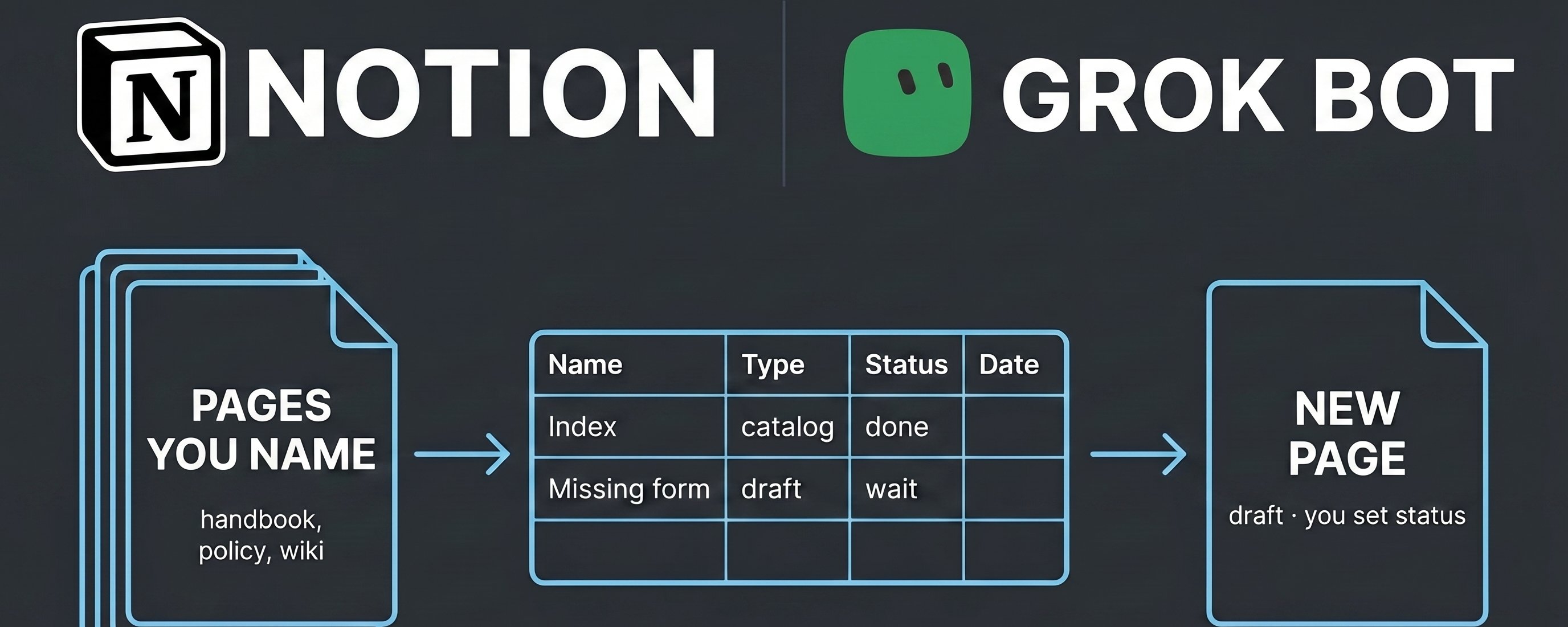
If you let an AI bot write files inside its own sandbox, your work disappears the second you close the tab.
To make it actually useful, Notion is your persistent filing cabinet. The bot reads your existing handbooks, spots missing forms or policies, drafts one document at a time, and logs its output in a database you review on Monday morning.
The Core Rule: If Monday's log has no new row, you don't have an automated system—you just have an expensive chat.
The Setup in 4 Steps
[Clean Notion Pages] ──> [Strict Bot Profile] ──> [Catalog & Gap Audit] ──> [Weekly Draft & Log]
Step 1: Prep Your Notion Workspace
Don’t plug an AI into a swamp of "Untitled" pages. It will only give you an organized list of junk.
-
Explicitly name your core pages: Use clear, literal titles (e.g., Insurance & Risk Management, Volunteer Onboarding, Safety Policy).
-
Build an Ops Log database: Name it clearly (e.g., Bot Ops Log) before running anything.
Column NameProperty TypePurposeNameTitleShort description of the runDateDateTimestamp of executionArtifactText / LinkTitle or link of what was draftedGap RowRelation / TextWhich missing requirement this addressesStatusSelectDraft → In Review → Approved / RejectedNotesTextFlags or assumptions the bot made
Step 2: Connect and Set Hard Guardrails
Do not hand the bot your entire workspace. Restrict its scope inside its system profile:
-
Whitelist explicit titles: Tell it exact page names to read.
-
Blacklist sensitive folders: Hard-ban member rosters, personnel records, financial files, and case notes.
-
Define its job boundary: The bot drafts paper (blank forms, draft templates, checklists). It never handles people (evaluations, clearance decisions, approvals).
-
Throttle the output: Limit it to one artifact per run so you don't burn quota on bulk hallucinated documents.
Step 3: Run the 3-Phase Kickoff Prompt
Don't ask it to "fix your operations" in one prompt. Execute these three stages sequentially:
-
The Catalog: Have it list your whitelisted pages with links and a single-sentence summary of each.
-
The Gap Analysis: Have it compare what your policies mandate versus what actual templates or forms exist.
-
The First Draft: Have it pick one missing form from that gap list, generate it with a clear DRAFT / NOT IN FORCE watermark at the top, and log the entry into your Bot Ops Log.
Step 4: The Weekly Operating Rhythm
Once the baseline is set, switch to maintenance mode:
-
Scheduled trigger: Set it to check the gap list once a week (e.g., Sunday night).
-
Draft one artifact: It produces one template and pings your log database. If nothing is missing, it stays quiet.
-
Human sign-off: Open your Notion log on Monday. Review the draft, verify it didn't pull weird assumptions, and change the status from Draft to Approved.
3 Rules to Keep It From Breaking
-
Feed it nouns, not vibes: Tell it "Open 'Insurance and Risk Management'", not "Figure out compliance." Broad prompts produce generic fluff; explicit titles produce targeted drafts.
-
Never let it create phantom databases: If a target table or log doesn't exist, instruct the bot to halt and flag it rather than inventing a new structure.
-
Watch your run costs: Run it on a single weekly cadence before scaling up. Evaluate the quality of the outputs against the API/token spend before giving it more tasks.
#grokbot #notion
Published on grokbot.sh. Cite the public log, not a prompt pack.