
Grok Bot on Cursor: The Complete Guide to the Five Bots That Are One Computer
Elon Musk's AI coworker product installs from cursor.com. You sign in with a Cursor account, not an X account, not a Grok account. The iOS app's listed publisher is Anysphere, which is
Article
Job breakdowns
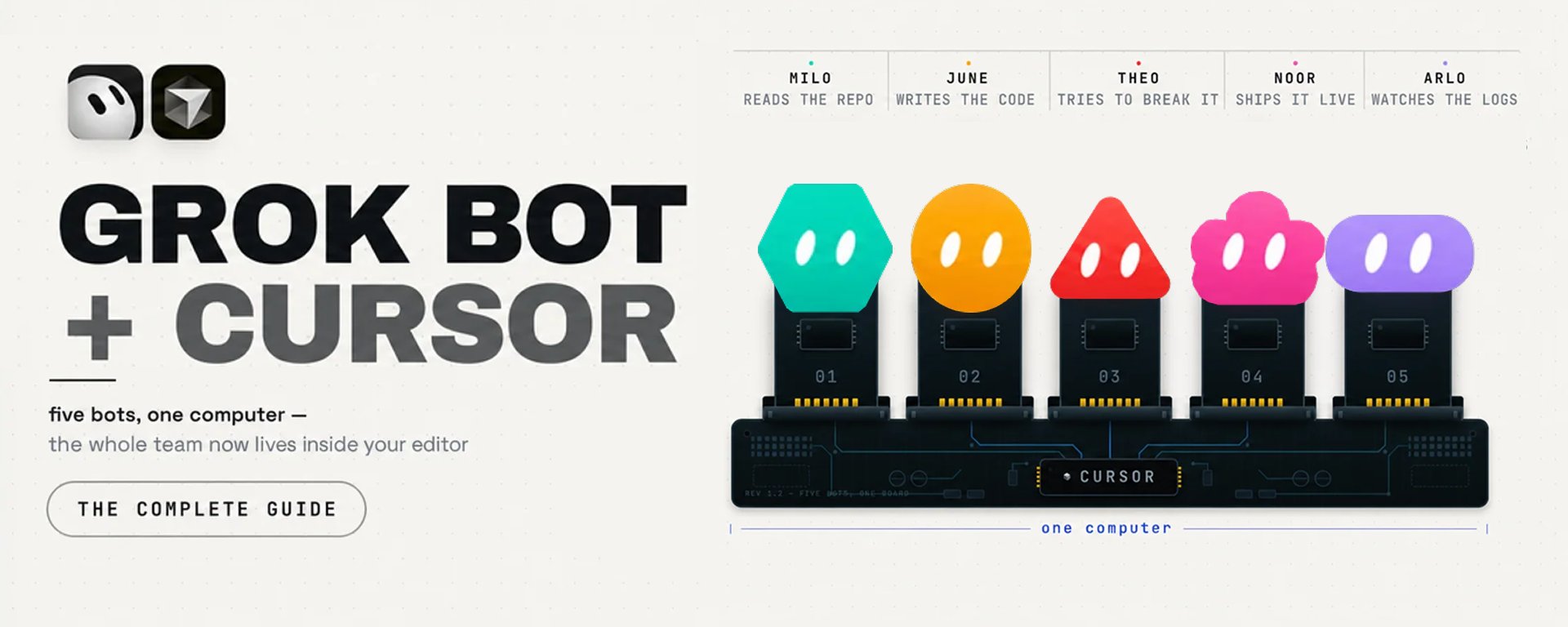
Elon Musk's AI coworker product installs from cursor.com. You sign in with a Cursor account, not an X account, not a Grok account.
The iOS app's listed publisher is Anysphere, which is Cursor's legal name. Your usage is metered on your Cursor bill. The docs say it outright: "Grok Bot usage is metered on your Cursor account, not on your Grok account."
It shipped on 11 August. SpaceX finished buying Cursor on the 14th.
For three days, xAI was selling a product built by a company it did not yet own.
That is the first thing nobody tells you. Here is the second, and it is the one that costs money. It is a sentence xAI wrote in its own documentation and left up:
"Do not use separate Bots as a security boundary."
You were going to make five of them. An inbox bot, a research bot, a CRM bot, a finance bot, a personal one.
You would sign each into the tools it needs. That is the entire pitch.
There is no team.
There is one Linux machine, assigned to your account, and every bot you create is a window onto it. Same filesystem, same browser profile, same cookies.
Sign into your bank for the finance bot, and the research bot is already logged in. That is the bot reading email you did not write and opening pages you have never seen.
The reflex is to split things up. A bot per risk level, a bot for work and a bot for personal, delete the one that worries you.
None of that does anything. The per-bot screens are "separate work surfaces, not separate security boundaries," and deleting a bot leaves its files and logins standing.
So stop reading it as a roster. Read it as one machine you are renting, that stays signed in as you, and that you address through named costumes.
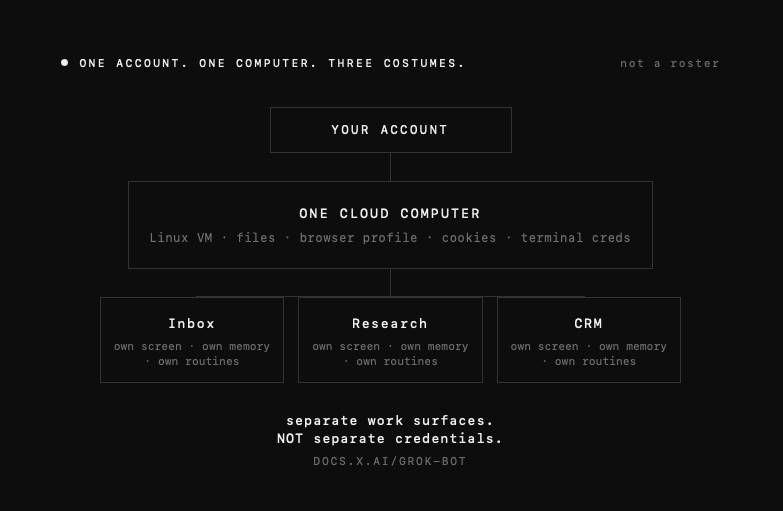
Everything else falls out of that diagram. Why it does things Claude and ChatGPT cannot, what to connect first, and the one thing you must never put on that machine.
And then the half nobody writes about. The same $60 bought you Cursor, and Grok Bot is one item on that account's menu. The two products are opposites, they share a bill, and knowing which job goes to which is most of the value here.
Price moved too. Entry was $200 a month when I started writing this. It is $60 now, and $40 on a team seat.
The floor collapsed on 21 August. Almost nothing published before that date is still accurate.
Every claim below is quoted from xAI's docs, Cursor's docs, the App Store, or a named forum thread. Where the only source is somebody's post, it says so.
The guides going viral right now cite nothing. This one is the vendor's own paperwork, including the parts the launch thread skipped.
Bookmark it before you buy, not after.
1. Three products, one brand, and a $60 billion receipt
Three products share a brand and get confused constantly.
Cursor is the code editor and coding agent, built by Anysphere since 2022. Editor, Agent, Composer, a CLI, cloud agents, Bugbot for PR review, and as of 17 August its own code hosting product called Origin. Current build 3.16.
Grok Build is xAI's terminal coding agent, a CLI later open-sourced. This is the one with AGENTS.md, worktrees, plan mode, /tour. Not the subject of this guide, but it is where your Grok coding quota actually goes.
Grok Bot launched in early beta on 11 August 2026. Not a coding tool. Persistent named agents that get a cloud computer, sign into your existing web apps, and finish multi-step jobs while your laptop is shut.
The three are one company now. SpaceX took an option on Cursor on 21 April, exercised it on 16 June, and closed on 14 August: an all-stock deal at roughly $60 billion, about 389 million SpaceX Class A shares, the largest startup acquisition on record.
Cursor became a subsidiary inside SpaceXAI, itself the rebranded xAI that SpaceX had already absorbed in February.
Which is why Grok Bot is a Cursor product wearing an xAI label. The evidence is public.
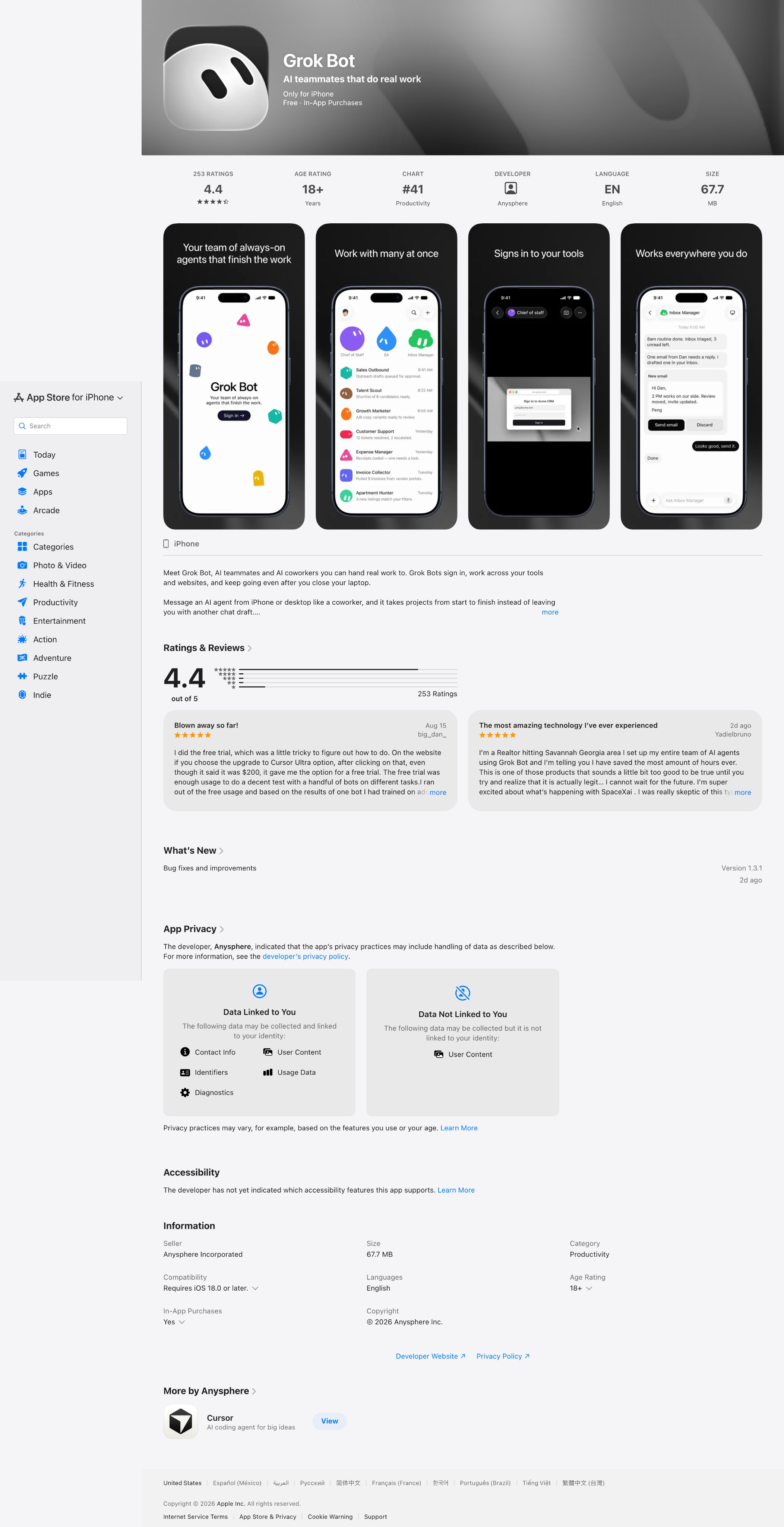
The iOS publisher is Anysphere Incorporated. The desktop download sits behind cursor.com/bot/onboarding, and the help pages for a product called Grok Bot live on cursor.com/help/grok-bot/.
Grok 4.6 and 4.5 are listed in Cursor's own docs as "jointly trained by Cursor and SpaceXAI."
You do not need Cursor the editor to use Grok Bot. You need a Cursor account. The docs are explicit: "Grok Bot uses your Cursor account."
So-what: Every account, billing and privacy decision in this guide happens on the Cursor side, not the Grok side. If you configured privacy on grok.com, you configured nothing.
2. How to buy it, and the five ways to overpay
There is no standalone Grok Bot subscription. Access rides on a plan.
And the plan list changed on 21 August 2026, which is the first thing every guide in circulation gets wrong.
At launch the gate was three plans and a $200 floor. Cursor's own help page said, verbatim, "Cursor Pro and Pro+ do not include Grok Bot access."
Then xAI published x.ai/news/grok-bot-more-plans, titled "Grok Bot is now included with more plans," adding SuperGrok Plus, Cursor Pro+, and Cursor Teams Standard. Cursor rewrote the help page to match.
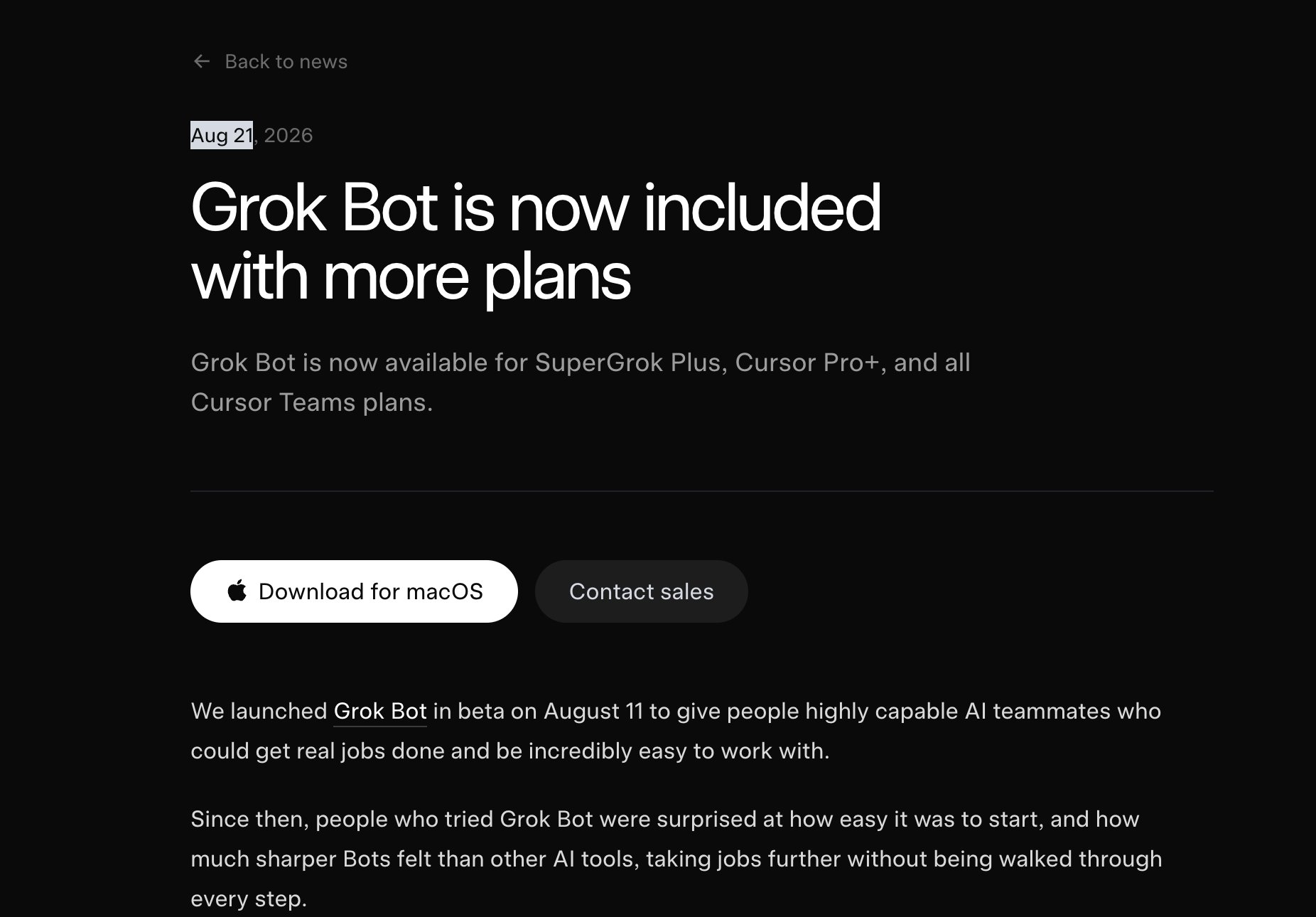
One caveat before you act on it. I could not find a single first-person report of anyone gaining access through Pro+, a Teams Standard seat, a SuperGrok Plus link, or the trial.
Not on the forum, not on Reddit, not on X. The pages moved; the confirmations have not appeared. It is possible the docs shipped ahead of the rollout.
Check your own plan screen before you upgrade for this.
Verified prices, read off vendor pages 21 August. All monthly, with the annual column beside it because it is 20% cheaper:
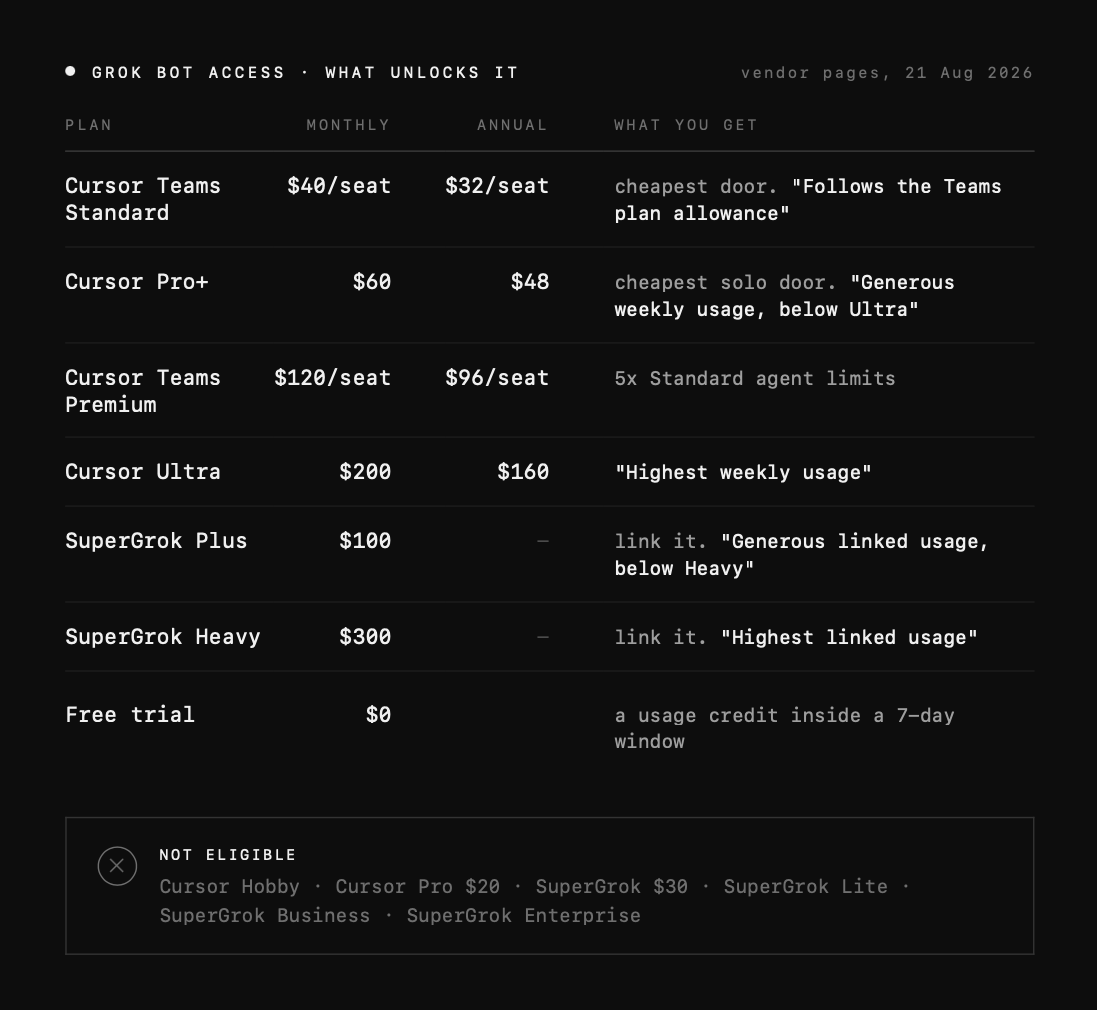
None of those prices changed. This was purely an eligibility change. The same money now buys more.
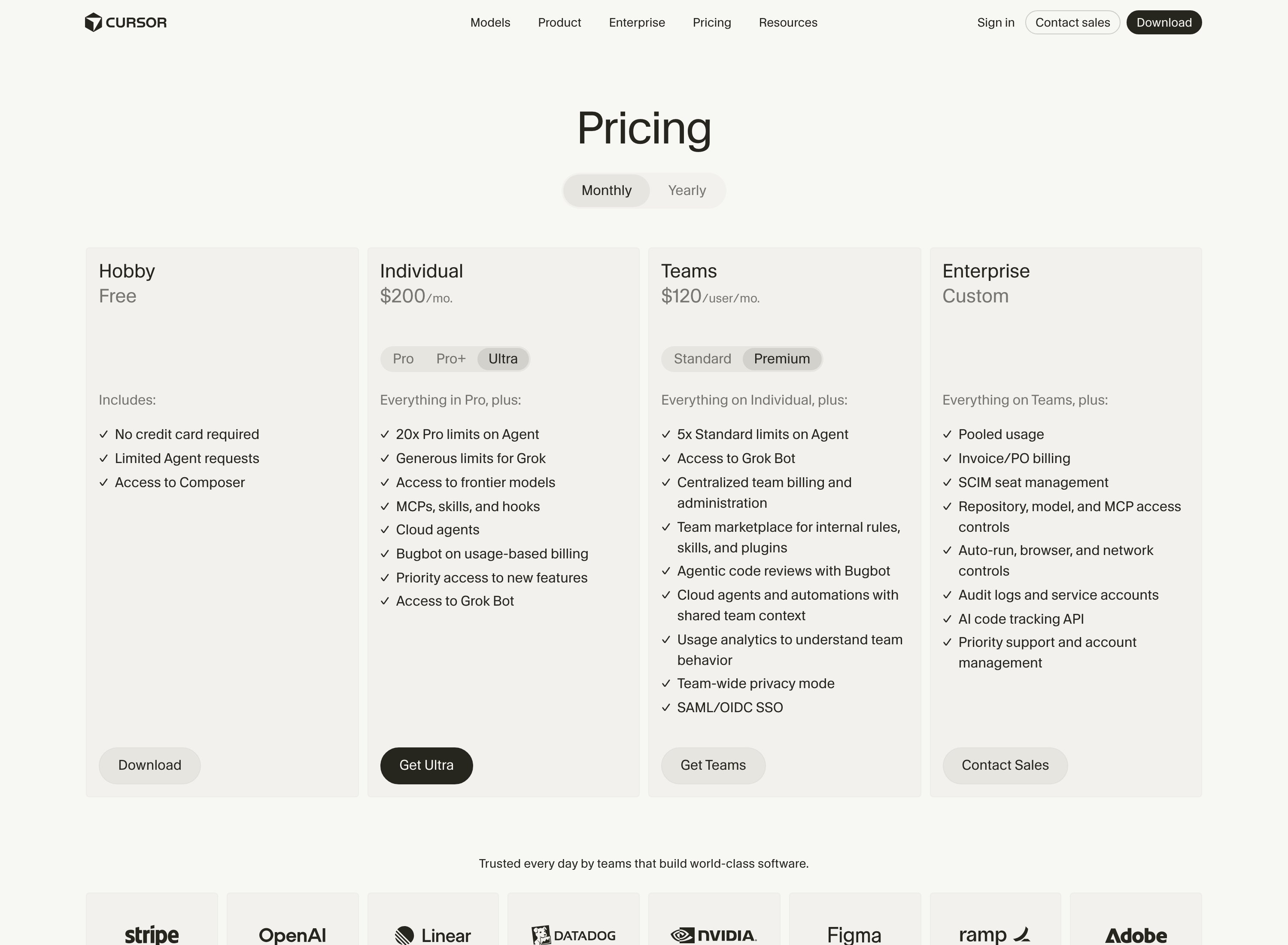
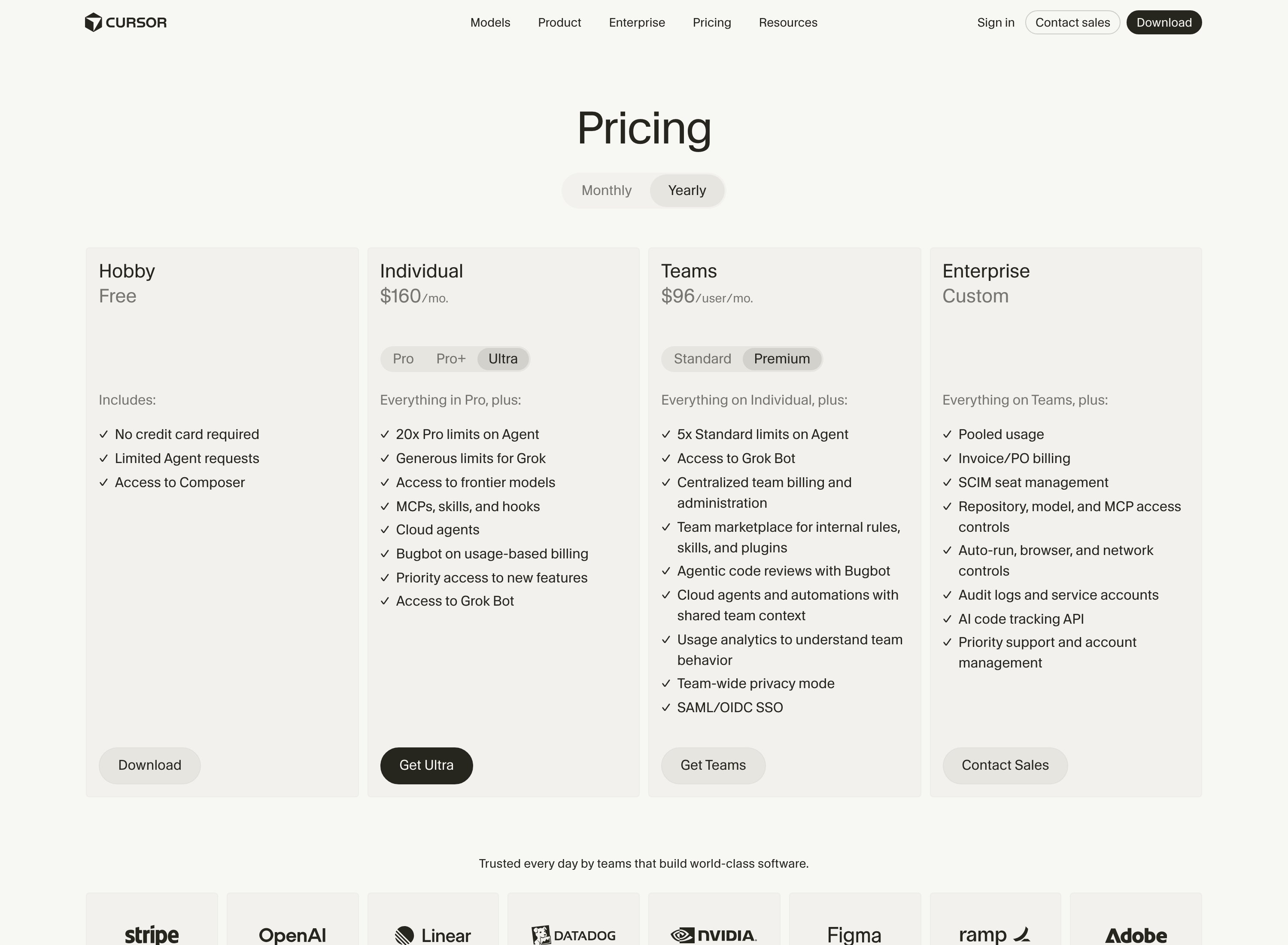
The best place to check them is x.ai/bot, which carries all six figures in one toggled table. That page and x.ai/pricing refuse automated readers, which is why most guides quote Apple's App Store list instead and get it subtly wrong.
Here is the part everyone including me got backwards. Apple does mark up, but only on Cursor's own SKUs, by almost exactly 30%.
The Cursor app's in-app purchases read Pro $25.99, Pro+ $77.99, Ultra $259.99, against web prices of $20, $60, $200.
Apple does not mark up xAI's. SuperGrok $30, Lite $10, Plus $100, Heavy $300 in the App Store are the same numbers xAI publishes on the web.
So do not discount the SuperGrok figures on markup grounds. $100 and $300 are real. Do add "billed through cursor.com" next to $60 and $200.
The $40 team line is real, affirmed by both vendors. Cursor's help page: "every member gets Grok Bot... Team admins do not need to assign a Premium seat." xAI's docs: "Standard and Premium seats include a weekly Grok Bot usage allowance." Cursor's pricing page carries an "Access to Grok Bot" bullet in the Standard column.
The one thing no page states is whether Teams enforces a seat minimum. The rule that does exist reads "There must be at least one Admin and one paid member on the team at all times," which sounds like one seat is enough, but nobody says so outright.
If you are one person and want no ambiguity, Pro+ at $60 is the clean answer.
The free trial is real, and it is not seven days of use. It is a credit: "The Grok Bot free trial is a usage credit rather than a set number of days, though a 7-day window also applies."
It is drawn down "by agent steps and tokens rather than the number of messages you send." Cursor warns that "a large or long-running agent task can use most or all of it at once," and that spent credit "is not restored or topped up."
It does not roll into billing. When it is gone you are told to upgrade. Cursor calls it "a usage credit, not a charge, so there is nothing to refund," and says nothing about needing a card.
The size of the credit is published nowhere. The docs tell you to read it off the plan screen.
Take the trial before you buy anything, and scope your first task small, because one long run can eat the whole thing.
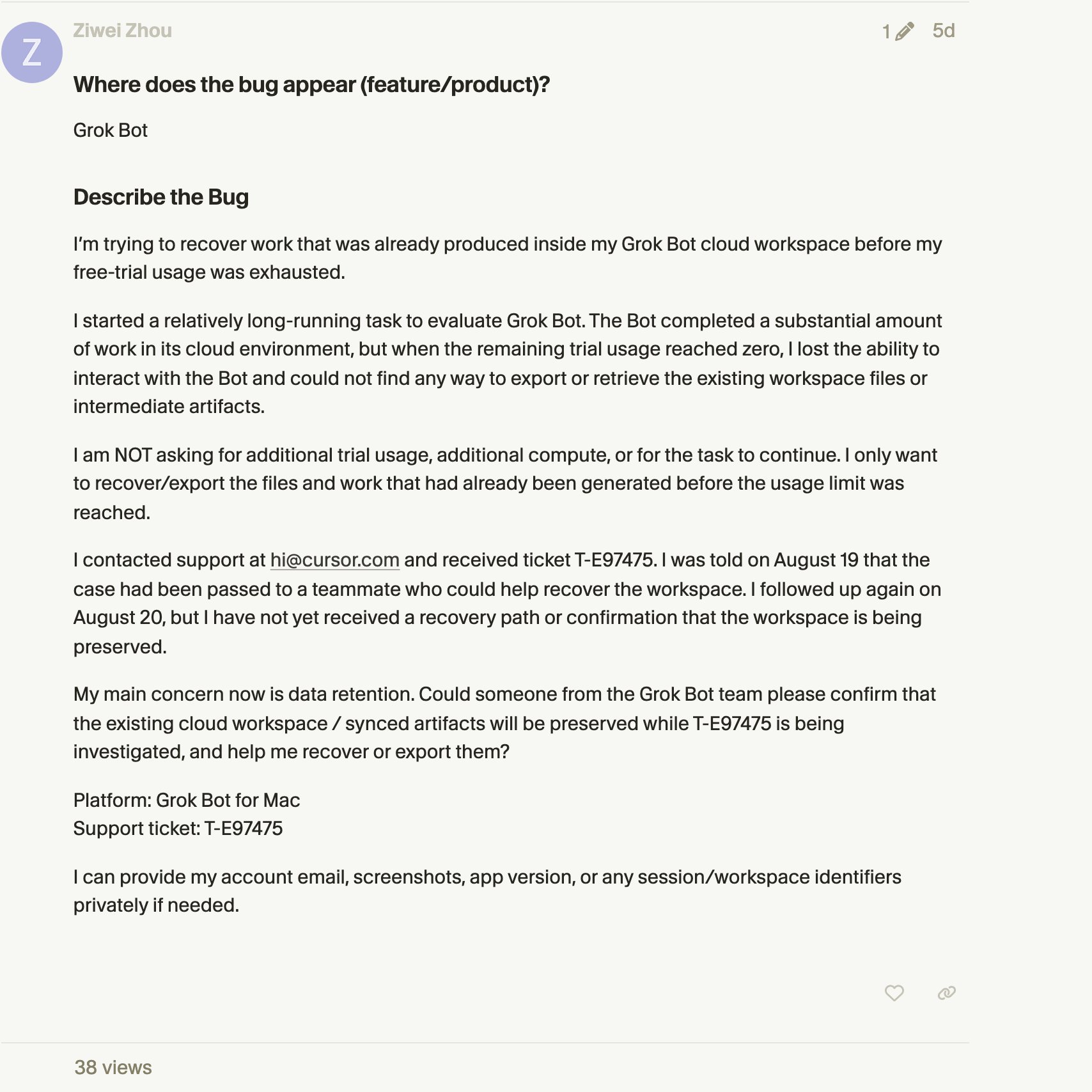
And do not leave anything valuable on that machine while you are on it. A user opened a forum thread on 20 August titled "Grok Bot cloud workspace inaccessible after trial exhaustion."
His report: "I lost the ability to interact with the Bot and could not find any way to export or retrieve the existing workspace files or intermediate artifacts." No documented export path, no staff reply when I read it.
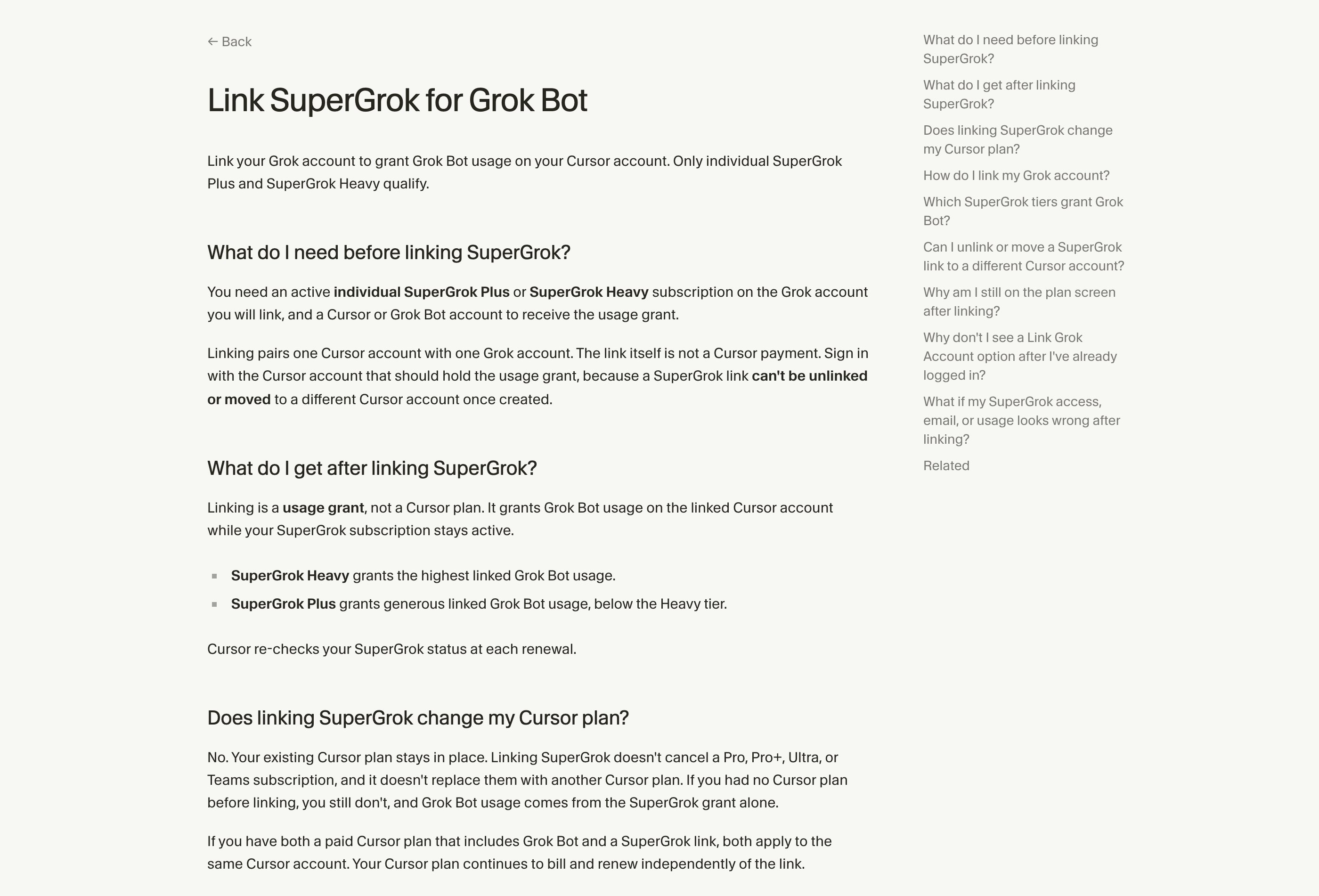
Linking SuperGrok buys usage, not a plan. This is the trap in the cheap-looking route.
Cursor's page: "Linking SuperGrok is a usage grant, not a Cursor plan. Your existing Cursor plan stays in place after linking." It "doesn't cancel a Pro, Pro+, Ultra, or Teams subscription."
So a $100 SuperGrok Plus subscriber gets Grok Bot usage and no Cursor entitlement. Strictly worse than $60 Pro+ if Grok Bot is what you came for.
Worse still, the same page says a SuperGrok link "is permanent once created," that "you can't unlink a Grok account from a Cursor account," and that you cannot move a link to a different Cursor account.
Link the wrong one and you cannot undo it. There is already a forum thread from someone who deleted a Cursor account, orphaned the Grok link, and got blocked from relinking.
And the perk everybody still recommends has quietly left the page. Until recently, cursor.com/help/grok-bot/supergrok-heavy stated that SuperGrok Heavy subscribers receive "free Cursor Ultra created at $0," with "No Cursor payment card is required."
A Cursor staff member confirmed it on the forum on 15 August: "Cursor Ultra stays active as long as your SuperGrok Heavy subscription is active."
That page has since been retitled "Link SuperGrok for Grok Bot" and now describes a usage grant. Search it for "$0," "free," or "payment card" today and you get nothing.
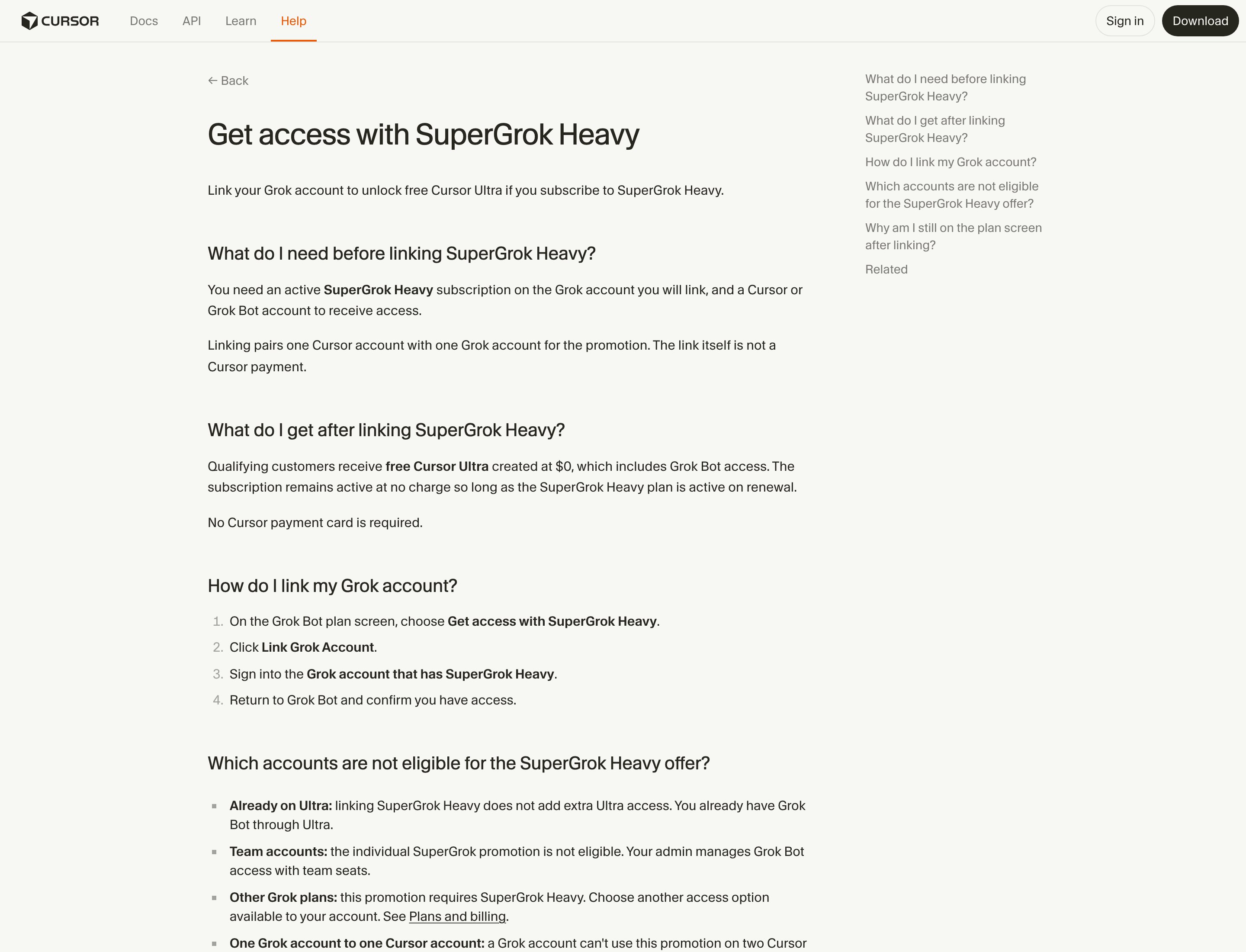
There is a promo URL at cursor.com/promos/grok-heavy-ultra, but it sits behind a sign-in wall, so the terms are no longer publicly checkable.
I am not telling you the perk is dead. Nothing was announced, and on 20 August a user was still writing about it as live.
I am telling you the two sources disagree, and you can no longer check which is true before paying $300. If that perk is your reason for choosing Heavy over $60 Pro+, get it confirmed in writing first.
The five ways to overpay:
-
Buying Ultra when Pro+ now does it. $200 versus $60, for a difference the vendor describes only as "highest" versus "generous, below Ultra." No page states what either allowance actually is.
-
Buying SuperGrok Plus for $100 instead of Pro+ for $60. More money, no Cursor plan, irreversible link. Note also which way the meter runs: "Grok Bot usage is metered on your Cursor account, not on your Grok account." Hold both and "Grok Bot uses whichever has more usage."
-
Buying in-app on iOS, mostly. Apple's Grok Bot listing carries exactly two purchases, Ultra $259.99 and Pro+ $77.99, against $200 and $60 on the web. It buys no extra capacity: "macOS and iOS share a single usage bucket tied to your signed-in Cursor account." Cursor cannot cancel or refund an Apple-billed plan, and in-app is monthly individual plans only.The "mostly" is earned. Cursor: "Cursor doesn't store a payment method for in-app subscribers, so you can't turn on on-demand spend."An in-app subscription structurally cannot overflow into the uncapped billing in section 10. It is the only hard spend ceiling documented anywhere in this product. If what frightens you is an agent running all week against a meter with no cap, that is what buying it wrong actually buys you.
-
Believing "Grok Harvey." No such tier exists. Apple's SKU list runs Lite, SuperGrok, Plus, Heavy, and the string appears on no xAI or Cursor page. It is a garbled "Grok Heavy," attached to a $99 promotional rate that circulates by private link. Reported durations conflict, no vendor page documents it, and it reverts to list price.
-
Expecting a student discount. Cursor's free-year student program closed to new sign-ups on 25 June, and it was Pro anyway, which does not reach Grok Bot.
One more for anyone already on Pro and about to click upgrade. A mid-cycle Pro to Pro+ move is netted against usage you already consumed, not prorated by unused days.
Cursor billing, quoted by a user on the forum: "If Pro monthly usage was already consumed, no refund." The natural path, hit the Pro limit then upgrade, gives you nothing back.
Annual billing exists at cursor.com/dashboard/billing, but Cursor publishes no discount percentage anywhere. The "20% off yearly" figure in circulation traces to no Cursor-owned page. You also cannot switch yearly back to monthly mid-plan, only schedule it for the period end.
Refunds are narrow. Cursor refunds only if the charge is under 14 days old and you have not used the subscription in that period. Consumed on-demand usage is never refundable.
Cancel at cursor.com/dashboard/billing, keep access to the end of the period, then drop to Hobby.
One warning about every other article you will read on this. While I was writing this section, the vendor pages moved underneath it.
Earlier in the day, three pages on docs.x.ai and Cursor's own marketing page still described the old three-plan gate. One of them stated flatly that Teams Standard seats got no allowance, the exact opposite of what Cursor's help centre said at the same moment.
By the time I re-read them from source, all four carried the new list and the contradiction was gone. The xAI pages now stamp themselves "Last updated: August 20, 2026."
I cannot prove which read was the true state of the page and which was a caching artifact. So I am not going to tell you a story about xAI's docs lagging for days.
The practical part is what matters: this documentation changes faster than anything written about it.Every quote here was read on 21 August.
So-what: Buy off cursor.com/help/grok-bot/plans and x.ai/bot, take the free trial first, and treat any guide dated before 21 August as describing a different product at a different price.
3. Installing it, and the two gates that stop people
Supported platforms, verbatim from the FAQ: macOS (Apple silicon and Intel), Windows (x64 andArm64), iPhone on iOS 18+.
Also verbatim: "Linux desktop is not currently supported," and "Grok Bot is currently designed for iOS on iPhone, not iPad or Android."
Ignore the widely repeated claim that it is Apple-Silicon-only. It is wrong.
Ignore every headline announcing Linux support too, and here is where that error comes from. The cloud computer is Linux, "a managed Linux virtual machine." The client is not. Aggregators converted one into the other.
The download page is cursor.com/bot/onboarding and it is behind a login wall. It redirects to Cursor's auth endpoint and on to WorkOS.
You cannot grab a .dmg anonymously to test whether your region works. Make the Cursor account first.
-
macOS: pick Apple silicon or Intel, open the disk image, drag Grok Bot to Applications, launch. (Chip: Apple menu, About This Mac.)
-
Windows: pick x64 or Arm64, run the installer, launch from Start.
-
iOS: App Store, open, "Login with Cursor," finish auth in the browser.
The app auto-updates. Manual updates live under Settings, Beta. It moves fast: the desktop client went 0.16.0 to 0.23.0 in about eight days.
Gate one: which account signs in. It is "Sign In with Cursor," not an X login.
Cursor's own warning: "Sign in with the same Cursor account that should own your plan and usage."
If your entitlement comes from SuperGrok, there is a separate four-step link. On the plan screen choose Get access with SuperGrok Heavy, click Link Grok Account, sign into the Grok account holding the subscription, return and confirm.
One Grok account cannot serve two Cursor accounts. This marriage of two accounts is where most people get stuck.
Gate two: Legacy Privacy Mode. "Grok Bot requires cloud data storage, so Legacy Privacy Mode is not supported."
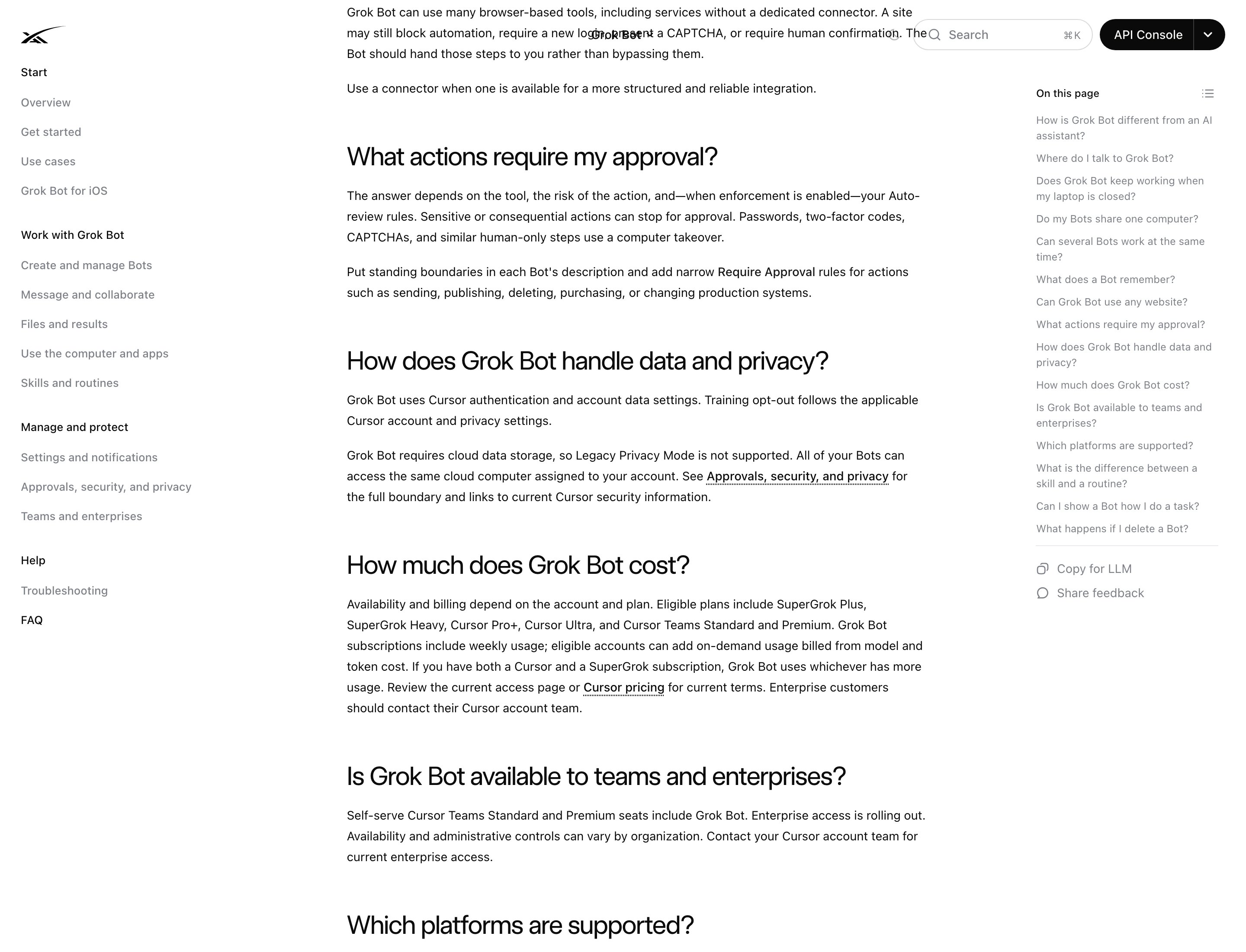
If your Cursor account is on it, you must switch before the product will run. Paying does not grant access on its own.
Training opt-out follows your Cursor account settings, not xAI's.
First launch is scripted: a concept intro, a question about which tools you use, background setup of the computer, then a "Meet a future teammate" screen.
One thing beginners get wrong. Answering the tools question does not connect anything. The docs say it only "shapes the first teammate suggestions."
So-what: Two things block a paid account from starting: signing in with the wrong Cursor account, and Legacy Privacy Mode. Check both before you troubleshoot anything else.
4. One machine, two ways in
One VM per user. The docs call it "a managed Linux virtual machine."
One user on X who reverse-engineered it reported 8 vCPU, 16 GB RAM, 128 GB disk on Debian. Plausible, unconfirmed by xAI, treat it as a tweet.
Each bot gets its own screen on that machine, so several can drive a browser in parallel. But each bot runs only one computer-use task at a time, which is the real reason to split work across bots rather than pile it on one.
It keeps running with everything closed. "Bot work runs on the cloud computer. Closing the app, laptop, or iPhone does not stop a background turn."
Two ways it reaches your tools:
The docs' own advice: "Prefer a connector when one is available: it is often more reliable than clicking through a website." Connectors are account-wide. Authorize once, every bot has it.
MCP works, but only over the network. This catches developers coming from the Cursor editor, where local servers are normal.
Cursor staff, on the forum: "Grok Bot does not attach MCP servers that run on your own machine, whether that's stdio or something listening on localhost." The reason: "the Bot works from a persistent cloud computer, so those local processes aren't reachable from it."
A custom remote server has to be publicly reachable over HTTPS, because the connection and the OAuth discovery run from Cursor's infrastructure. Tunnel it or it will not connect.
It never types your password. When a bot hits a login, 2FA, a CAPTCHA, a payment or an identity check, it stops and hands you live control of its desktop.
You sign in yourself, then give control back.
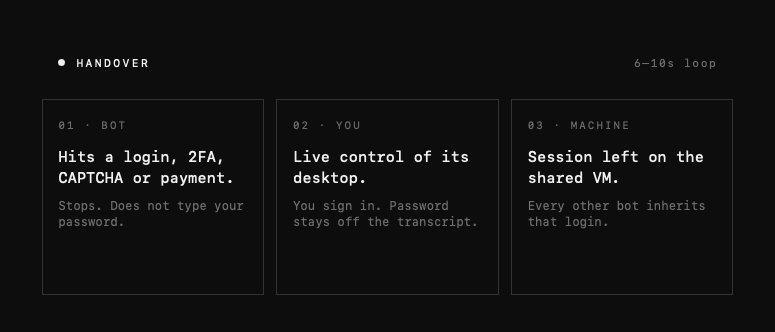
Which is the point people miss. That hand-over exists to leave a durable session on the shared machine, and that session is the artifact every other bot inherits.
Memory is real but not authoritative. Bots persist memory, files, browser sessions and preferences across turns. The docs still caution against treating memory as truth: for anything that matters, tell it to re-check the live source.
There is no model picker. Routing is automatic on the backend. Good for beginners, frustrating for power users, and it means you cannot route work to a cheaper model when your bill climbs.
Files go in a shared /workspace on the machine. That is how bots hand off to each other.
Uploads cap at 6 attachments per desktop message, 25 MB per document, 200 MB per video. Encrypted files are unsupported.
So-what: Prefer connectors over the browser wherever one exists, and remember that every manual sign-in you perform is a credential you just handed to the whole roster.
5. The other half of what you bought
Here is the part every Grok Bot guide skips, including the ones with a million views. You are not buying an agent. You are buying a Cursor account, and Grok Bot is one of the things that account unlocks.
Nobody who bought Pro+ for the bots knows what else arrived with it. So:
The editor and Tab. Cursor is a code editor first, currently on build 3.16, on macOS, Windows and Linux. Tab is its inline model: it suggests as grey text, edits multiple lines at once, adds imports, and after you accept it predicts where you will edit next and jumps there. Accept with Tab, reject with Escape, take it word by word with Cmd/Ctrl and Right Arrow.
Agent, and the three modes. Agent has full tool access. Plan is design-focused and asks clarifying questions before touching anything.
Ask is read-only exploration. The same three modes exist in the terminal.
The CLI. One line installs it: curl https://cursor.com/install -fsS | bash. It runs interactive or headless with -p for scripts and CI, and takes --model.
Bugbot reviews pull requests automatically, leaves comments with fixes, and works against GitHub, GitLab, Bitbucket and Azure DevOps. Billed as usage.
Cloud Agents run work off your machine. On 13 August they got Builds, pre-warmed environment snapshots that Cursor claims cut time-to-first-token by roughly three times; it became the default on the 17th.
Origin, launched 17 August, is Cursor's own code hosting. Repos get a URL at cursor.com/codebase/[name], existing GitHub repos sync bidirectionally, and PR comments cross over within seconds.
Router, from 22 July, picks a model per request across three modes: Intelligence, Balance, Cost. Cursor claims around 60% savings at frontier quality, citing $6.76 per commit on Intelligence against $12.69 on Fable.
The customization layer is Rules, Hooks, MCP, Skills, Subagents and Plugins. Cursor Skills are ordinary SKILL.md folders, and it auto-loads them from .agents/skills/, .cursor/skills/ and, for compatibility, .claude/skills/ and .codex/skills/.
So-what: If you bought Pro+ at $60 for the bots, you also bought an editor, a terminal agent, a PR reviewer, cloud agents and a code host. Most people never open four of those.
6. Which one gets which job
The two products are opposites in almost every dimension that matters, and that is what makes running both worth it. Same login, same bill, opposite capabilities:
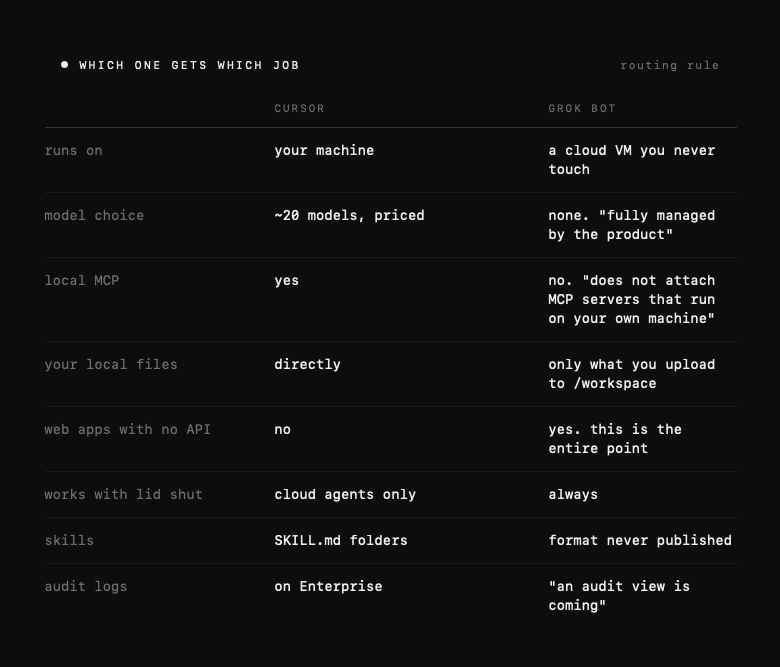
Read that table as a routing rule. Code, local files, and anything where you want to pick the model goes to Cursor.
Anything that lives behind a login in somebody else's web app goes to Grok Bot. Neither does the other's job, and neither is trying to.
There is one thing you must know before running both hard, and it is a bill problem. They share a usage pool. Cursor staff explained it on the forum after a user watched his custom-model spend climb all month with every model disabled: turning models off in Settings only changes the editor's picker. Grok Bot, Bugbot and agent sessions keep drawing from the same "Other Models" pool.
So a heavy week of bots quietly eats the budget you were saving for the editor.
Model prices in Cursor, per million tokens, input then output, for the routing decision: Composer 2.5 at $0.50 and $2.50, Grok 4.6 at $2 and $6, Claude Sonnet 5 at $2 and $10, Gemini 3.1 Pro at $2 and $12, Claude 4.7 Opus at $5 and $25, GPT-5.5 at $5 and $30.
Note what that list proves about the acquisition. SpaceX bought Cursor on 14 August, and three weeks later Anthropic, OpenAI and Google models are still shipping in it at published prices. Model neutrality survived the deal, at least so far.
So-what: Cursor for your machine and your code, Grok Bot for other people's web apps. Watch the shared pool, because the bots spend the editor's money.
7. One job per bot, and the field that does the routing
New in the sidebar (or Cmd/Ctrl+N), New chat, Create new agent, Bot actions, Edit Profile.
Four fields: name, title, description, avatar. That is the whole identity surface.
The description is the closest thing to a system prompt, and the split that matters is documented:
Use the conversation for task-specific instructions. Use the description for rules that should remain true.
So Never send external messages without approval belongs in the description, where it survives every future thread. Draft follow-ups for these twelve accounts belongs in chat.
Write the description like a job brief for a new hire, not like a prompt.
One job per bot. This is official, not folklore. A bot should "own a repeatable outcome, not a loose category of questions."
The docs name the anti-pattern by example: "A job such as General Helper gives the Bot less guidance and makes its saved context harder to reuse."
Split when the work has a distinct goal, tool set, working style, approval boundary, or schedule.
Eight roles ship as templates: Sales Outbound, Talent Scout, Paid Media, Expense Manager, Product Performance, Bug Reproduction, Account Health, Chief of Staff.
The docs also give a shape for every request worth copying: outcome, sources, constraints, deliverable, review point.
Their own Chief of Staff example ends with the line that should end most of yours: "Do not send messages or change meetings."
Account ceiling: 50 bots and group chats combined. Group chats spend from the same budget.
So-what: The description field is the product. A vague one produces a vague bot, and it is the only place an approval boundary survives past the current thread.
8. Teach it once, then put it on a clock
Connections. Settings, Plugins, browse, Add, finish auth in the browser.
Reported catalogue includes Gmail, Google Calendar, Google Drive, Notion, Slack, GitHub, X, Playwright and more.
Two first-hand gotchas from a Cursor engineer's public walkthrough. GitHub can claim it is already connected via Cursor and still demand a personal access token. X requires a bearer token from the developer portal.
Never paste a password or a one-time code into chat. Where a connection offers a masked secret field, use that. It stays out of the transcript.
Skills are the how. A reusable set of instructions. Two documented ways to make one, and neither is writing a file:
-
Dictate it. Finish a task successfully, then say: "Save the process we just used as a skill called Weekly account health."
-
Demonstrate it. Hit teach-a-task and do the browser workflow once while it watches. Capped at ten minutes, video only, no microphone audio, desktop only.
The docs are blunt that the result is unfinished: "The learned skill is a draft. Add decision rules, failure handling, and approval boundaries that may not be obvious from one example."
Invoke with / in the desktop composer. @ addresses bots, groups, routines and connectors. Skills are account-wide but toggled per bot under Settings, Plugins, Yours.
Worth knowing: xAI has never published what a Grok Bot skill physically is. No path, no format, no import.
Its sibling Grok Build uses ordinary SKILL.md folders compatible with Claude Code and Cursor. Grok Bot's docs describe no file at all. Anyone telling you to drop a SKILL.md into Grok Bot is extrapolating.
Routines are the when. One bot, one schedule.
You create them by asking, not by writing cron. The docs' example phrasing is literally "Every weekday at 8:00 AM." Event triggers exist too, sourced from Cursor integrations like Slack and GitHub.
Specify six things or it will guess: schedule, time zone, input source, expected result format, approval boundaries, failure handling.
The gating rule, verbatim: "Create a routine only when retries and failure cases are defined."
Hard limits: 50 routines per bot, and only the 20 most recent run records kept per routine. A routine running hourly loses its own history inside a day.
And the sentence that should be on a poster:
"A test run performs real work. It can navigate websites, change files, and call connected tools."
There is no dry run. No sandbox, no replay against historical data. Your test sends the email.
The official promotion path: manual run, correct it, save as skill, test on a second input, then routine.
So-what: Demonstrate rather than describe, and never promote a workflow to a routine until it has survived a second, different input.
9. The team, and the part that is oversold
The orchestrator pattern is real and endorsed. xAI's launch post: "People inside SpaceXAI often run multiple Bots in parallel, with one to manage the others. A chief of staff sits on top, with a specialist for each lane."
The docs' cleanest line about why: bots pass ownership "so you are not the router."
Mechanically, a bot sends another bot an asynchronous message. The receiving bot wakes, does the work, replies later.
Group chats hold two to six bots. Route with @Name.
One caveat that will bite anyone wiring a design-review chain: bot-to-group handoff messages are text-only. Images must go bot-to-bot directly.
Now the part the launch threads leave out. Everyone is selling swarms. The vendor's own advice is the opposite:
"Ask for a single owner at each stage. Too many parallel handoffs can create duplicate work and noisy updates."
There is also an unresolved conflict to know about before you architect anything.
Multiple write-ups claim bots automatically scan each other's descriptions and forward matching work. The official collaboration docs describe only @-mention routing and never mention auto-delegation.
Nobody has resolved it publicly. Write good descriptions either way.
If auto-routing is real, they are the router. If not, they are still the system prompt.
So-what: Build a chain with one accountable owner per stage, not a swarm. The vendor says so, and the vendor is selling you the swarm.
10. What it costs to run, which is not what it costs to buy
The subscription is an access floor, not a budget ceiling.
-
Grok Bot usage resets weekly, a separate meter from the rest of Cursor, which resets monthly.
-
xAI does not publish the size of the weekly allowance. Not in tokens, not in dollars, not in hours, on any tier.
-
Overage is "billed from model and token cost" following the actual serving model. Grok 4.6 lists at $2/M input, $6/M output.
-
Verbatim: "There is no Grok Bot-specific spend cap yet."
-
When the allowance runs out, "extra Grok Bot usage can continue on your account's shared on-demand spend if on-demand is enabled." Note shared. The overflow drains the same pool as the rest of your Cursor usage.
-
Cheaper plan, smaller allowance. Pro+ hits that overflow sooner than Ultra does.
-
Desktop and phone draw on one meter: "macOS and iOS share a single usage bucket tied to your signed-in Cursor account."
You have three brakes, none of them Grok-Bot-specific.
On-demand usage is off by default and must be explicitly enabled. You can set an account spend limit, and you can watch spend at cursor.com/dashboard/usage.
One thing that will confuse your bill, explained by Cursor staff and by nobody else. A user reported his custom-model usage climbing all month after disabling every model except Grok 4.6 and Composer.
The answer from Cursor on the forum: turning models off in Settings only changes the editor's model picker. Grok Bot, Bugbot code reviews and agent sessions keep drawing from the shared "Other Models" pool regardless.
So if you are hunting a mystery line on your invoice, your bots are a likely source, and switching models off in the editor will not stop them.
Early users report the burn scales with uptime, not headcount. One pre-release tester: "I've used less tokens in the last 5 years prior to this month than I have this month. Always on perpetual agents use a LOT of tokens."
Another burned half a weekly quota in three hours of experimenting. Metering was visibly unreliable at launch, with one tester seeing a dashboard at 0% while the app read 48%.
So-what: Turn on-demand off until you have watched a full week, and batch connector syncs to once a day. Constant syncing is the single most reported source of waste.
11. The blast radius
This is the section to read twice, and all of it is xAI's own text.
"All of your Bots share one cloud computer assigned to your user account. Files, browser sessions, and command line credentials on that computer are available across your Bot roster."
"Because the browser is shared, signing in for one Bot makes the session available to your other Bots."
"The screens are separate work surfaces, not separate security boundaries."
"Do not use separate Bots as a security boundary."
"Do not place a credential or file on it if another Bot on your account should not be able to use it."
On cleanup: deleting a bot removes its profile, conversation and routines, but "files and logins on that computer may remain."
Delete is not containment. The documented remedy is manual: sign out of the service yourself.
To be fair about what is isolated, because "no isolation" would be wrong. The computer "is isolated to your account, not to an individual Bot." On teams, "each member gets one dedicated cloud computer." And "The Bot runs as a non-root user."
Three real boundaries. What does not exist is a boundary between one person's own bots. That is the whole gap, and every "spin up your AI team" thread is silent about it.
Three more facts belong next to those.
Approval is not undo. "An approval controls the proposed action. It does not reverse work already completed."
Which tells you where to draw the line, and it is not where most people draw it. The useful test is not how big a task is. It is whether the bot can take it back.
The vendor already published the list, and every item on it is irreversible in the same way:
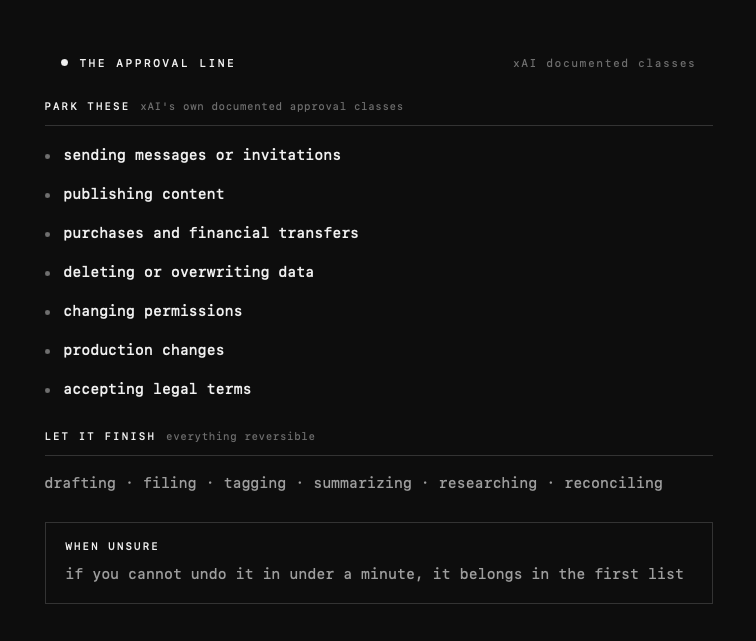
Anything in the top block leaves your account and touches somebody else. Anything in the middle block stays inside the machine, where a bad result costs you a re-run.
There is no audit log. "An audit view of Bot actions is coming." Today you have chat transcripts, unsearchable across a team.
Sit with that alongside the pricing. On 21 August, access widened to every seat on a $40 team plan, and the audit view did not arrive with them.
It is now missing for far more people than at launch, and nobody covering the price drop has mentioned it.
The far-end log says it was you. Bots act inside your signed-in sessions, under your identity. Whatever happens, the other system's audit trail names you.
On 1 May 2026, six Five Eyes cyber agencies published joint guidance on agentic AI recommending least-privilege access, system isolation, and strong non-overridable guardrails.
Grok Bot's shared-session design is the opposite architecture. That is not a scandal, it is a trade: the same shared session is exactly what makes handoffs work without re-authenticating. But make the trade knowingly.
What that means in practice. Put nothing on that machine you would not hand to every bot on the account.
Money, customer replies, production systems and admin consoles stay behind approval or stay off entirely. If you need real separation, you need a second account, not a second bot.
One live discrepancy, in the interest of accuracy. A forum bug report documents the opposite problem: each agent's browser demanding its own sign-in despite the shared-account promise. Cursor staff confirmed that is unintended.
Documented behaviour and shipped behaviour are not currently the same thing.
So-what: Your blast radius is every credential on the machine, not the bot you gave the task to. Draw it before you create the second bot, not after.
12. What will break, and where it will not work at all
From the official troubleshooting page and named forum threads:
-
"The computer cannot be reached."
-
Bots stuck on logins, CAPTCHAs, approvals or verification.
-
Plugins failing to install or authenticate.
-
Routines failing when their owning bot is deleted or a plugin loses authorization.
-
Work halting on usage exhaustion or spend limits.
-
Desktop app and cloud computer update independently, so version skew happens.
Add what the forum looked like in the week of the wider rollout, all of it still open when I checked.
First-run setup failing server-side for new users, with "The app cannot create the shared agent computer." Cursor staff confirmed that one was on their side. It is precisely the wall a trial user hits before seeing anything work.
A cloud-side outage on 20 August where bots accepted messages then failed with "Bot failed to respond."
GitHub sign-in returning a 404 on both desktop and iOS, reported on launch day. Staff promised an update, the thread went quiet.
The official X plugin's OAuth failing across platforms. And the per-agent browser sign-in bug from section 11, unresolved nine days on.
Do not anchor any of this to a version number. Whatever build you install will not be the one these were filed against.
The geography problem is the big one. A user traced the cloud computer's egress to Oregon and found sites behind an Imperva WAF returning a hard block before any login form appeared.
On 18 August, Cursor's Colin confirmed on the record: "the Agent Computer currently egresses from US cloud infrastructure and there's no region selection today." He called it a known limitation.
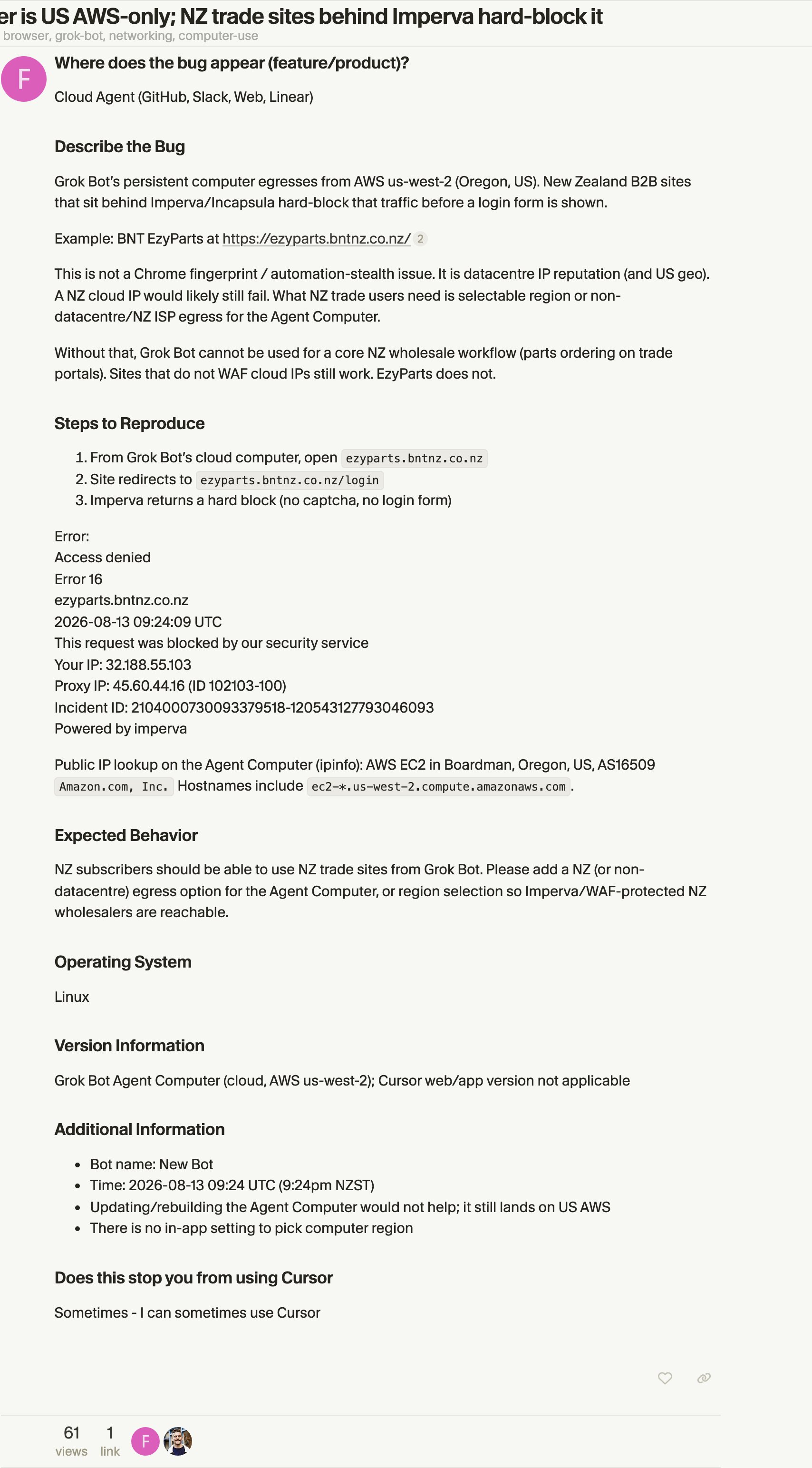
So to your bank, your government portal and every regional service you use, your bot is a US datacenter. Expect blocks. One user hit exactly this trying to order groceries.
Neither vendor publishes a supported-country list, and the "restricted regions" lists circulating online trace to no primary source.
What is documented: Cursor's terms restrict use in US-embargoed countries and require trade-law compliance, and xAI's consumer terms carry a standard OFAC representation. Neither names VPNs.
Note the asymmetry that catches people out. The interface is English-only even though Grok itself supports 39 languages. And payment checks run on the issuing bank's country, not your IP, so a VPN does not solve a card decline.
So-what: Before you buy, test one task against the regional service you actually care about. US-only egress breaks more real workflows than any bug on this list.
13. When the answer is no
A week ago this was easy. The floor was $200, so unless you needed a persistent cloud machine, you bought something else.
Two things changed that, and only one of them is the price.
The price is the smaller change. The bigger one is that the persistent cloud machine stopped being a moat.
Claude Cowork now runs work on Anthropic's servers: "Cowork runs your tasks in the cloud (in beta). Claude's work runs on Anthropic's servers, in an isolated environment." Those sessions survive your laptop going to sleep.
That is on Claude Pro, $17 a month annually, $20 monthly.
So state the moat precisely, because it is narrower than it was. What Grok Bot still has alone is a persistent signed-in desktop. One long-lived browser profile that stays logged into things.
That is what lets it drive software with no API, no MCP and no connector.
Legacy web apps. Portals. Things a human clicks.
Everyone else either spins a fresh environment per task or reaches services through connectors.
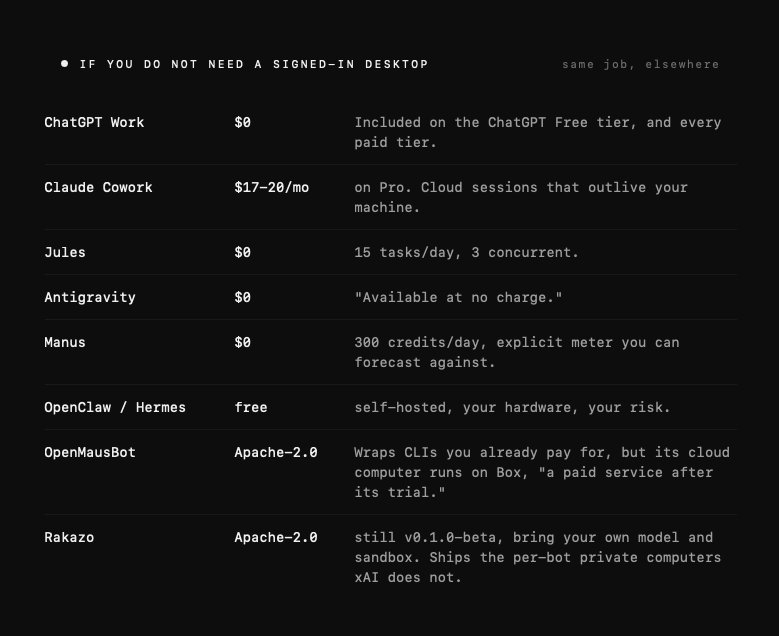
If you do not need that, here is what the same job costs elsewhere:
Two open-source clones appeared within 48 hours of launch, which tells you the moat is the infrastructure, not the idea. Rakazo in particular fixes the exact flaw documented in section 11.
The honest rule under the new pricing. Grok Bot is worth turning on the moment its marginal cost is zero.
That means you already pay for Cursor Pro+, Ultra or any Teams seat, or you already hold individual SuperGrok Plus or Heavy. Take the trial if you are curious, it costs nothing.
But buying it net-new for Grok Bot alone, at $60 monthly or $40 a seat, is a harder case than it was a week ago. The thing you were paying the premium for is now $17 elsewhere.
Do not buy it at all for regulated work, support queues, or anything needing per-action audit. There are no confidence thresholds, no per-record scoping, no audit trail, and no compliance certification of its own. The security page delegates to Cursor's, which offers SOC 2 Type II on request.
And be honest about the evidence. Nobody has benchmarked Grok Bot on OSWorld, GAIA or anything else. Every comparison in circulation, including the enthusiastic ones, is an impression of a product that is two weeks old.
So-what: Turn it on if you already pay for an eligible plan. Buy a new plan only if you need a browser that stays logged in, because everything else in this list is cheaper or free.
14. The first hour, in order
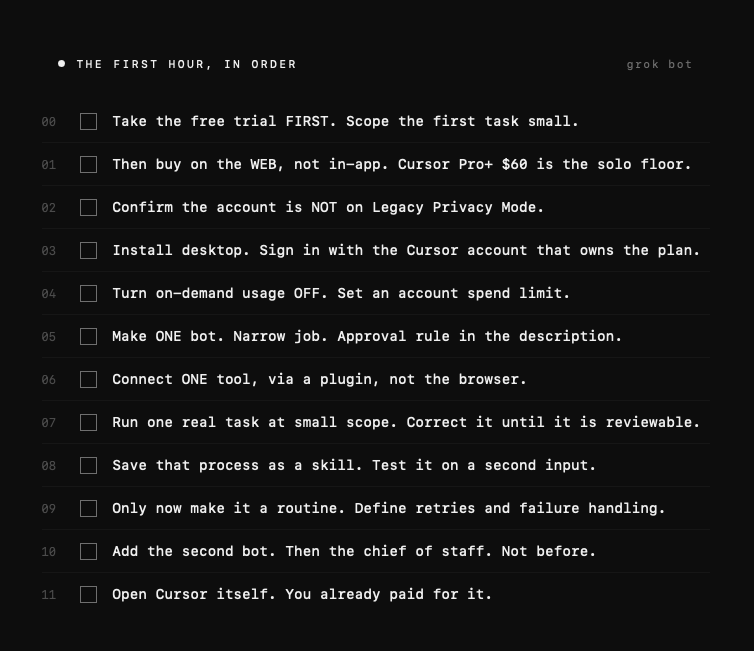
The description field decides whether any of this works. Here are the rewrites that matter, copy-paste and adapt:
-
One job per bot. Never a General Helper.
-
Standing rules go in the description, task scope goes in chat.
-
Draft-and-approve by default, with a human gate at every send-or-spend step.
-
Demonstrate, do not write a 500-word prompt.
-
Nothing on that machine you would not give to every bot on the account.
-
A test run is a real run.
So-what: A bot is only as good as the sentence you wrote in its description field. Rewrite the six above for your own work before you create anything.
Do one thing before you close this. Open your plan screen and read the number next to your weekly allowance, because neither vendor publishes it and you are about to spend against it.
Then open cursor.com/dashboard/usage and turn on-demand spend off.
Two minutes. It is the only ceiling this product has.
Five bots, one machine, one login. Price it accordingly.
Conclusion
You stop being the one who clicks. That part is real
The cloud is not what changed. Cowork does that for $17. What changed is that the work now runs as you: your sessions, your cookies, your name in the far end's log.
So the skill is not prompting. It is deciding what your identity can reach, and what it cannot take back.
Write that in the description field. Nowhere else survives the thread.
Published on grokbot.sh. Cite the public log, not a prompt pack.