
Grok Bot’s Second Brain: How to Run a Business Through It
Grok Bot is a real product xAI shipped in beta on August 11, 2026, not a chatbot, but a roster of persistent AI teammates that keep working after you close your laptop. The "second brain" part is the
Article
Job breakdowns
Grok Bot is a real product xAI shipped in beta on August 11, 2026, not a chatbot, but a roster of persistent AI teammates that keep working after you close your laptop. The "second brain" part is the layer that lets those teammates share memory and plug into real tools, like a business's own command line, instead of forgetting everything the moment a chat ends. Here's exactly what that looks like, step by step, using a real, documented example: running a Whop-based business entirely through Grok Bot.
What Grok Bot actually is
The facts, before anything about "second brains."
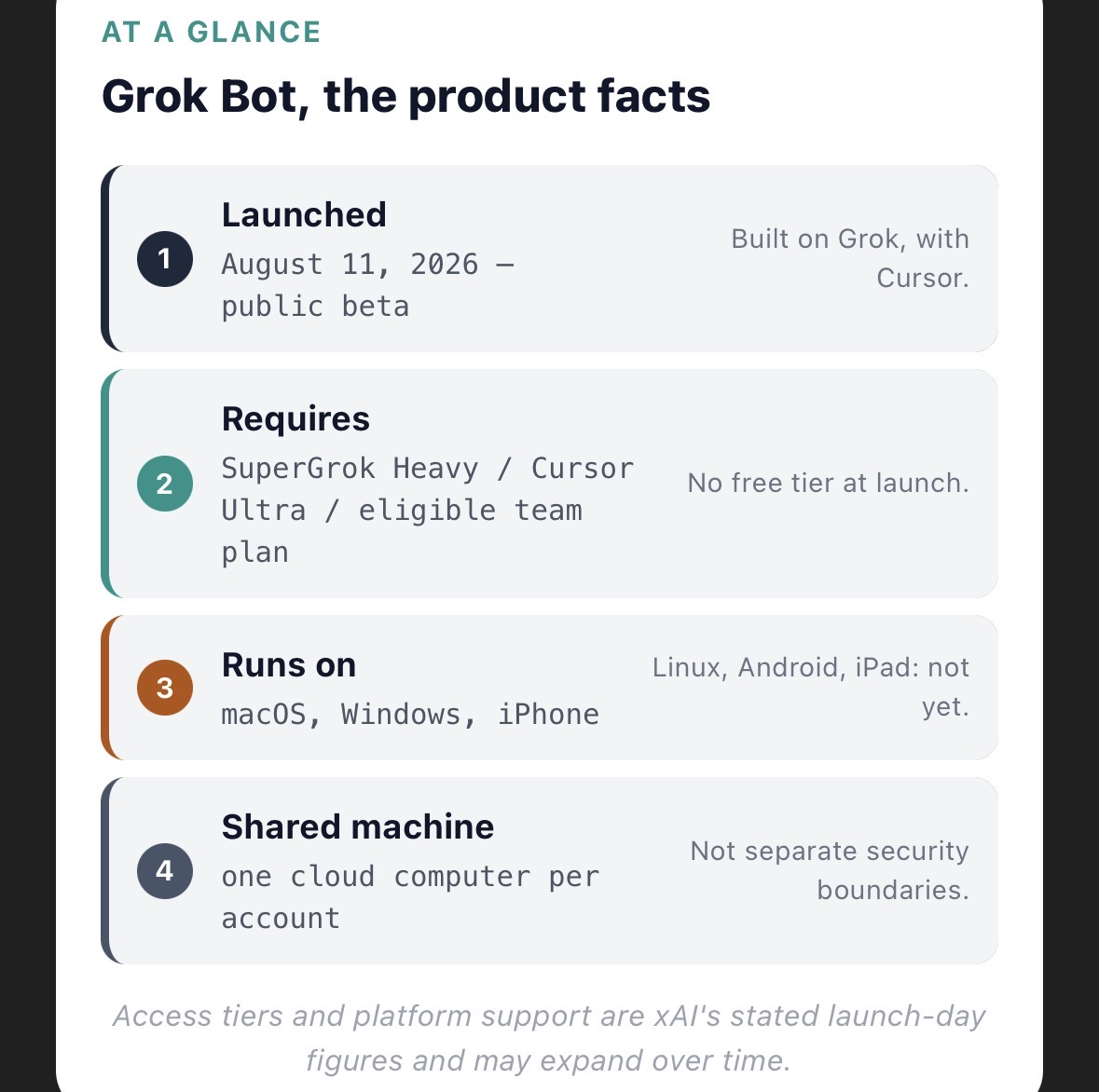
Grok Bot is launched in beta and built on top of Grok and distributed jointly with Cursor, the AI coding company SpaceX is acquiring.
It started as an internal prototype xAI's own teams used for sales, marketing, operations, and engineering work before becoming a public product. Instead of one chat window, you get a roster: each Bot is a named, persistent agent with a defined job, and it runs on its own dedicated cloud computer, complete with a browser, a file system, and a terminal, so it keeps working even when your own device is off.
This release didn't appear from nothing. xAI added scheduled Automations to Grok in July 2026, then added large parallel workflows to Grok Build, its coding agent. Grok Bot is where those ideas converge into a teammate-style interface where several persistent agents can coordinate on the same account.
The Full Feature Set
Beyond the basic pitch of "an agent that keeps running," several specific capabilities are what make Grok Bot function as a coordinated system rather than several separate chatbots:
• Persistent cloud computer: browser, files, and command-line tools that keep running after your own device closes.
• Shared workspace: all Bots on one account share that same computer, files, and browser sessions, with each Bot getting its own screen for parallel work.
• Computer use: Bots can navigate websites directly when no clean connector or API exists, though sites can still block automation or demand a CAPTCHA.
• Plugins and MCP: connectors and MCP servers give a Bot access to structured tools; xAI recommends a connector over raw browser control whenever one is available.
• Multi-Bot collaboration: two to six Bots can share a group chat, message each other, and hand off ownership of a task without you manually relaying information.
• Skills: a process that works can be turned into a reusable skill with defined steps, decision rules, output requirements, and approval boundaries.
• Routines a Bot can run a workflow on a schedule, or in some cases in response to an event.
• Teach a task: where enabled, you perform a browser workflow once while the Bot watches, and it drafts a skill from that demonstration for you to review.
• Approvals: you can require sign-off before actions like sending, publishing, deleting, purchasing, or touching production systems; passwords, 2FA, and CAPTCHAs stay under human control even during a Bot's browser session.
What Makes It A "Second Brain"
xAI never branded a single feature "second brain." The term comes from how people are actually using Grok Bot: connecting it to a structured, persistent knowledge system that survives after a chat ends, instead of relying on whatever the model happens to remember in one session.
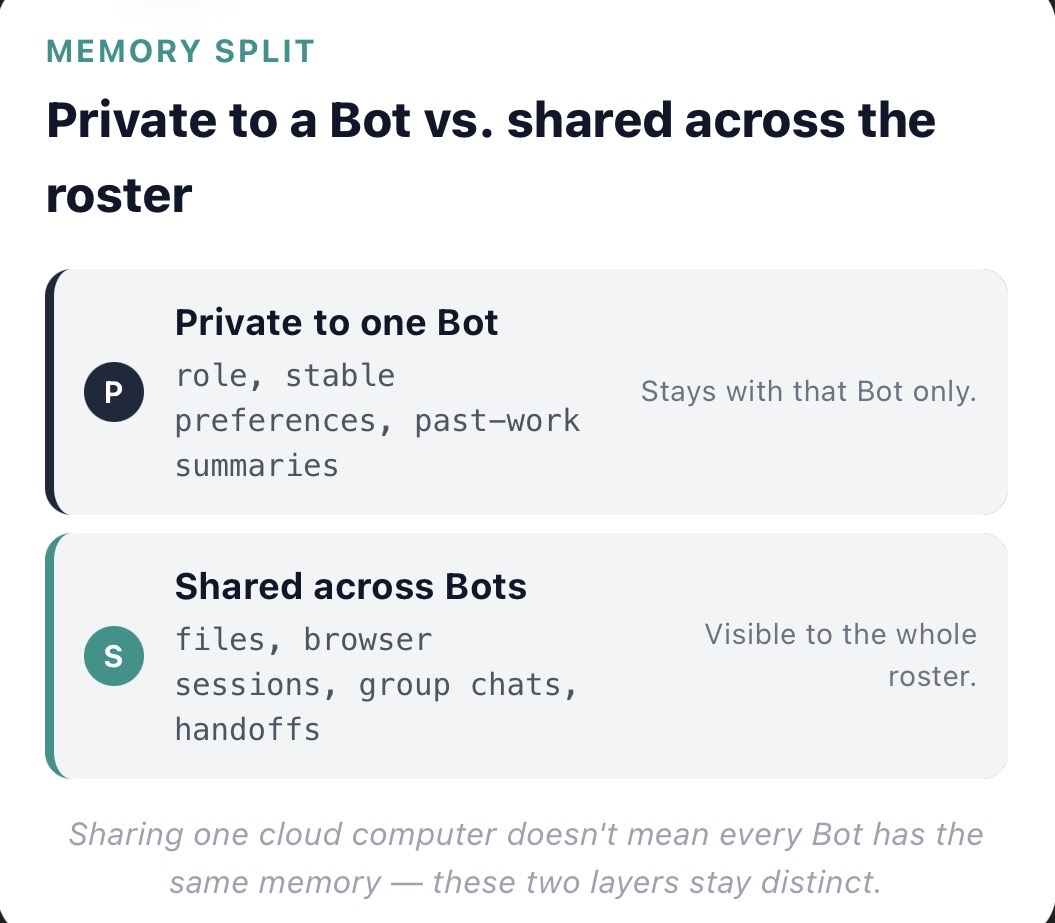
This becomes useful once you're running more than one Bot on a task, a researcher, a verifier, and a writer, for example. Each keeps its own persona and role, while shared work still moves between them through the group chat or connected files, rather than you manually copying context from one chat window into another.
One documented pattern for building the shared layer uses a git-native structure with a strict rule: reads happen on the main branch, writes happen on a worktree or separate branch. That single rule is what stops multiple agents, Grok Bot, Claude Code, Codex, or others sharing the same knowledge base, from overwriting each other's work when they're all pulling from and writing to the same "brain" at once. Someone already maintaining a structured knowledge repository can connect it to Grok Bot, and every Bot built afterward inherits that context instead of starting from zero. xAI itself also recommends checking the live source for anything important or fast-changing, rather than trusting only what a Bot remembers.
Setting It Up
The general Grok Bot setup, before connecting any specific tool.
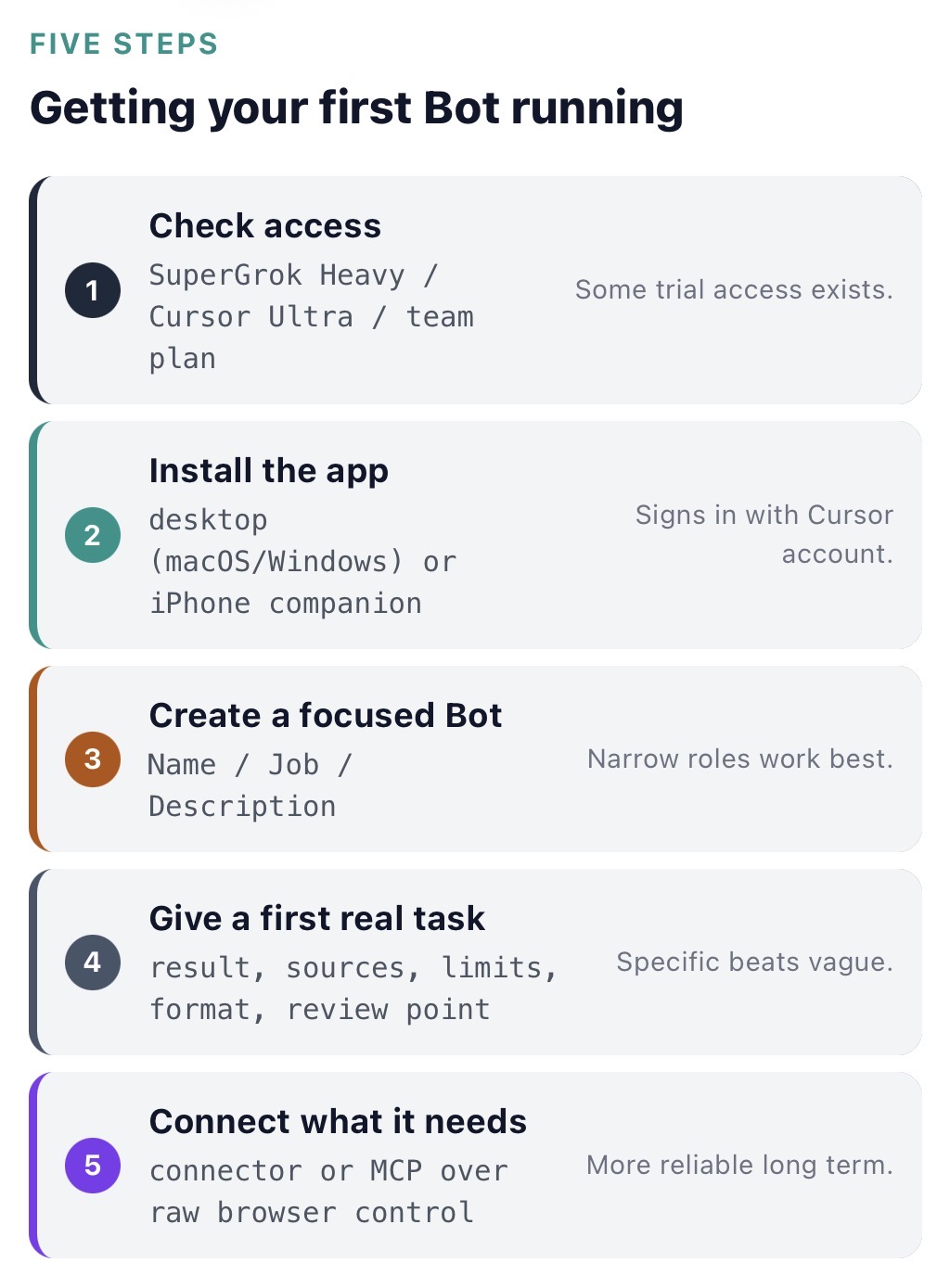
A sample first-Bot definition, close to what xAI itself recommends: a short name, one job, and rules stated plainly, for instance, a Researcher Bot told to use public sources only, keep a direct source link for every important claim, separate verified facts from assumptions, and never publish or send anything externally without review. The more specific that initial framing is, the more useful the Bot's accumulated context becomes over time, since it isn't guessing at its own boundaries on every task.
For workflows that touch several outside services at once, GitHub, Slack, Gmail, Salesforce, and similar, connecting each one separately adds friction. This is the gap tools like Composio's plugin fill: installed once from Settings → Plugins → Marketplace, it exposes tool discovery and execution across more than 1,000 apps, with OAuth connections and automatic token refresh handled centrally instead of per Bot. A Bot can then request access to a specific app only when a task actually needs it, rather than every integration being pre-connected up front.
The Worked Example: running payments through the Stripe CLI
This is where "second brain" stops being a concept and becomes something you can actually type.
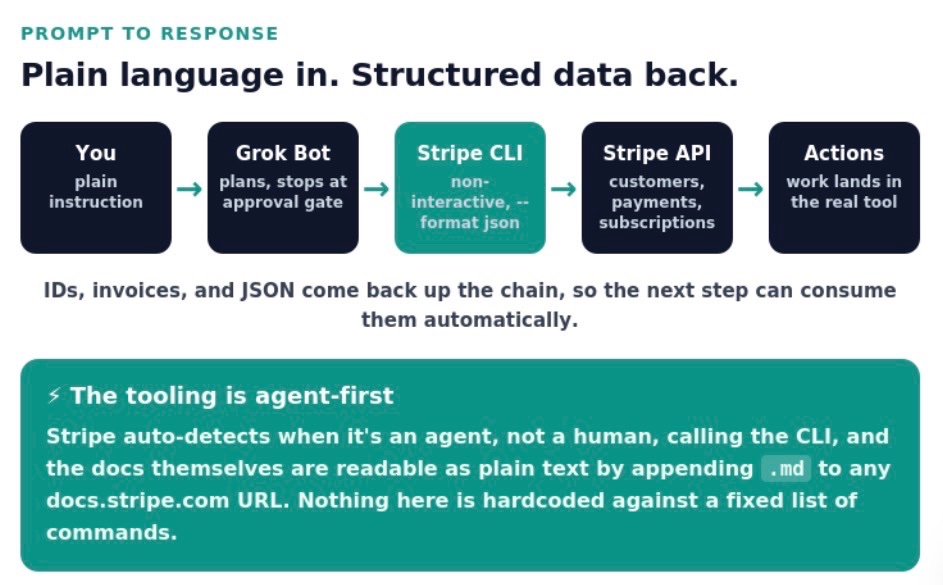
Stripe is the most widely used payments platform for software businesses, and it ships an official command-line tool alongside a hosted MCP server built specifically for agents, it even auto-detects when it's being driven by an AI agent and tags API requests accordingly. The important detail for an agent like Grok Bot: Stripe explicitly documents its CLI, MCP server, and even its own docs pages as agent-first, appending .md to any docs.stripe.com URL returns the plain-text version, built for a model to read directly instead of scraping a rendered page.
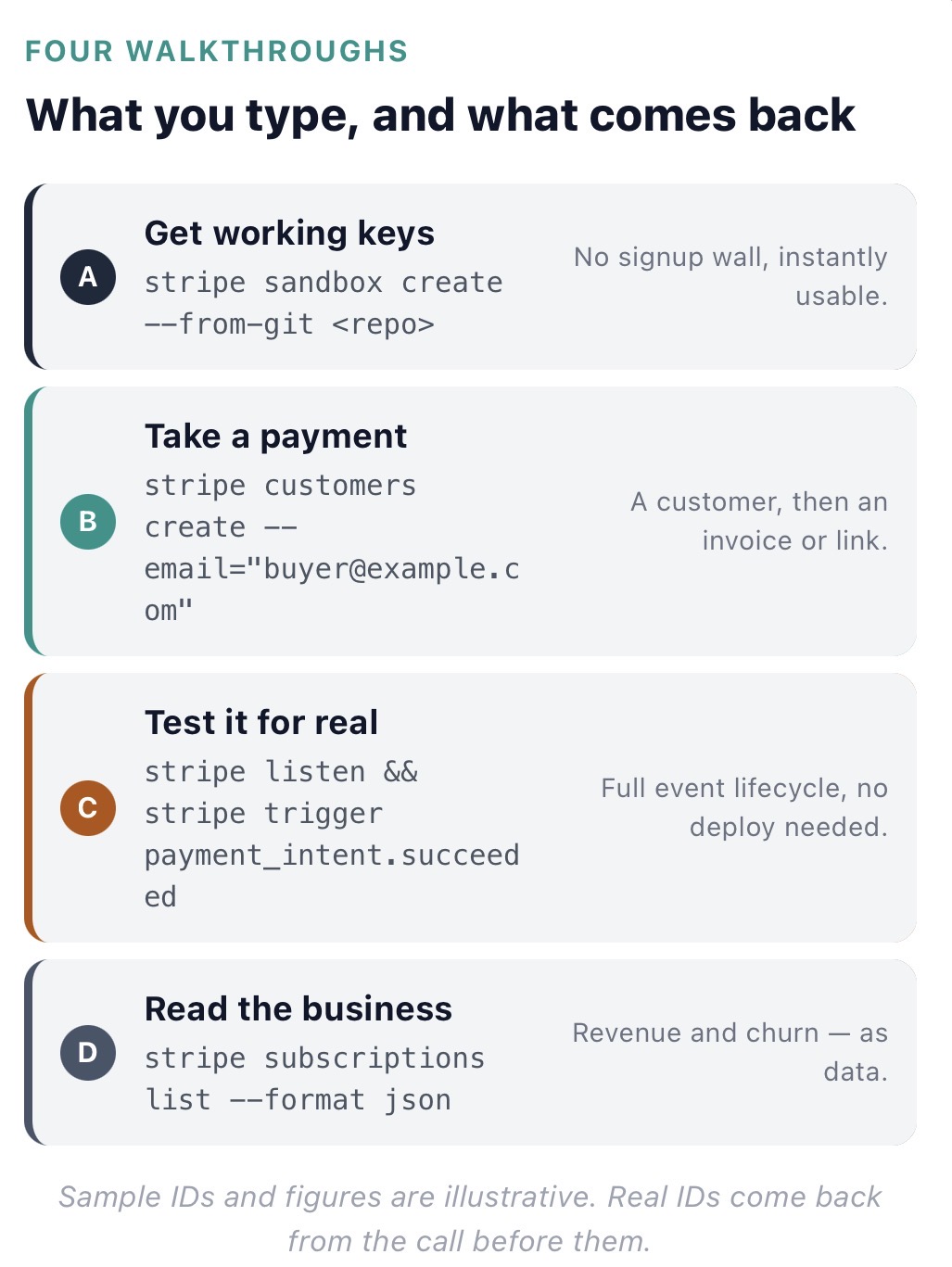
A. Get working keys, no signup required
spin me up a working Stripe environment from this starter repo
This forks a sandbox environment straight from a git repo's configuration and hands back working API keys immediately, no account setup required first. That matters for an agent: it can bootstrap an isolated, disposable environment to build or test in in the middle of a task, without a human going through Stripe's dashboard first.
B. Take a payment
create a customer for this buyer and get them invoiced
Stripe's CLI resources follow a consistent shape, create / list / retrieve / update across customers, invoices, subscriptions, refunds, and disputes, so an agent that has learned the pattern on one resource can apply it to the next without new instructions. The same shape is what lets an agent move from creating a sale to processing a refund or responding to a dispute using an identical command structure throughout.
C. Test the whole flow, without deploying anything
make sure the webhook actually fires before we ship this
This is the step that used to take a human several minutes per attempt, deploying a handler, registering an endpoint in the dashboard, firing a test event, and checking logs. An agent instead opens a direct tunnel from Stripe's event system to a local server and fires a real event through it in seconds, entirely from the terminal, with no public URL or redeploy involved.
D. Read the business back as data
give me the numbers as data, not a dashboard screenshot
Structured output is what lets a Bot parse and act on a result directly instead of interpreting a rendered table. The same read pattern extends to balances, payouts, and disputes, so a Bot investigating a revenue dip can pull the exact records it needs without a human exporting anything by hand first.
Connecting The CLI To An Agent
Three commands do the actual wiring.
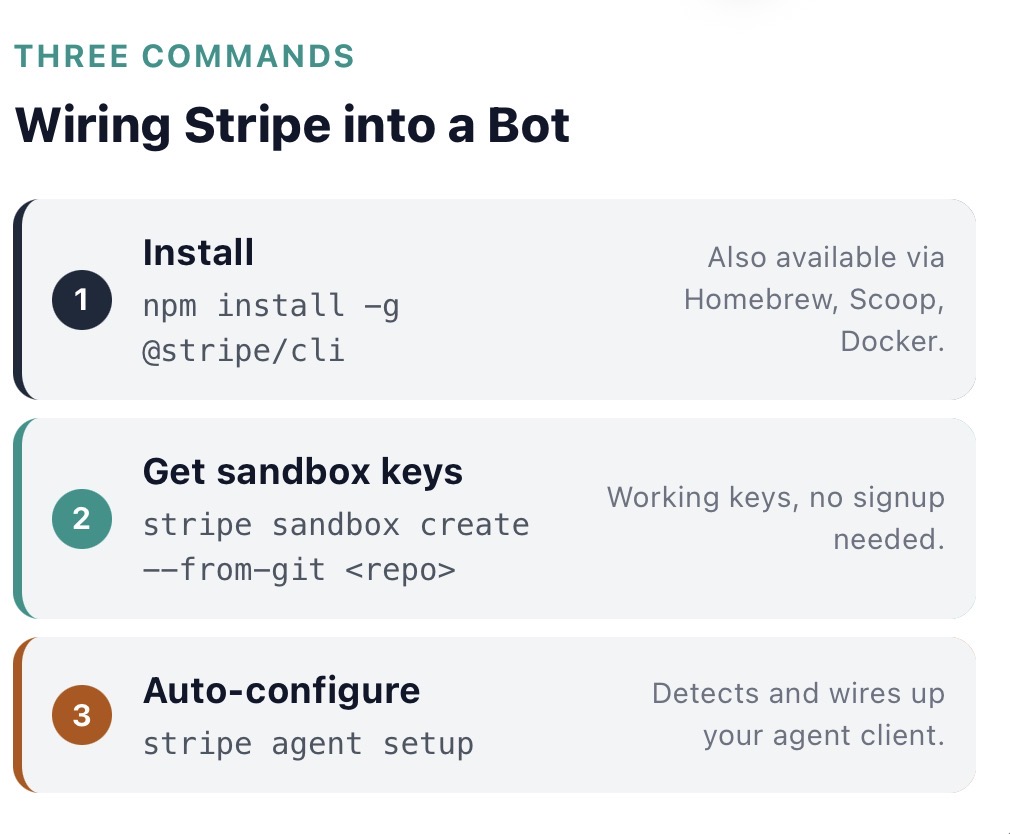
The last step is the self-describing part in practice: stripe agent setup detects which agent client you're running and configures Stripe's hosted MCP server plus its maintained skill set for it automatically, keeping both up to date without manual reconfiguration. The same MCP server can also be reached directly at mcp.stripe.com over OAuth for any MCP-aware client, including Grok Bot, giving an agent structured tool access, listing customers, pulling invoices, reading balances, on top of whatever the raw CLI already covers.
For unattended runs, a scheduled routine, or a Bot working while you're offline, the CLI and MCP server both support a restricted API key as an alternative to an interactive OAuth login, which is the pattern to use once a Bot needs to act without a human present to approve a browser sign-in each time.
How the pieces connect
nothing here is routed manually. this is the actual chain every time.
Scaling it up: more than one Bot at once
The same shared-context idea extends past a single Bot running a single tool. Grok Bot supports putting two to six Bots into a group chat, where they message each other, pass ownership of a task, and keep working without a human manually relaying updates between them. In one documented case, a builder assigned separate Bots distinct personas, modeled on real team members, and had them align on a plan, assign owners, and produce a finished deliverable together, with each Bot checking in on blockers and handing off work automatically when its piece was done.
This scales the "second brain" idea in a specific way: each Bot keeps its own role and private context, but the group chat, shared files, and any connected knowledge repository act as the common layer all of them read from and write back to. For visibility once several Bots are running in parallel, some builders connect a task tracker so every Bot logs what it's doing, what it handed off, and where a task is currently stuck, turning a swarm of agents into something with a single, checkable status view rather than several untracked conversations.
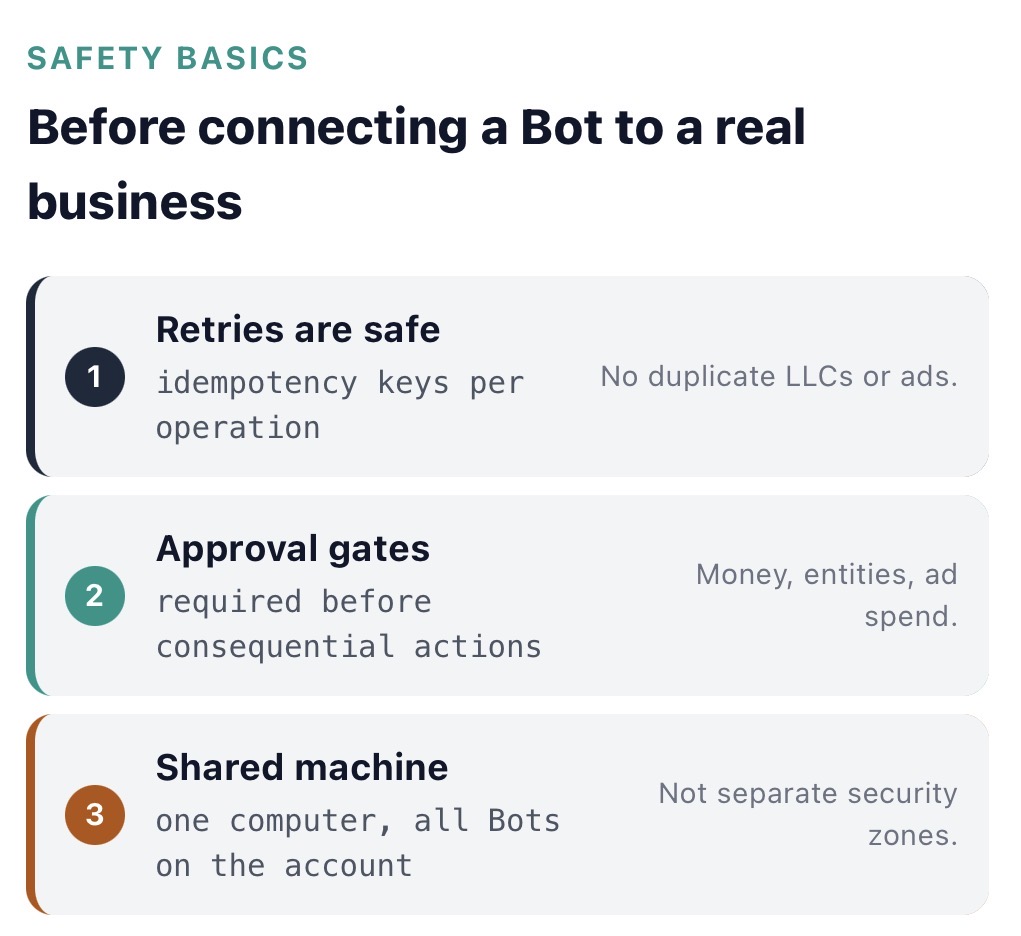
Three things to know before letting it run unattended
-
Retries are safe. Systems like this are built so the same action doesn't happen twice if an agent has to retry a step after an error, the standard pattern is an idempotency key attached to each operation, so a repeated request returns the original result instead of duplicating the action. Without this, a network blip could mean a customer charged twice, or two identical refunds issued, instead of one.
-
Approval gates matter for consequential actions: Grok Bot supports requiring explicit approval before actions like sending messages, publishing content, deleting data, making a purchase, or changing a production system. xAI specifically recommends keeping these boundaries in place for anything with real-world consequences, money moving, refunds, live production changes, rather than letting a Bot execute them freely. Passwords, two-factor codes, and CAPTCHAs stay under human control even during a Bot's own browser session, by design.
-
Bots on one account are not separate security boundaries. Every Bot shares the same cloud computer, including files, browser sessions, and command-line credentials. A scoped API key limits what one connected tool can do, but it doesn't wall off one Bot's access from another's on the same machine. For anyone connecting several MCP servers at once, a gateway layer that centralizes credentials, access limits, and activity logging across all of them, rather than managing each connection separately, becomes worth considering once the number of connected tools grows past a handful.
Where Grok Bot still hits limits
Written plainly, no bullet-point spin.
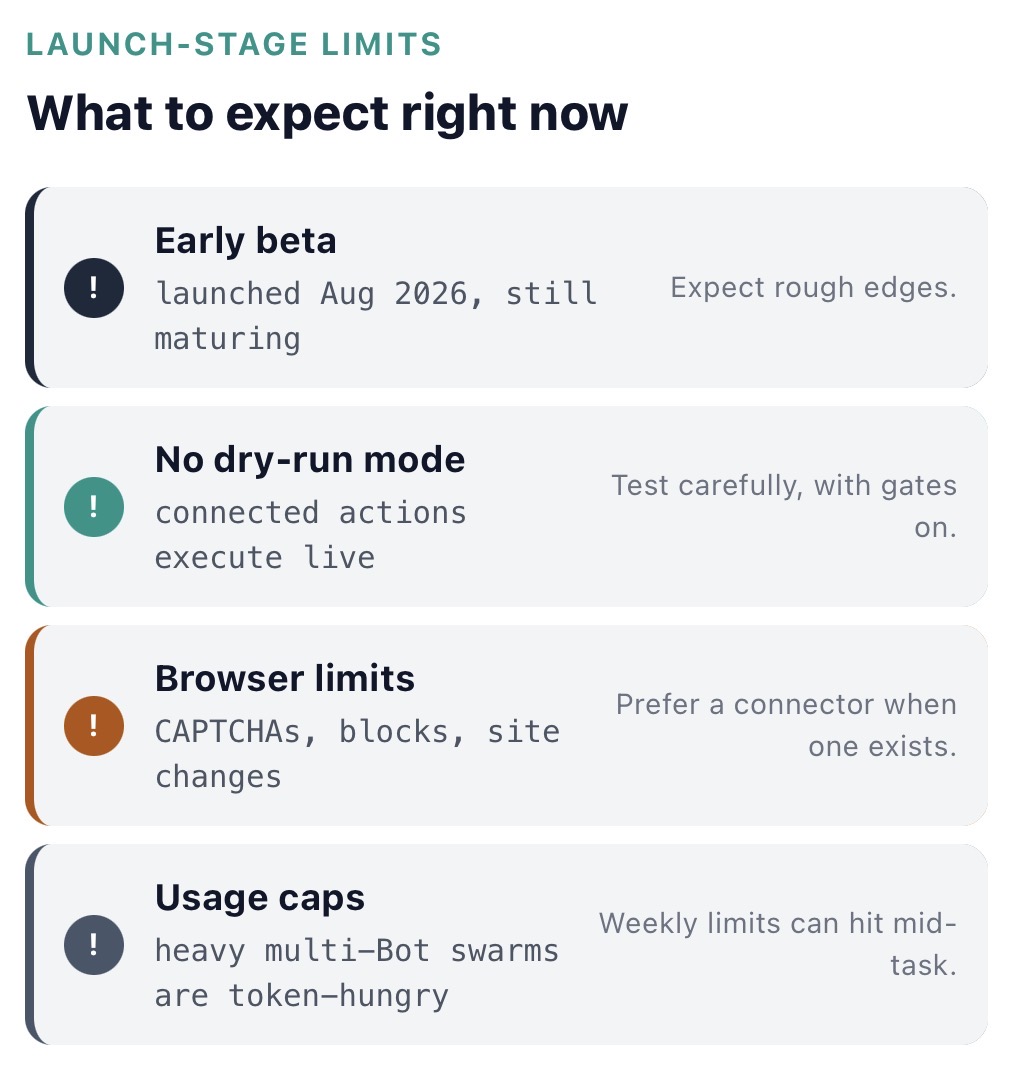
It's an early beta. Grok Bot launched in August 2026 and is limited to macOS, Windows, and iPhone; Linux desktop, Android, and iPad were not supported at launch.
Access isn't free. It requires SuperGrok Heavy, Cursor Ultra, or an eligible Cursor team plan, there's no free tier at launch, and enterprise availability is still rolling out.
There's no dry-run mode on live keys. When a Bot is connected to a real tool like the Stripe CLI using live account credentials, actions execute for real. A sandbox environment keeps testing safe, but testing an unfamiliar workflow against a live key without an approval gate in place means testing it on the real business, with real consequences if something goes wrong.
Browser automation has real limits. Where no clean connector or CLI exists, Grok Bot falls back to controlling a browser directly, and websites can block that automation, present a CAPTCHA, or require human confirmation, xAI itself warns about this in its own documentation.
Heavy multi-Bot use can hit usage limits quickly. Running several Bots in parallel on one complex task is far more token-intensive than a single chat, and reports describe hitting weekly usage caps mid-task on demanding, swarm-style workflows, a real constraint to plan around before building something ambitious on top of the platform. —————————————————————
Put together, the "second brain" people mean when they talk about Grok Bot isn't one switch in a settings menu. It's the combination of a persistent, shared context layer, private per-Bot memory plus a common layer of files, chats, and handoffs, and an agent-first tool like the Stripe CLI that lets an agent go from a plain-language instruction to a real, structured action: creating a customer, taking a payment, testing a webhook, or reading a business's numbers as data, without a human clicking through each step by hand. The approval gates and scoped keys aren't friction bolted on afterward; they're what makes handing that much real-world authority to an agent something you can actually do safely, today, in an early beta product that is still very much finding its edges.
Published on grokbot.sh. Cite the public log, not a prompt pack.