
Grok Bot’s updater filled my Mac with 225 GB of leftover copies
Today, my Mac was down to a few gigabytes free. The installed Grok Bot was fine. What filled the drive was leftover copies the updater never cleaned up: 729 copies of Grok Bot.app,
Article
Job breakdowns

Today, my Mac was down to a few gigabytes free. The installed Grok Bot was fine. What filled the drive was leftover copies the updater never cleaned up: 729 copies of Grok Bot.app, 221,616 files, and 224.4 GiB of real disk space (225 GiB of allocated blocks). None of it was my chats.
The app updates with Squirrel. The helper is ShipIt, and the bundle id is com.anysphere.sand. On my Mac, the loop ran about every five minutes for several days because Grok Bot was still open. Each failed attempt left a full copy behind.
What they are
Before ShipIt replaces /Applications/Grok Bot.app, it unpacks the new build into a folder like this:
On a Mac, $TMPDIR looks like /var/folders/xx/.../T/. These folders land in the parent of that T directory. Each one is a complete app bundle, about 316 MB, mostly the Electron framework. They contain no user data. Chats and settings live in ~/Library/Application Support/Grok Bot, which is a different folder.
What the log showed
ShipIt writes a log here:
From September 18 on, almost every install attempt ended the same way: “App Still Running Error.” Grok Bot was open, so ShipIt refused to replace the app in /Applications. It also left the unpacked copy behind.
The copies still on disk were from September 25 through September 29:
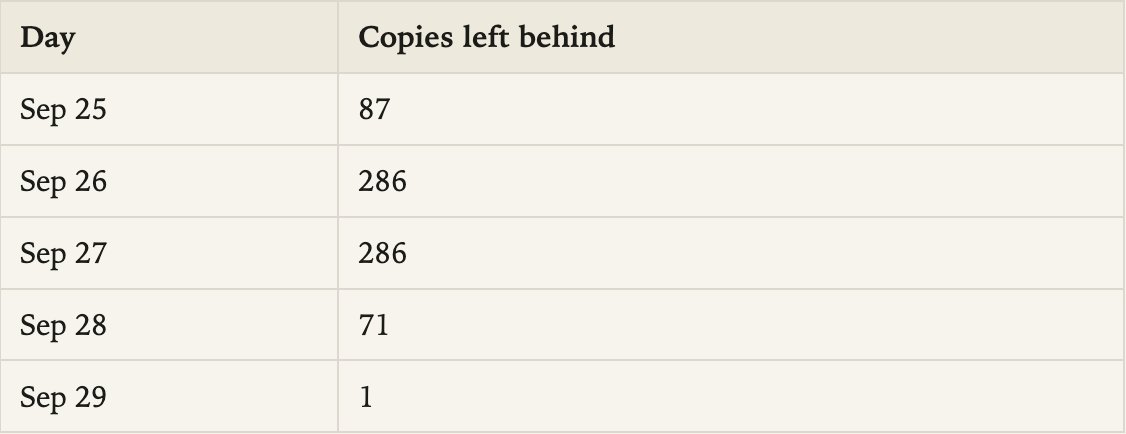
September 26 and 27 match the log exactly: 286 cancelled installs each day, about 12 an hour. The same loop had been failing since September 18. Those earlier staging folders were cleaned up. The ones from September 25 on were not, and they sat there until the disk was effectively full.
The leftovers were older than the app that was actually installed:

A later install did succeed on September 29. The temp copies were not part of that install. Nothing was running out of them.
How to check your Mac
Quit nothing yet. This only looks.
Hundreds of folders will not fit in one du command. Count them, then size one. Each full copy here was 316 MB.
The same failure shows up in the log:
One or two ShipIt folders can be a normal update in progress. Hundreds of them, each a full Grok Bot.app, are this problem.
How to remove them
Quit Grok Bot first. Do not delete the temp directory itself. Other apps keep live files there. Delete only the Grok Bot staging folders:
Leave these alone:
-
/Applications/Grok Bot.app is the real app.
-
~/Library/Application Support/Grok Bot is your data.
-
Any ShipIt folder whose name does not start with com.anysphere.sand. Slack, Cursor, Superhuman, and others use the same updater and have their own bundle ids.
After the delete, check free space with df -h /System/Volumes/Data. On this Mac that went from 7.7 GiB free to 233 GiB free. The Data volume dropped from 897 GiB used to 672 GiB used. That is the 225 GiB those folders were holding.
What to watch for
If Grok Bot stays open across an update, look at that temp directory again the same day. A new com.anysphere.sand.ShipIt.* folder every few minutes means the same loop is back. Quit the app, let one update finish, and remove any folders that remain.
Published on grokbot.sh. Cite the public log, not a prompt pack.