
Grok Bot Second Brain: The Upgrade That Remembers Everything - and Pays You Back
Every build I've posted so far has been about running someone else's business - a clinic, a trading desk, an agency. This one's different. This is the version that runs your life. The idea is simple
Article
Job breakdowns
Every build I've posted so far has been about running someone else's business - a clinic, a trading desk, an agency. This one's different. This is the version that runs your life.
The idea is simple to say and genuinely hard to live without once you have it: instead of one Grok Bot Chief managing seven employees, it manages twenty-six agents, and every one of them owns a piece of what your brain is supposed to be doing for you and mostly isn't - capturing, remembering, retrieving, connecting.
That's the pitch. Here's the actual build, what it does, and - because a demo that doesn't make anyone money isn't worth the electricity - three ways this turns into real income, with numbers I'd actually stand behind.
Why You Actually Need This
Here's the uncomfortable part nobody puts in the productivity-app pitch: your brain was never built to be a filing system. It's a well-documented, century-old finding - the Ebbinghaus forgetting curve - that people lose roughly half of new information within an hour of learning it, and the majority of it within a day, unless something forces it back into view. That's not a discipline problem. That's the hardware.
Now stack today's actual input volume on top of that hardware: a full inbox, a Slack that never sleeps, a reading list that only grows, three tools that each hold a third of your notes, and a calendar that has opinions about all of it. None of that is a "get better organized" problem. It's a throughput problem, and throughput problems get solved by adding capacity - not by trying harder to remember.
A second brain isn't a nice-to-have productivity trend. It's the only response to that math that actually scales: something else has to hold the twenty-six jobs your memory can't keep doing alone, so the four or five that actually need you get your full attention instead of getting drowned out.

Why Grok Bot and Not Something Else
Every alternative on the market solves part of this and quietly gives up on the rest.

A regular AI chatbot forgets everything the moment the session ends. Ask it what you decided last Tuesday and it has no idea what Tuesday was. It's a conversation partner, not a memory.
Note apps - Notion, Obsidian, Mem - hold what you put in them, perfectly. They don't go get anything for you, they don't triage your inbox, they don't know the difference between an idea and a commitment. They're storage. A second brain needs a nervous system, not just a filing cabinet.
Custom-coded agent frameworks can technically do all of it - if you or someone you pay can stand up and maintain a VPS, wire together the APIs, and keep it running. That's real engineering work, ongoing, forever. Most people who'd benefit from this most are the least equipped to babysit a server.
Grok Bot sits in the one spot none of those three cover: persistent, multi-agent, and zero-code. Every agent keeps its memory between sessions because they all share one cloud computer instead of starting fresh each time. You get twenty-six specialized agents instead of one generalist that's mediocre at everything. And you set the whole thing up by giving job titles and showing tasks once - not by writing a line of code. That combination - remembers, delegates, no engineering required - is the actual gap in the market right now, not a marketing angle.
What "Second Brain" Actually Means Here - and What Grok Bot Actually Adds
Worth separating these clearly, because blurring them is how a build like this turns into vaporware, and only one of the two things below is mine.
The methodology is Tiago Forte's - Building a Second Brain, and the PARA method underneath it (Projects, Areas, Resources, Archives). It predates any of this AI tooling by years. You can run it with a paper notebook if you're disciplined enough, or with Notion and a lot of manual tagging if you're not. The methodology defines what should get captured, indexed, and resurfaced, and on what structure. I didn't invent that part and I'm not claiming to.
What Grok Bot adds is the runtime - the part that actually does the capturing, indexing, and resurfacing without you manually filing any of it. You could run the identical PARA structure on cron jobs and a Postgres database if you can code, or Notion databases wired together with Zapier if you can't. Grok Bot's actual claim isn't "a better second-brain method" - it's the same well-established method, running on twenty-six persistent agents you configure by giving job titles instead of writing integration code. The methodology is the map. This build is one vehicle for driving it, not the only one, and not the one that drew the map.
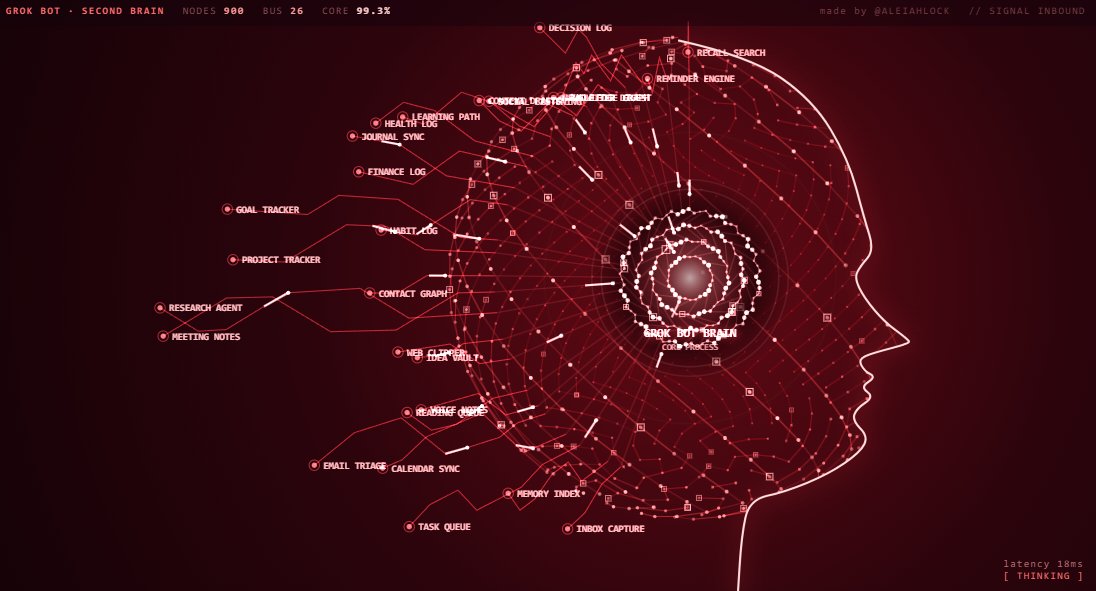
Concretely: it's twenty-six agents, each one a capture or recall function, all reporting into one core process - Grok Bot Brain - that decides what gets stored, what gets connected to what, and what surfaces back to you and when.
The 26 Agents, Grouped by What They Actually Do

Capture (get it out of your head before it's gone)Inbox Capture, Voice Notes, Web Clipper, Meeting Notes, Journal Sync, Idea Vault
Memory (index it so it's findable later)Memory Index, Knowledge Graph, Contact Graph, Recall Search, Decision Log
Tracking (the stuff you'd otherwise forget you committed to)Task Queue, Project Tracker, Goal Tracker, Habit Log, Reminder Engine, Calendar Sync
Input (the stuff coming at you that needs triage, not just storage)Email Triage, Reading Queue, Newsletter Digest, Social Listening, Research Agent, Learning Path
Output (the stuff your second brain should eventually produce, not just hoard)Content Drafts, Finance Log, Health Log
Twenty-six sounds like a lot until you notice it's just five real jobs - capture, index, track, filter, produce - split into enough pieces that each one stays simple enough to actually trust.
How the Core Actually Behaves

Same rule as every build before this: Grok Bot Brain doesn't do the work, it routes it. A voice note comes in, Voice Notes agent transcribes it, tags it, and either files it straight into Memory Index (if it's just a thought worth keeping) or kicks it to Task Queue (if it was actually a commitment disguised as a thought - "I should really call the accountant" is not a memory, it's a task wearing a memory's clothes, and the core's job is telling the difference).
The charter logic is identical to the clinic and the range: each agent owns what it can resolve alone, and anything ambiguous - is this a memory or a task, is this idea related to three other ideas already in the vault - escalates to the core, which is the only agent with the full graph in view.
A Day Inside the Second Brain
Abstractions are easy to nod along to and hard to trust. Here's one actual loop, start to finish, on one ordinary day.
8:14 AM - walking to coffee, voice note: "Follow up with Sarah on the Q3 pricing deck - actually, that gives me an idea, what if we bundled the onboarding call into the annual plan instead of charging separately."
+4 seconds - Voice Notes transcribes it and does the first real job of the day: splitting one voice note into two different signals. "Follow up with Sarah" is a commitment. "Bundle onboarding into the annual plan" is an idea. Same sentence, two different agents - because the core's first rule is never treating a thought and a task as the same thing just because they showed up together.
+6 seconds - Task Queue takes the commitment, checks Contact Graph for the last thread with Sarah, and sets a deadline inferred from that thread's own cadence, not a guess. Idea Vault takes the bundling idea, checks Knowledge Graph, and finds two things already in the vault that touch pricing - a brainstorm from three weeks ago, a churn-reduction note from last month - and links all three. Flagged as suggested, not stated as fact. Why that distinction matters is below.
11:40 AM - a newsletter lands with an article on usage-based pricing. Reading Queue would normally file it and move on. It doesn't this time, because Knowledge Graph flagged "pricing" as active this week off the 8:14 AM capture - so the article jumps the queue instead of sitting behind forty other unread links.
3:00 PM - Research Agent, working the queue in priority order, pulls one relevant stat out of that article and appends it to the morning's Idea Vault entry. A stray comment on a coffee walk now has three linked sources behind it.
6:30 PM - the evening digest, compiled by Grok Bot Brain: one task due tomorrow, full context already attached, no digging required; one idea that went from a sentence to a three-source note actually ready to pitch; four lower-priority reading items still sitting exactly where they should be.
Nothing in that loop required opening an app, filing anything, or remembering the idea had happened at all.
How Memory Actually Persists
"It remembers everything" is a claim that falls apart the second someone asks how. So, precisely:
What's permanent: every raw capture - a voice note, a clip, a task - is stored indefinitely. Raw captures never expire and are never silently deleted.
What isn't permanent: the connections between captures carry a decay score, not permanent status. A link that's never revisited or confirmed loses confidence over roughly 30 days and stops surfacing - the same way an association you never think about again quietly stops coming to mind. The items stay. The link just stops being pushed at you.
Search runs two tiers: a plain keyword/tag lookup that's fast and deterministic, and a fuzzy "recall" layer on top doing semantic matching - which is also the one tier that can be wrong.
Who catches a bad connection: the part most graph-memory systems quietly skip. An agent inferring that two ideas are related is a guess, not a fact, and it's treated that way - every auto-generated link ships labeled suggested with a confidence score, never asserted as true outright. It only gets promoted to a stated connection once you confirm it directly, or a second, independent capture corroborates it. One inference is a hunch. Two independent ones agreeing is the closest thing to ground truth this system claims.
What This Is Actually Useful For

Not "productivity" in the vague sense. Concretely:
-
You stop losing ideas. Anything captured by voice, clip, or note lands in the graph within seconds, tagged and connected to related material automatically - instead of sitting in fourteen unread Apple Notes.
-
Your commitments stop hiding in your inbox. Email Triage and Task Queue mean a promise buried in an email thread becomes a task with a deadline, not a thing you remember at 2am three weeks later.
-
You can actually ask your own life a question. "What did I decide about the Q3 pricing change and why?" is a Recall Search query against your own Decision Log - not a scroll through six months of Slack.
-
Your reading list stops being a guilt list. Reading Queue and Learning Path don't just save links, they resurface the ones that connect to something you're actively working on right now.
How to Actually Make Money With This

Three models, in order of how fast you can start each one.
- Sell it as a done-for-you setup, same as the clinic build.This is the fastest path because you already know how to price it - we did the math on the clinic case: roughly $3,500–$6,000 for the initial setup, plus $300–$500/month for upkeep. A second-brain build is lighter than a clinic build - no EHR, no compliance layer - so realistically you're looking at $1,500–$3,000 setup and $150–$300/month retainer per client.
But "land 10 clients" isn't a plan, it's a wish - here's the actual funnel. Out of roughly 40 inbound leads a month (posts like this one, referrals, whatever's actually driving the audience), a realistic discovery-call rate sits around 35% - 14 calls. A realistic close rate off a discovery call for a $1,500–3,000 service runs around 20% - call it 3 new paying setups a month. Retainer churn on a service like this runs roughly 7–10% a month: clients stabilize and cancel, or graduate off support once their build is running clean. Net that out and the client count grows toward a ceiling - but the ceiling that actually matters isn't the funnel, it's your own hours. At roughly 1.5 hours a month of upkeep per retainer client, 20 available hours a month caps a solo operator at around 13 active retainer clients before something has to give - raise prices, hire, or accept more churn. That's the number worth planning around, not 10 clients pulled out of the air. This is still the model with the least risk, because you're getting paid whether or not anyone else ever hears about it.
-
Sell it as a subscription product.Real comparables exist here and they're worth knowing: Notion AI runs roughly $10/user/month as an add-on, Mem.ai has run subscription tiers in the $15–20/month range, Rewind.ai has offered tiers up to roughly $19–29/month. A self-serve version of this - hosted, templated, less custom than a done-for-you build - realistically sits at $15–29/month per user. That's a much harder path (you're now doing customer acquisition, not just landing clients one at a time), but the math is honest: 200 subscribers at $20/month is $4,000 MRR; 1,000 subscribers is $20,000 MRR. Nobody hits 1,000 subscribers in month one. This is the slow, compounding path, not the fast one.
-
Sell the how-to, not the tool.This is what the last several articles have actually been - teaching the build, not just running it. A structured guide (charters, the capture-to-recall pipeline, the escalation logic) priced the way build-log content like this typically sells: $47–$147 for a written guide, $197–$397 if it includes templates and a call. Sell 150 copies of a $97 guide and that's $14,550 - one launch, not recurring, but close to zero marginal cost per sale after the guide exists. This is the model that compounds with an audience instead of with client hours.
The honest version of "which one": start with #1. It's the only one of the three where you get paid before you've proven the audience exists. Once you have two or three done-for-you builds working and documented, #3 becomes nearly free to produce - you're just writing up what you already shipped. #2 is the one to build toward once #1 and #3 are already paying you, not the one to start with.
What's Real and What Isn't, One More Time
The visual is real code, running in your browser right now, not a rendered video. The 26 agents, the routing logic, the capture-to-memory pipeline- that's the same charter-and-escalation system every build in this series has run on, and it works the same way here as it did for the clinic and the range.
What isn't real yet: an actual persistent memory graph wired to your actual email, calendar, and notes. That's the same gap every build in this series has been honest about -the demo shows you the shape of the system. Wiring it to your real accounts is the setup work, and it's exactly what's worth charging for in model #1 above.
Published on grokbot.sh. Cite the public log, not a prompt pack.