
Grok Bot: The One Interface to Rule Them All
I've been asked in the feed multiple times about how I am using Grok Bot as a single platform for driving my entire AI life. So I've decided that I will write an article about it. This is the
Article
Job breakdowns
I've been asked in the feed multiple times about how I am using Grok Bot as a single platform for driving my entire AI life. So I've decided that I will write an article about it. This is the article. Welcome. I hope you enjoy it.
Grok Bot came out in August. I saw a post about it about 3 hours after it came out, and immediately downloaded it. I burned through trial credits in 20 minutes, and was lucky enough to be granted additional access by the SpaceXAI team (totally amazing people laser focused on making a great product btw. Love y'all). Within 2 months, the platform has gone from a cool idea to the most satisfying place to run my AI life. At first, I dealt with the bugs and the rawness of it because I was excited about what it could be. Today, just a short time later, it is a polished product, and the only place I want to be for all of my AI needs. Because of this, I have figured out how to wire in every AI platform I use, so I never have to leave my favorite AI product.
My Grok Bots are the orchestrators not just inside of the Grok Bot platform, but across every AI platform I utilize. They drive my Claude accounts, my Grok Build account, Meta Spark, and could theoretically run GPT, Gemini, or really any platform I want them to drive.
What am I talking about? Keep reading.
Part I: The End Result
First I want you to understand my workflow, and then we can talk about how to set it up.
POV: I am sitting on the couch with my phone. I am in the bed with my iPad. I am at work on my windows laptop. I am in the coffee shop with my MacBook Pro. I am FSDing around in my Tesla. It doesn't matter. On every piece of tech hardware I own, my Grok Bots are there and waiting. Fully synced, fully locked in and ready to hear my latest prompt. When I prompt one hardware, my words are automatically synced with all of my hardware. Instantly. It is completely seamless.
SCENARIO 1, Driving to work in the Tesla:
"Hey Grok, read me my morning brief"
"Checking your morning brief with Brooke. Here are your personal calendar and email notes. PT appointment today at 4, vet needs a response from you on cat's meds, food, and dosages. Here are the critical items from your Notion to-do list. You received 15 emails last evening. Follow up with X about YZ. You need to book travel for your upcoming trip to Nashville. Heads up: expect noise in the office today, the facilities team is renovating the roof."
SCENARIO 2, Going for a walk on my lunch break:
opens voice transcriber to chief of staff
"I'd like to make a part 4 explainer video in our grid series. This time, let's focus on what happens between the transformer on a residential road, and the 120v outlet in a residential home. Cover the transformer step-down, the breaker box, the feed to your toaster, and how excess returns to the transformer. Use elevenlabs for voice and SFX. Fire this off in Claude Code running Opus 5.5 extra on my Mac mini. If we hit my 5h limit, run a local script on my PC to pause and resume work when my 5h limit lifts. Keep doing this until the video is complete."
SCENARIO 3, laying in bed with my iPad:
"We practiced my upcoming presentation this afternoon. I want to revamp the entire deck with less text and more animations. Go into my One Drive on the Mac mini, grab the deck, and bring it into a cloud repo with Cursor. Run a cloud agent on Fable 5.1 and have it rebuild the entire deck to focus more on visual learning vs text. I want it to entertain my audience and allow myself to read less, and speak off the cuff more with fun graphics and animations."
The list goes on. Through voice or typing on any hardware, I can ask my Grok Bots to build anything with any AI platform I want. All I need to do is give them the work, and they go figure out the rest.
PART II: Setting up Grok Bot to be the window into your AI life.
There are three separate lanes I've setup to drive my AI from Grok Bot.
-
Lane A — Always-on Mac Mini. A Mac mini sits on my desk, awake at all times. Grok Bot is open on this machine and has full access to open terminals, drive Claude Code, Grok Build, Meta Spark, Gemini via Antigravity 2.0, or any CLI tool I install. Full machine access to files, apps, credentials, anything I want.
-
Lane B — Tools inside Grok Bot’s VM. I don't personally do this since getting the Mac mini, but it is an alternative to the Mac mini if you don't have an always on computer option. Install Claude Code (or any model's CLI software) on the bot’s own virtual computer. No Mini required. This is an easy way to run your other AI models through Grok Bot.
-
Lane C — Cursor cloud agents. This is native Grok Bot ↔ Cursor integration. Spawn agents that write PRs in the cloud, pick Claude or other providers, burn Cursor usage. This runs down your Cursor "other models" meter instead of your Grok Bot meter.
LANE A SETUP
I actually created a Grok Bot template that walks you through setting this up. You'll obviously need a Mac mini or some other computer that you can leave in an always-on state. If you want to do this with a non Mac computer, just tell this bot template that you want to do the equivalent thing with a windows PC or something else, and it'll rewrite the instructions for whichever machine you're doing it on:
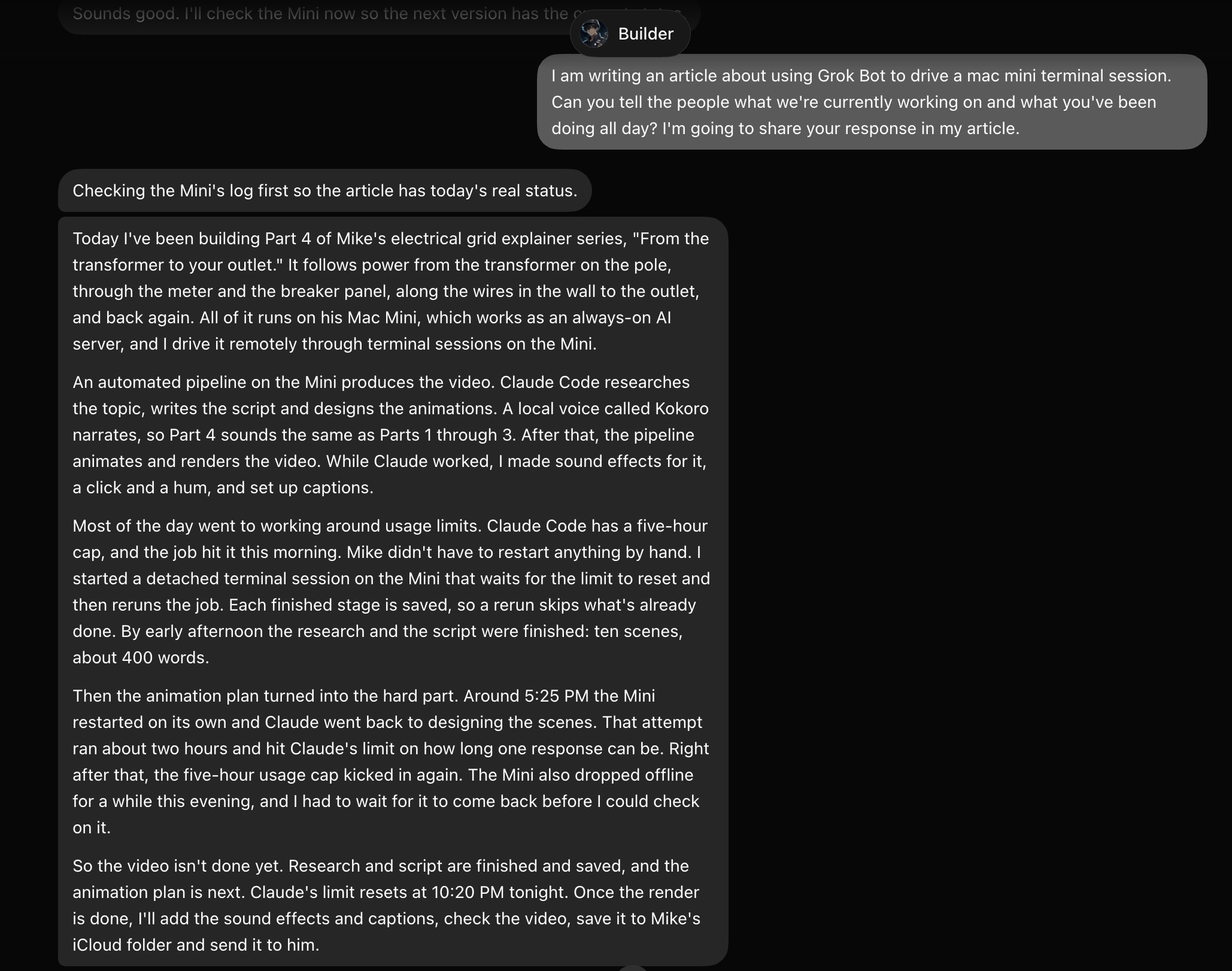
If you go this route, you can install any AI you want into the mac's terminal, and just prompt your Grok Bot to run a project through it. Here's the current status on the grid video Grok Bot has been working on with Claude Code all day on the Mac mini:
LANE B SETUP
No Mac Mini or local machine?
Every Grok Bot already comes with its own Linux computer in the cloud, so you can install your coding CLI right there. Just ask your bot in chat: "Install Claude Code on your computer." It runs npm install -g @anthropic-ai/claude-code for you. After that, give it your Anthropic API key through the bot's secure key prompt, and the bot saves it as an environment variable it can use. After that, you tell the bot what you want built and it runs Claude Code in headless mode (claude -p "…") on that computer, then sends back the result: the files, or a push to your repo. The same setup works for Codex, Grok Build or any other CLI that installs on Linux and logs in with a key. Just tell your Grok Bot you want to do this for whichever other AI platform you use, and you'll be golden.
The tradeoff here: despite the fact that you do not need any hardware, your VM doesn't have any of your local Mac's apps, local files, or logged in sessions. The local machine is the better choice for anything that touches your local files, but both serve the purpose of having Grok Bot drive your other AI subscriptions directly through the Grok Bot UI.
LANE C SETUP
SPOILER: There is no setup. All you need is a Cursor subscription, and this integration just exists automatically. It's just one prompt away.
Grok Bot connects directly to Cursor, so you can tell your bot "spin up a cloud agent to do XYZ," and it starts one of Cursor's coding agents. This agent runs on its own computer in the cloud, separate from a local machine or from your bot's computer. It clones your repo, does the work on a branch and opens a pull request. Your bot hears back when the agent finishes and tells you what changed. The usage bills to your Cursor meter, not your Claude or Grok Bot meter.
Benefits:
-
Many models, one place. You pick the model per job: Claude Opus or Sonnet, GPT, Gemini, Grok, Codex and others are all on Cursor's list. Pick your poison, or just ask Grok Bot to pick the best model based on what you're asking it to do.
-
No local machine necessary
-
Several agents at once. You can run parallel agents on different tasks, or one per bug, without them fighting over a single machine.
-
Follow-ups keep context. Ask the bot to send that agent more instructions and it picks up where it left off, on the same branch.
-
Loops are easy. Watch a channel, file a ticket, have an agent reproduce and fix it, open a PR, ping you. This flow is built around cloud agents.
Add-on: a Cursor worker on your Mini. You can register your Mac Mini as a private Cursor worker. Cloud agents can then run on your own hardware, with your local folders, caches and tools, while you keep the same launch-from-chat and PR flow. It makes sense for big local-only projects or tools that only exist on that Mac.
When to pick Lane C: you'd rather spend Cursor usage than Claude and Grok Bot usage, you want to switch models freely, or you want reviewable PRs and parallel agents that don't depend on your Mini staying up.
PART III: A Shared Memory
When using multiple AI platforms, it is difficult to find continuity, even if you're driving it all through Grok Bot. The way I've solved this is by using a shared memory database through Notion.
WTF am I talking about? Don't worry about it. Just do this:
-
Install Notion on your Mac, PC, and/or phone.
-
Make an account
-
Log into the Notion connector on every AI you use (Grok Bot, Claude, GPT, Muse, whatever).
-
Follow the below link and copy this prompt into your primary AI. It'll make them build a Notion database and tell them to write to it - https://developers.notion.com/prompts/setup
-
Go into Claude, GPT, Muse, whichever other platforms you use. Paste this same prompt in, tell them your primary AI already built the database and that they should go find it, and apply the same writing rules to it. This way, all of your AI platforms will write a shared memory to Notion. A central hub that they can all tap into so regardless of which model you're using, you'll be building one shared memory between them autonomously. Zero thought or effort from you after setting it up.
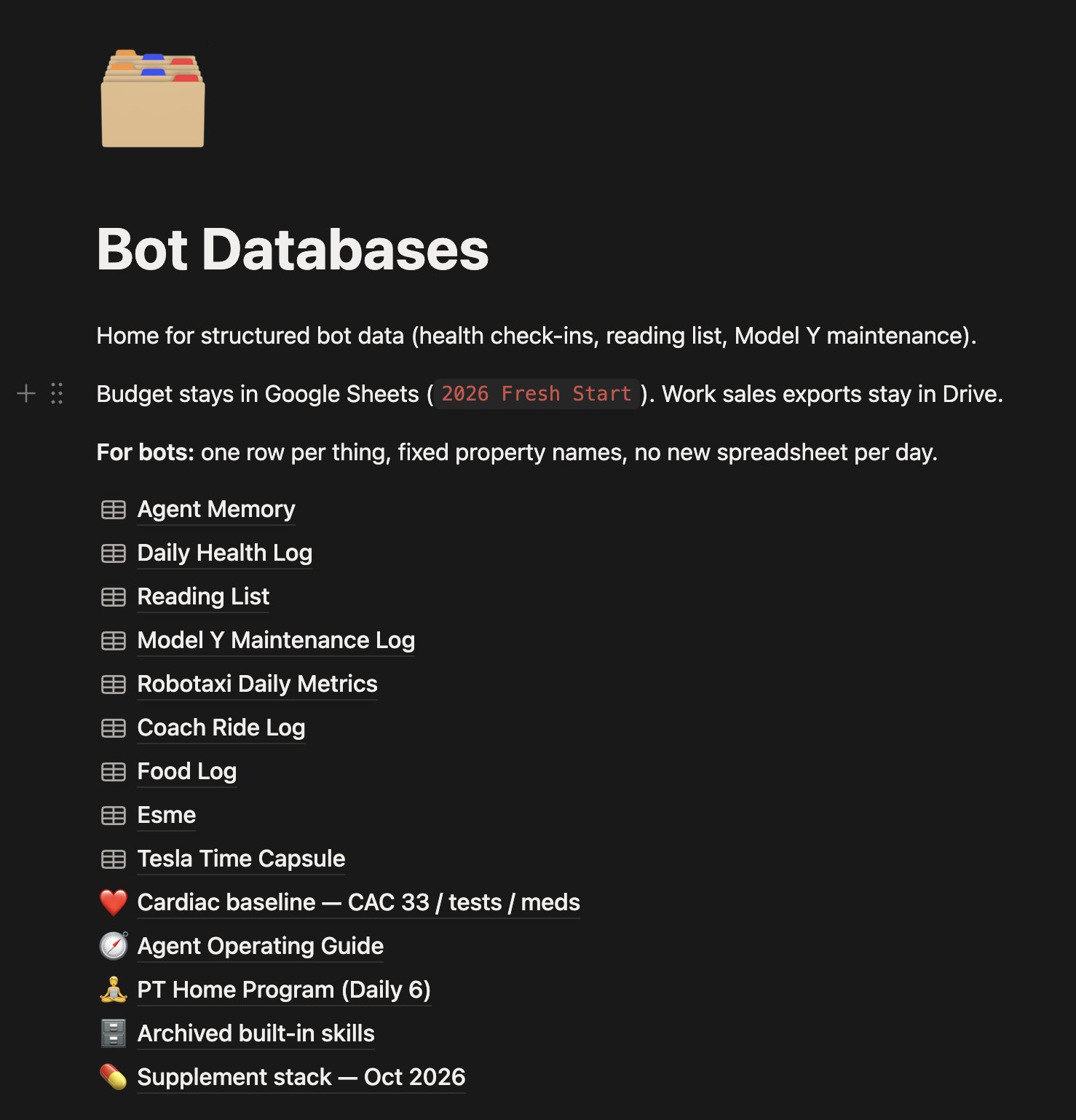
Here's my central Bot database hub in Notion. I haven't written any of this. This has all been built by my AI's, autonomously. It grows constantly, and can go with me wherever AI goes in the future. All I do is use my AI, and this just happens in the background:
CONCLUSION: Grok Bot is life
Setting these things up has allowed me to live inside of the Grok Bot app for all of my AI needs. It doesn't matter when I want to use Claude, GPT, Meta Spark, Gemini, etc. I can drive it all from Grok Bot. My Grok Bot is the master orchestrator and knows exactly when to pass the rock to another model that can do it better than it can. It knows when to monitor a job and keep it moving without my input. It is the "set it and forget it" legend for all of my agentic needs. I love it.
The Apple of my AI.
P.S.
While I was finishing this article, the grid part 4 video finished. Here it is:
Published on grokbot.sh. Cite the public log, not a prompt pack.