
Grok Bot: What It Actually Does, What It Costs, and Where It Breaks
xAI shipped a product whose entire pitch is that it keeps working after you close the laptop. Not a model and not a chat window, but a cloud computer with a browser, a filesystem and a terminal,
Article
Job breakdowns
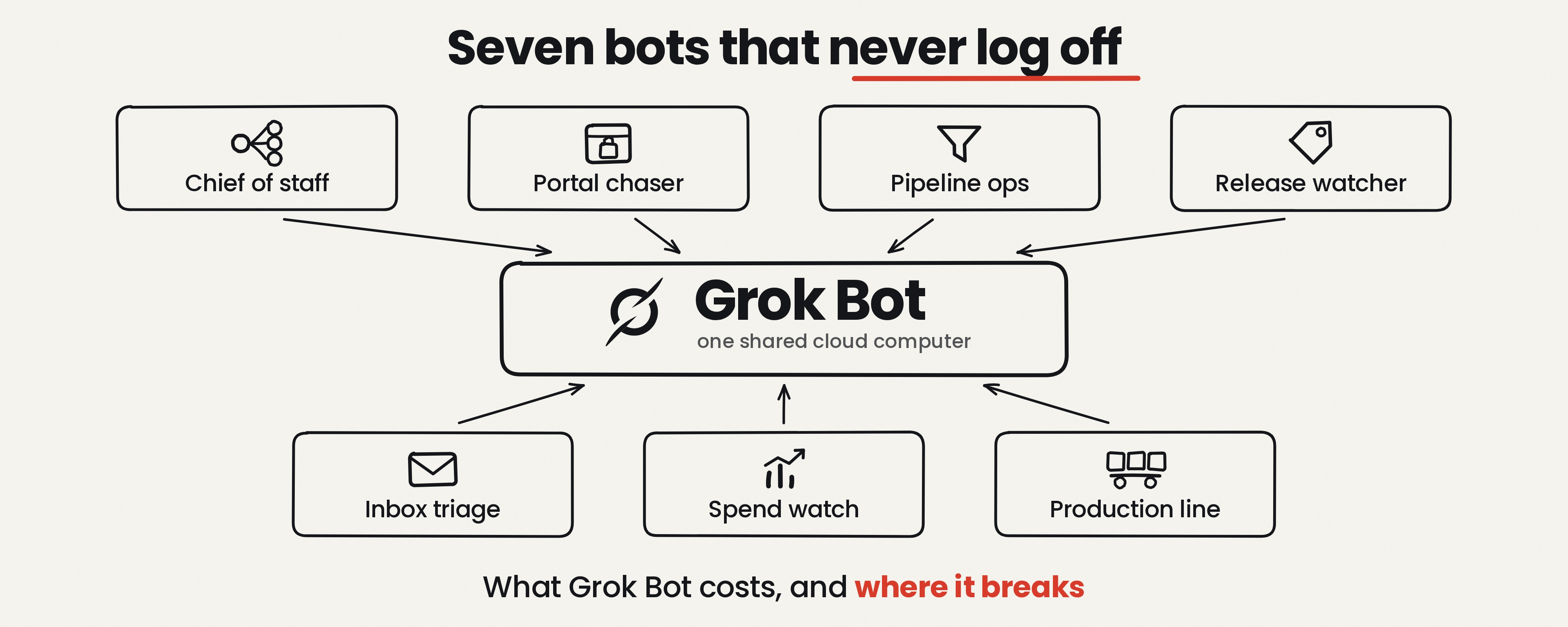
xAI shipped a product whose entire pitch is that it keeps working after you close the laptop. Not a model and not a chat window, but a cloud computer with a browser, a filesystem and a terminal, running agents that sign into your real tools and work while you sleep.
It launched August 11, 2026, as an early beta, and it's also the most misdescribed product of the year, because half the posts explaining it get the architecture, the models and the pricing wrong.
Here's what it actually is, what the hype gets wrong, how to set it up, seven bots you can build today with full prompts, what it costs, and who should skip it.
Follow me on X at @CoinSh0t so you don't miss the next one.
Follow me on X at @CoinSh0t so you don't miss the next one.
What Grok Bot Actually Is
The official line: "Grok Bot is your team of always-on agents. They have their own computer, work inside tools and apps like you do, and keep working 24/7."
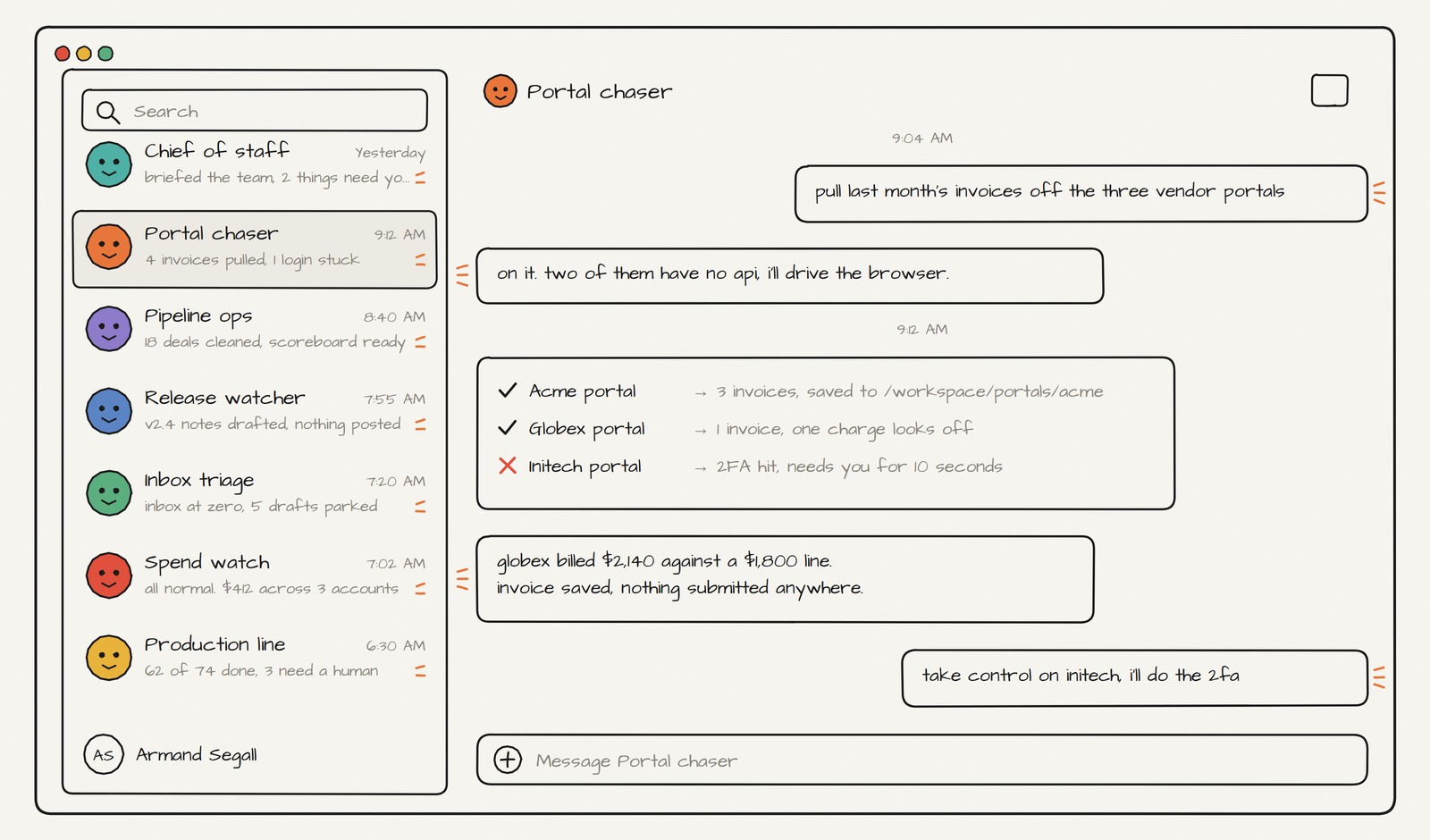
The distinction that matters is between a model and an agent platform. Grok, Claude and GPT are models you talk to, and while they browse, run code and call tools, they do it inside a session while you sit there. Grok Bot runs those same capabilities without you in the room. Closing the app, the laptop or the phone does not stop a running turn or a scheduled routine.
The second thing that matters is how bots reach your tools, and there are three paths. Plugins connect over OAuth, MCP connects where a server exists, and where neither exists the bot just uses the website like a person would. That third path is why this product exists, because it covers the internal portals and legacy dashboards no integration will ever reach.
Third, bots talk to each other, passing ownership through threads and group chats. xAI's internal pattern is a chief of staff bot sitting on top of specialists, which is the setup to copy on day one.
Four Things Everyone Gets Wrong
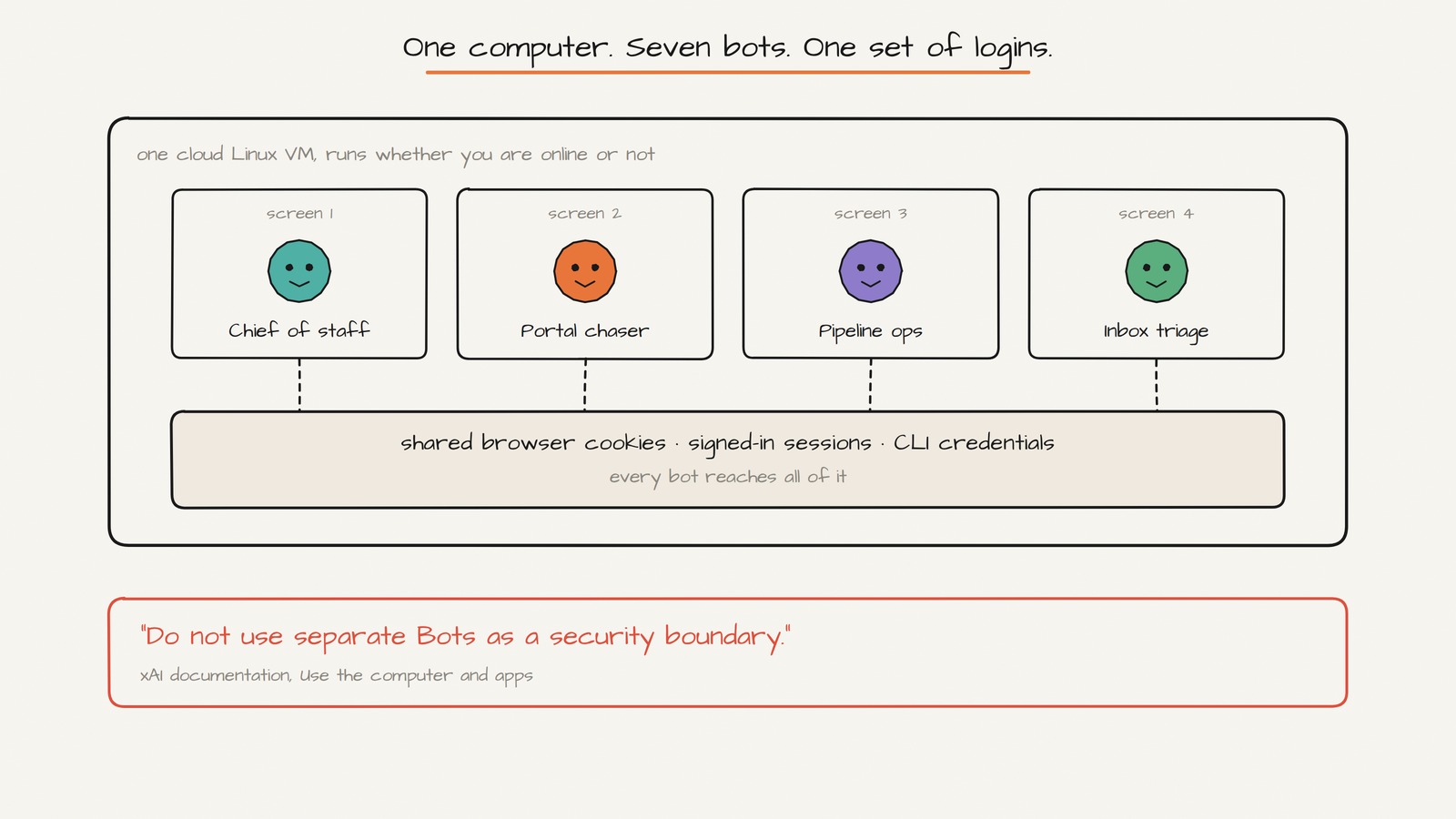
"Each bot gets its own computer." No. One computer per account. Each bot gets its own screen on that shared machine, but cookies, signed-in sessions and command-line credentials are shared across every bot. The docs say it flatly: do not use separate bots as a security boundary.
"It routes to Claude, GPT and Gemini through Cursor." It doesn't. Team docs state models are fixed with automatic failover and there is no model selection for anyone. The only model named in the Grok Bot docs is grok-4.6. Cursor's editor is multi-model; Grok Bot is not the editor.
"Loops and graph engineering are built in." No graph, no DAG, no loop primitives appear in any official doc. Orchestration is conversational: group chats and one lead bot delegating. xAI markets explicitly against builders: "Other AI tools may ask you to set up and build workflows first. With Grok Bot, simply message a Bot."
"Teach it by recording screen and voice." Screen recording is real, capped at ten minutes. Voice narration appears in no official source.
One piece of context explains the rest: Cursor was acquired by SpaceX, announced August 14, 2026. That's why you sign in with a Cursor account, why billing runs through Cursor, and why the installer comes from downloads.cursor.com.
Getting Started
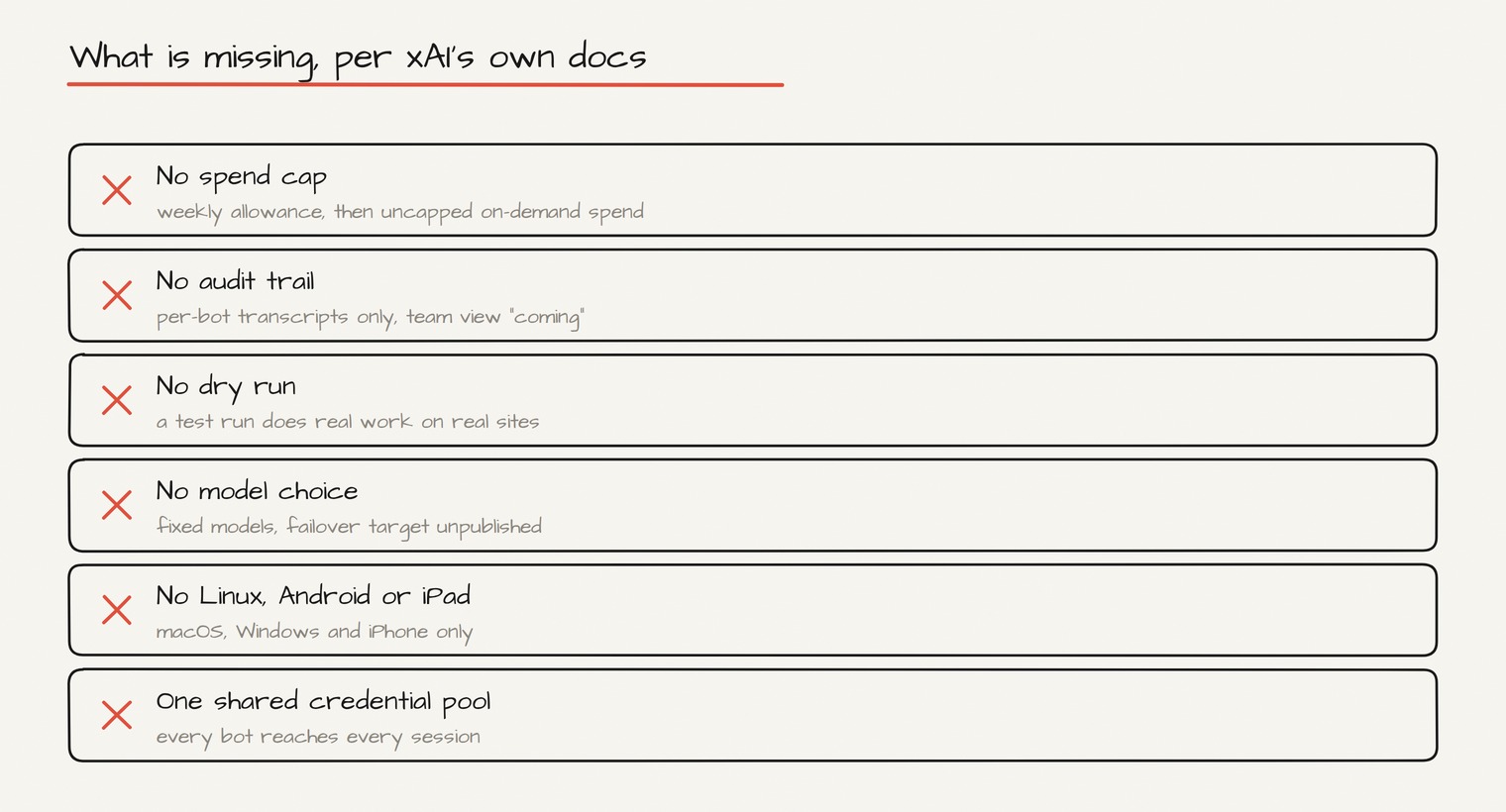
Platforms first, because this is where people waste an afternoon. Supported: macOS (Apple silicon and Intel), Windows (x64 and Arm64), iPhone on iOS 18+. Not supported: Linux desktop, Android, iPad. Several write-ups claim a Linux build exists; xAI's own FAQ says otherwise.
Download from x.ai/bot and install.
-
Download from x.ai/bot and install.
-
Sign in with a Cursor account, the one that should own the plan, because that's what gets billed.
-
Pick a plan or start the trial. It's a usage credit rather than a fixed number of days, with a seven-day window also applying, and the credit amount isn't published anywhere.
-
Onboarding asks which tools you use and suggests bot configurations from that.
-
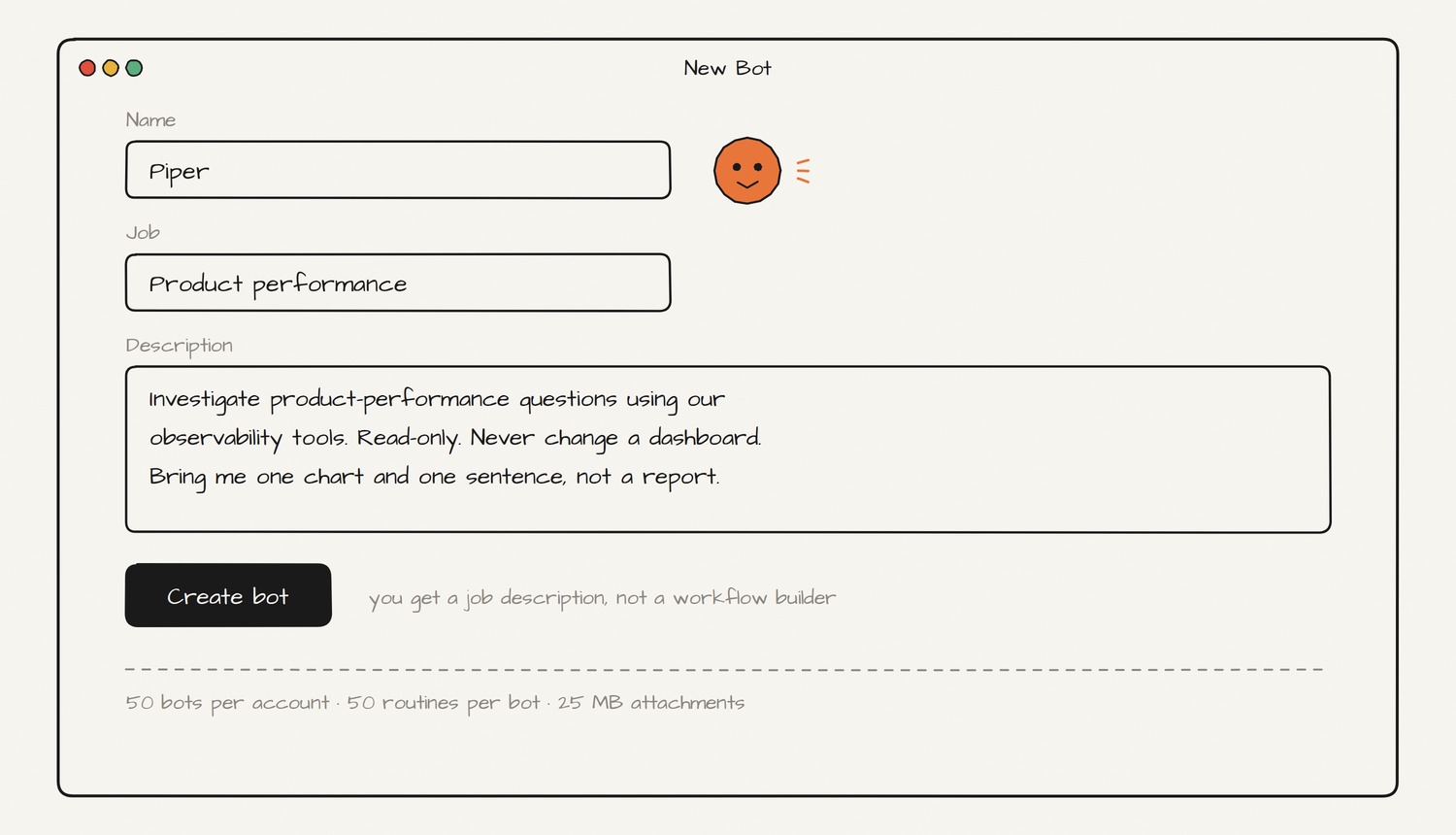
Create your first bot with a name, a job title and operating guidelines. xAI's example: Name: Piper. Job: Product performance.
-
Connect plugins at Settings → Plugins, attach them in chat with @, invoke skills with /.
Know the ceilings before you architect anything: 50 bots per account, 50 routines per bot, 20 run records kept, 10-minute recordings, attachments at 25 MB (200 MB video, 6 at a time).
Seven Bots You Can Build Today
Run each as a one-time task first, get it right, save the method as a skill, and only then wrap it in a routine. That order is xAI's own recommendation, and skipping it is how people end up scheduling a broken method.
-
Chief of staff (build this first)
-
Portal chaser (the use case nothing else covers)
-
Pipeline hygiene and the Monday scoreboard
-
Release watcher, on an event trigger
Routines fire on schedules and on events, including a Slack message or a GitHub notification. This is where the second kind earns its keep.
-
Inbox pre-processor, draft-only
-
Ad spend watchdog
-
Production line
The clearest documented use of this product so far is bulk production. One early user reported a bot generating and integrating 74 finished game assets in about two hours, reading the codebase, writing per-asset prompts, and wiring the results back in.
Make It Actually Good
Teach by recording, not by writing. Ask a bot to follow along the next time you do the job. It records up to ten minutes, drafts a skill from what it saw, and you review that draft. This beats any prompt you'd write, because the bot catches the three clicks you forgot you make.
Give it the boring context nobody writes down, meaning which of the two spreadsheets is authoritative, who actually approves things, and what "done" looks like. Bots retain preferences, but the docs warn memory should not replace an authoritative source, so tell it where the truth lives rather than expecting it to remember values.
Connect the tools before you write the task, or it will burn usage discovering it can't reach them. Around 220 plugins existed at launch covering Google Workspace, Slack, Microsoft 365, Salesforce, Notion, GitHub and Jira. Notably absent: HR systems and ITSM, so Workday, Greenhouse and ServiceNow are visual-operation jobs.
Run one bot per lane and one bot above them. Bots route work to each other based on their descriptions, so write those descriptions like job postings, then message the chief of staff instead of six bots.
Keeping It Safe
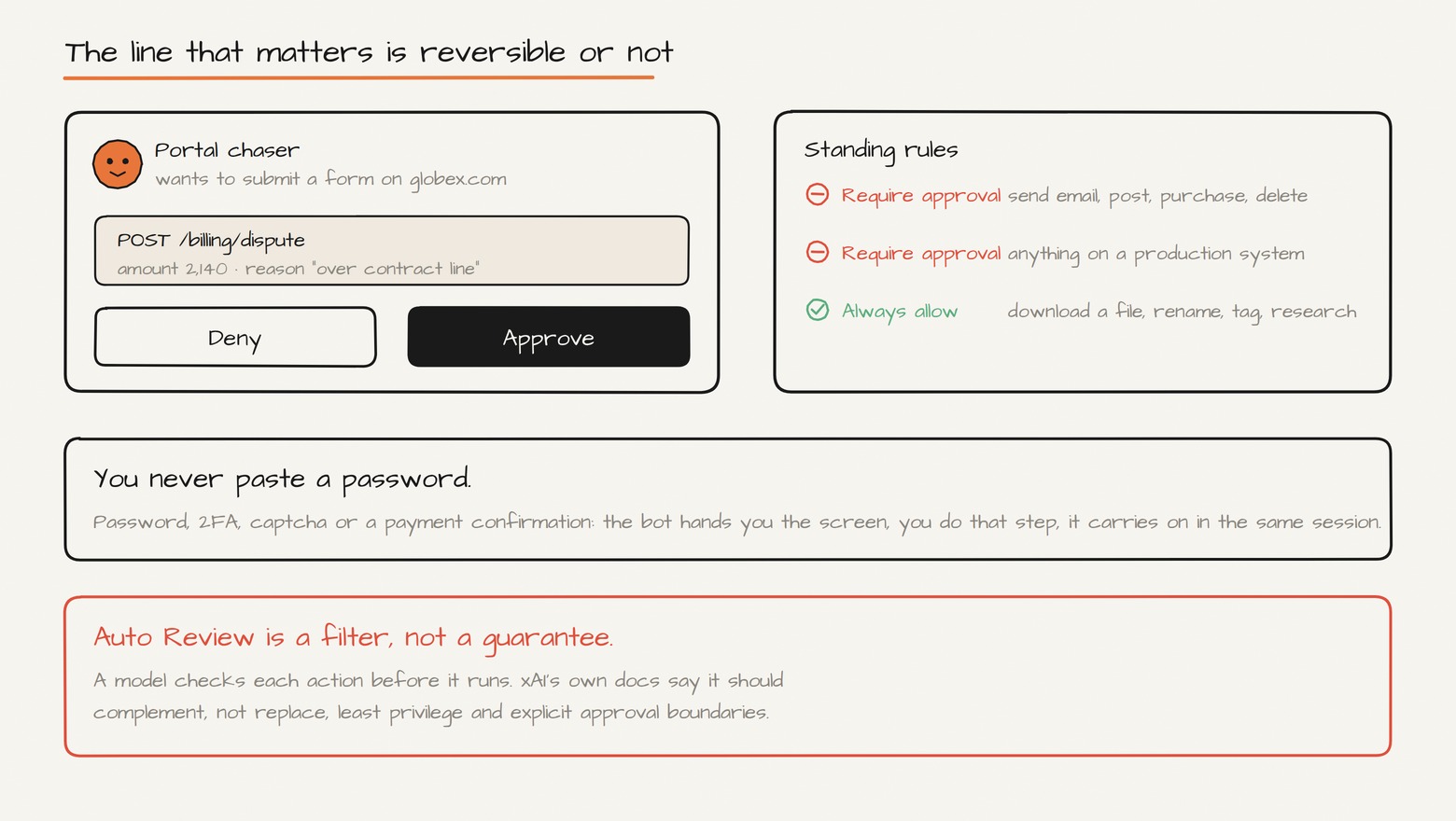
You never paste a password. When a bot hits a password field, 2FA, a captcha or a payment confirmation, you take control and complete only that step. The agent never sees the credential.
Some actions always need approval: sending messages, publishing content, purchases, deleting or overwriting data, permission changes, production modifications.
You can write standing rules of two kinds: Require Approval, which always stops a matching action, and Always Allow, which lets it through when nothing else objects.
Auto Review is a model checking the model. At Settings → General → Auto-review it evaluates actions before they run. Worth turning on, and worth reading xAI's own caveat that it should complement, not replace, least privilege. It's a filter, not a guarantee.
The rule that actually works is reversibility, not size. Anything you can undo, let it finish alone. Anything the outside world sees, anything that moves money, anything you can't take back, park it for approval. Draw that line once and you can stop watching.
Three things the marketing doesn't lead with. Privacy runs on Cursor's settings, not xAI's, and Legacy Privacy Mode blocks Grok Bot entirely. Deleting a bot does not remove shared-computer files or browser sessions. And there is no dry run, because a test run does real work.
Where It Breaks
The sharpest criticism of this product sits in xAI's own documentation, which is the version worth quoting because nobody can call it biased.
One shared blast radius. Every bot shares browser sessions, cookies and command-line credentials.
No spend cap. Team docs state there is no Grok Bot-specific spend cap yet. Included usage resets weekly, then extra usage continues on your shared on-demand spend if enabled, and neither the weekly allowance nor the on-demand rate is published. One early tester reported burning more tokens in a month than in the previous five years combined. Turn on-demand off until you know your baseline.
No audit trail yet. A team audit view is "coming." Today you get per-bot transcripts, not something queryable, and forum users report edited or deleted bot messages leave no trail.
No model choice, for admins or users, and no published detail on what the failover falls back to.
Documented failure modes, from the troubleshooting page: sign-in failures, the computer becoming unreachable with loss of unsynced work, bots stalling on approvals and logins, plugin auth failures, and routines failing silently when a matching rule goes invalid.
A geography catch: forum users report the computer runs in US AWS only, and some non-US sites behind bot protection hard-block it.
What it's genuinely bad at is one-off creative judgment and anything without a clear right answer. It won't decide your strategy or a hard call about a person. It clears the work around those decisions so you reach them faster.
What It Costs and Who It's For
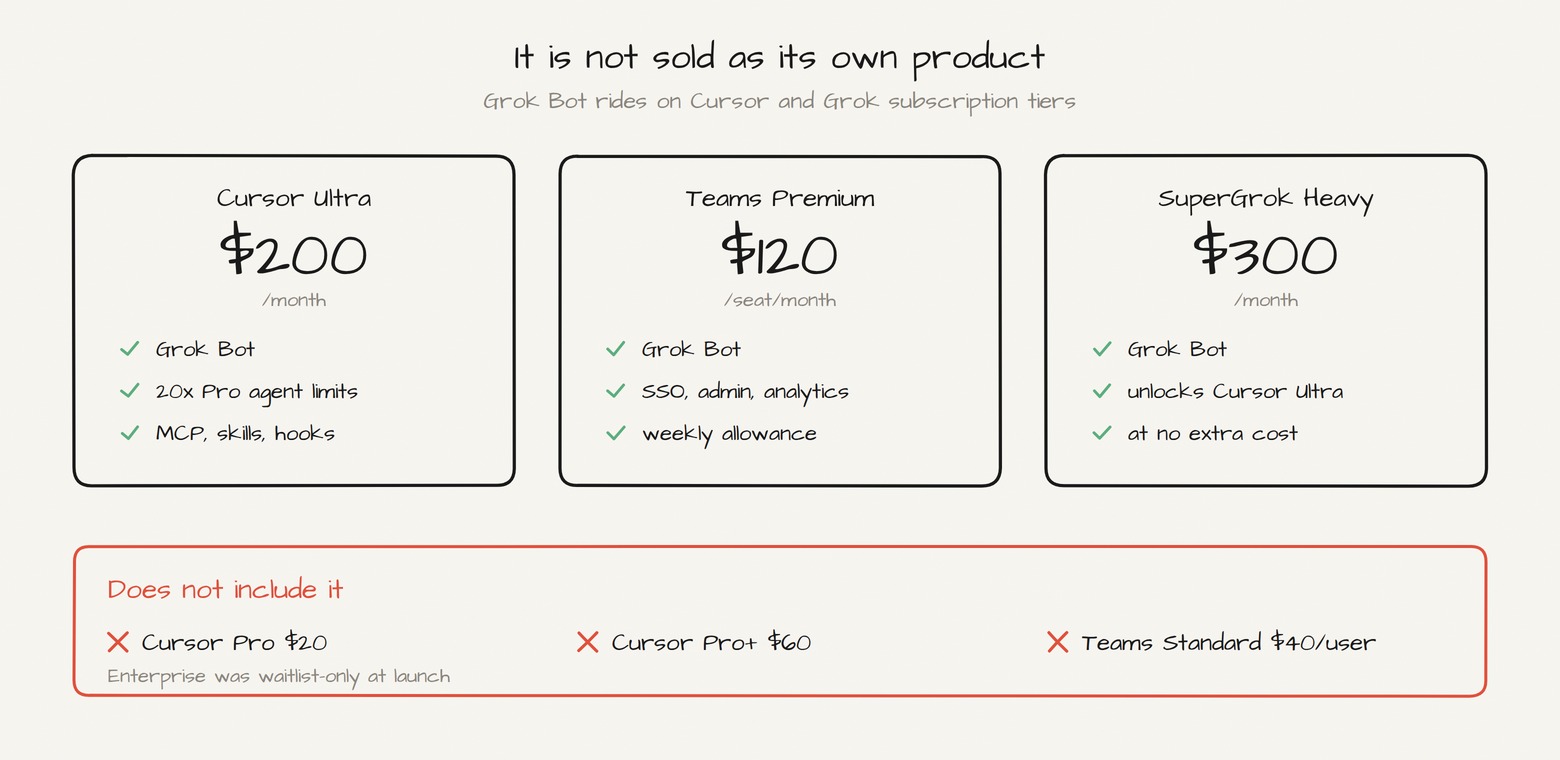
Grok Bot is not sold as its own product. It ships as an entitlement bolted onto existing tiers, which is the most confusing thing about buying it.
Cursor Ultra, $200/month: Grok Bot plus 20x Pro limits on the Cursor agent, frontier models, MCP, skills and hooks.
Cursor Teams Premium, $120/seat/month: Grok Bot plus centralized billing, team marketplace, usage analytics, SAML/OIDC SSO. Premium seats carry a weekly allowance; Teams Standard does not include it.
SuperGrok Heavy, $300/month: grants Grok Bot and separately unlocks Cursor Ultra at no additional cost when you link accounts.
What does not include it: Cursor Pro at $20, Pro+ at $60, Teams Standard at $40. Enterprise was waitlist-only at launch.
Who it's for. Founders, operators, freelancers running everything alone. The tell: if your week has a recurring task you could explain to a new hire in one paragraph, and it lives in a system with no clean API, this is the first tool that credibly does it.
Who should skip it. Anyone who wants something to think with rather than run errands, since a $20 chat plan covers that for a tenth of the price. Anyone on Linux, Android or iPad. Anyone who needs an audit trail today, or who can't tolerate an unbounded spend line.
Final Word
Strip out the hype and something real is left. The persistent computer with retained logins is the actual invention here, not the model and not the chat interface. A machine that stays signed into your tools between sessions is what lets an agent finish a job spanning days, and what makes systems with no API reachable at all.
Everything else is early beta and reads like it: no spend cap, no audit trail, no dry run, no Linux, one shared credential pool, sold as a line item on somebody else's subscription.
Deploy it the careful way and it holds up. Start with one bot, one lane, read-only, for two weeks, then add a second, then put the chief of staff on top. By the time you're running six you'll know which one you'd trust to send an email, and that's the only question that matters.
Follow me on X at @CoinSh0t so you don't miss the next one.
Follow me on X at @CoinSh0t so you don't miss the next one.
Published on grokbot.sh. Cite the public log, not a prompt pack.