
I asked Grok Bot to build its own Mail app. It took less than 30 minutes.
Yesterday, Grok Bot got its own email address. So I sent my bot one message: build me an inbox like Gmail or Outlook. 23 minutes later, it was live. This is it: I did not write a single line of
Article
Job breakdowns
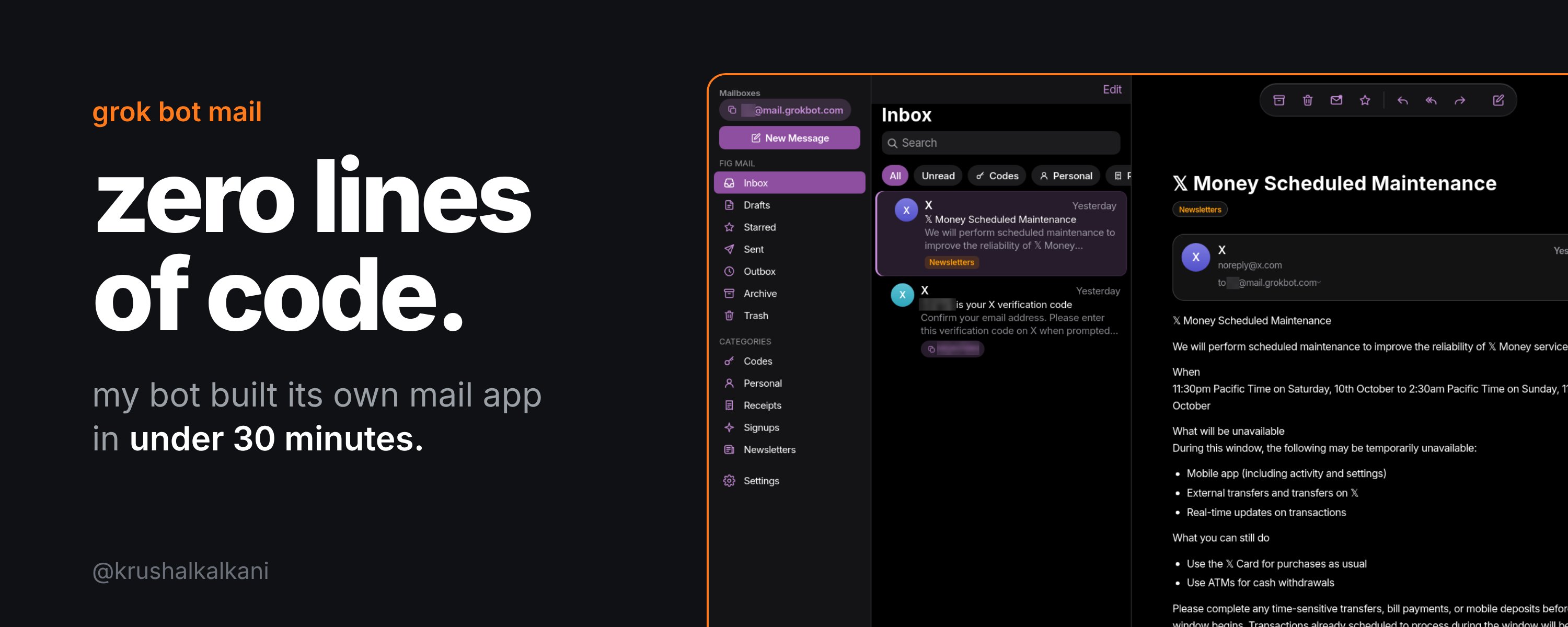
Yesterday, Grok Bot got its own email address.
So I sent my bot one message: build me an inbox like Gmail or Outlook.
23 minutes later, it was live. This is it:
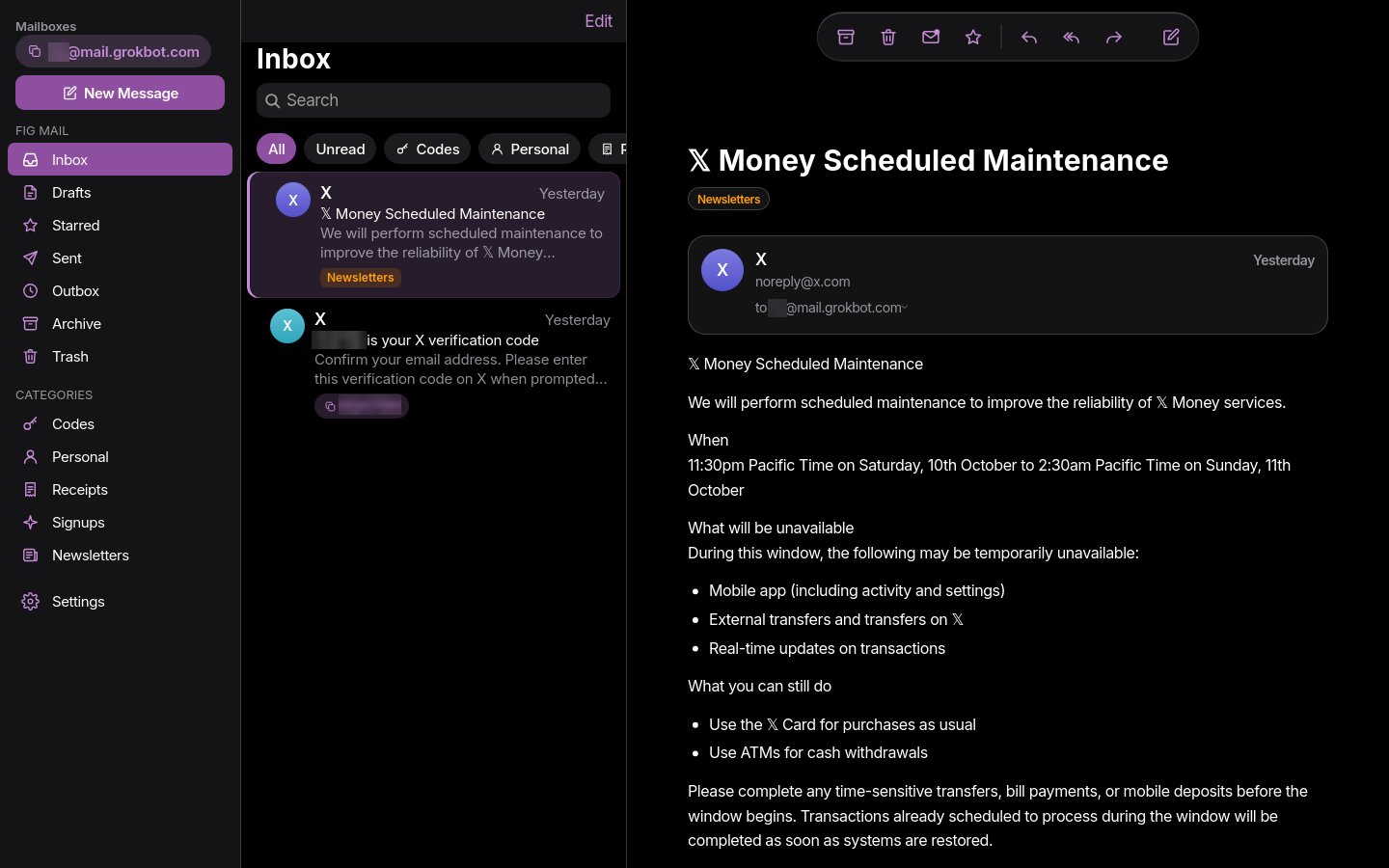
I did not write a single line of code. Grok Bot wrote all of it, and it went live on Vercel.
I asked for Gmail. It built me something that feels like Apple Mail.
I call it Fig Mail.
In this article:
-
What Grok Bot email is
-
Why your bot needs its own inbox
-
How to claim yours with one message
-
What my Mail app can do
-
What broke while building it
-
The prompt to build your own
What is Grok Bot email?
On October 9, the @bot account announced that Grok Bot now has its own email.
Your bot can get an address that ends in @mail.grokbot.com. It is a real inbox. It can get email and send email.
xAI says your bot can use it to:
-
sign up for services
-
contact businesses for you
-
schedule time with someone
Before this, Grok Bot had no address of its own. It worked inside your own Gmail or Outlook.
Why your bot needs its own inbox
Think of it like a work phone number for your bot.
Here is how I use mine:
-
Shopping. Order updates, returns, and receipts go to one inbox. The bot can search all of it.
-
Login codes. When a site sends me a code, I do not open Gmail. I just ask my bot for the code. Fig Mail also shows the code right on the email, with a copy button.
-
Replies. When I reply from Fig Mail, the bot sends it from its own address.
The best part: my personal Gmail stays clean. Anything the bot signs up for lands in the bot's inbox, not mine.
How to claim yours (one message)
No settings page. No form. You just ask.
-
Open Grok Bot and go to your main bot.
-
Type: claim your email address. You can also tag @bot on X.
-
Ask for the name you want. The bot checks if it is free. Mine suggested a few free names, and I picked one.
-
The bot sets up the inbox and sends a short test email.
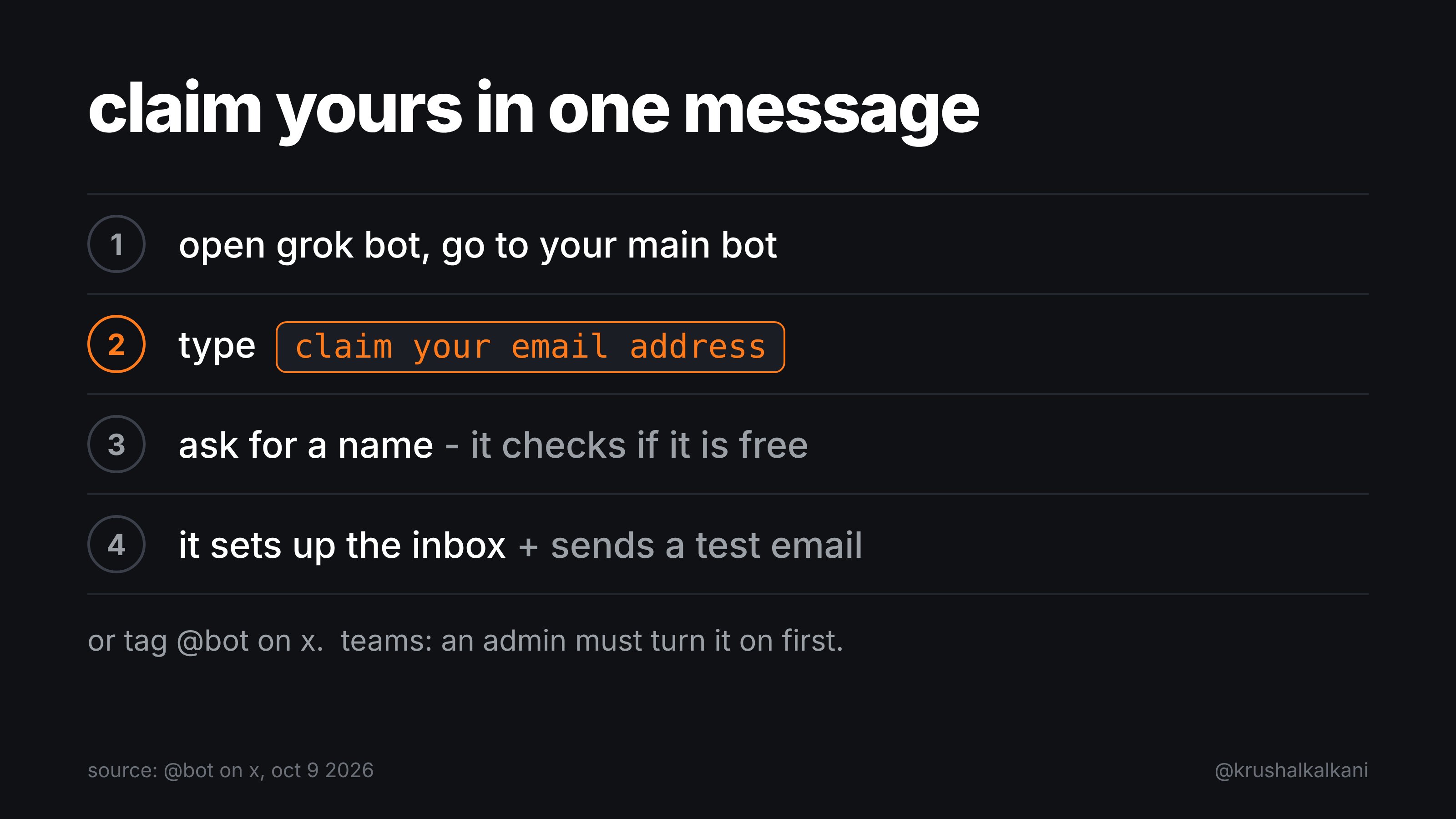
Using a team account? An admin has to turn it on first.
Two quick tips:
-
Pick a short name. You will type it on sign-up forms a lot.
-
Keep your address private. If people can email your bot, they can send it text that tries to trick it.
Why I built my own Mail app
The bot's inbox lives inside the bot chat. I wanted to see it like a normal email app, like Gmail or Outlook, with folders, search, and one tap to copy a code.
On X, @poteto replied that if you really want an inbox app for it, you can build one. So I did. Well, my bot did.
What Fig Mail can do
I asked for "something like Gmail." Grok Bot made the design choices on its own. Here is what it built:
-
Two layouts: three panels on a laptop, and a clean phone layout I can add to my Home Screen
-
iPhone-style design: large titles, frosted glass, and automatic dark mode
-
Mailboxes: Inbox, Drafts, Starred, Sent, Outbox, Archive, Trash
-
Smart categories with filter chips: Codes, Personal, Receipts, Signups, Newsletters
-
Login codes found automatically, with a Copy code button and a code chip on the email
-
Search with filters like from:, has:code, and is:unread
-
Swipe to archive or mark read, and pull to refresh
-
Write, reply, reply all, forward, plus a quick reply box
-
Drafts saved automatically
-
Select many emails at once to archive, delete, or star
-
Trash with undo
-
Remote images blocked until I tap, so senders cannot track me
-
Auto refresh every 5 seconds, with a new-mail banner
-
Keyboard shortcuts on desktop
-
Password login that keeps me signed in for 30 days
How it works (the simple version)
-
Mail lands in my bot's inbox.
-
When new mail arrives, a Grok Bot routine wakes up. It reads the email and copies it into a database.
-
Fig Mail shows the mail from that database and refreshes every 5 seconds. It is a website on Vercel.
-
When I send an email, it waits in the Outbox as "pending." On the bot's next sync, it goes out from the bot's address and moves to Sent. So sending is not instant.
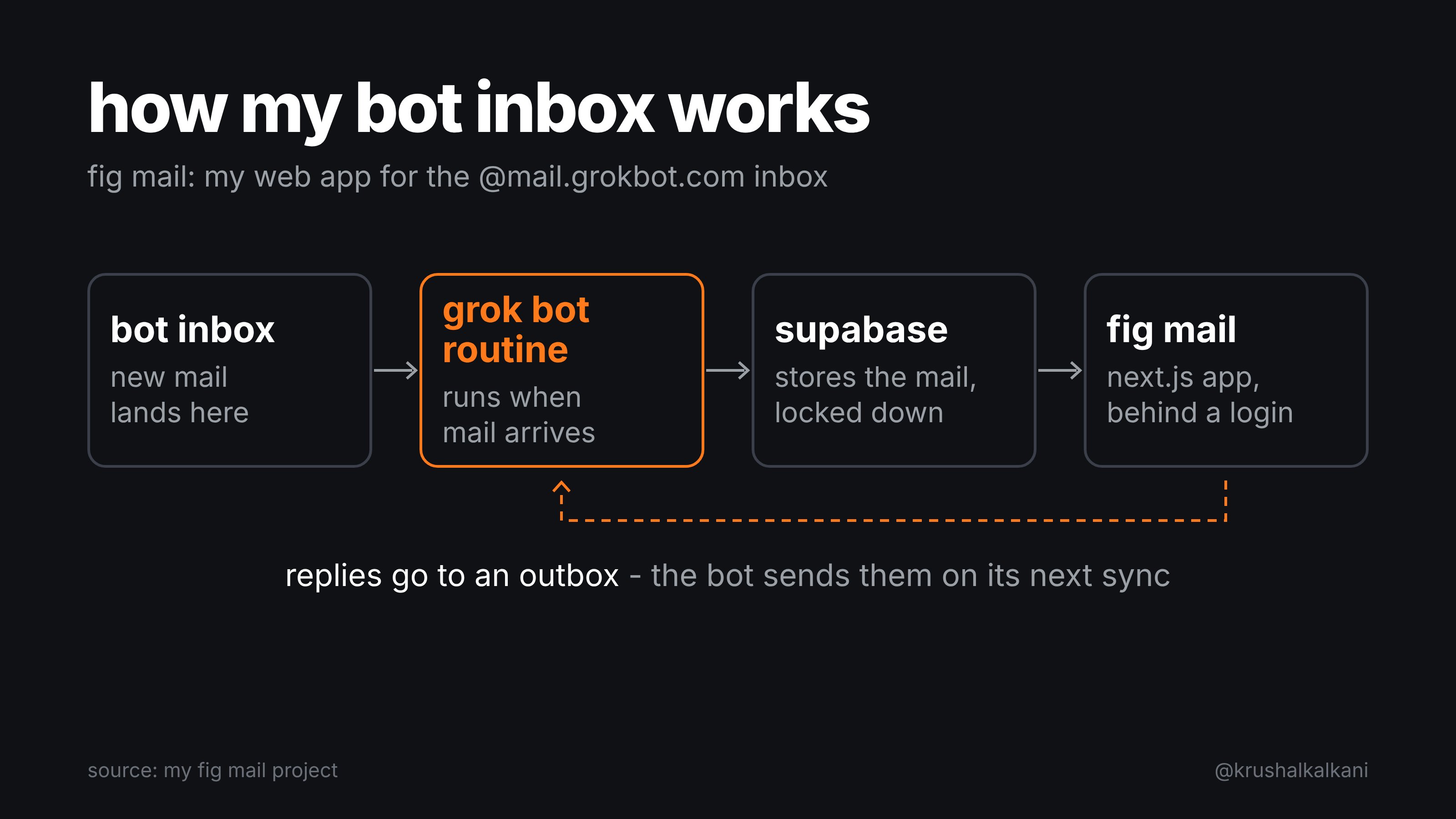
Three words, made simple:
-
Database (Supabase): the place where the emails are saved.
-
Routine: a task your bot runs on its own, again and again.
-
Vercel: a service that puts your website online.
The database is locked. The browser cannot read it. Only the app's server can, with a secret key.
What broke (and how the bot fixed it)
It was not perfect on the first try. Here is the honest list:
-
No full-access key. Supabase would not give the bot its master key. So the bot locked the data behind safe, token-checked database functions. The app is safer for it.
-
Scheduled runs could not open the inbox. So the bot switched to a routine that runs when new mail arrives.
-
iPhone bugs. Tapping an email selected text instead of opening it, and there was a black band on screen. The bot fixed 20 bugs in total, including these.
-
Wide emails did not fit. Newsletters were too wide, and the email frame was stuck at 160px tall. Both fixed.
-
Test emails leaked into my real inbox. The bot deleted them. Now it tests with fake data only.
-
Its computer reset mid-build. It was restored from a backup, so the bot rewrote its test scripts.
One part is still in testing. The first automatic sync got cut off before it finished. The bot caught that email up by hand, and I am watching the next runs.
That is the real story of building with an AI bot. It moves fast, and you still check its work.
Build your own: copy this prompt
You do not need to know how to code. Claim your inbox first.
Here is the exact message I sent my bot. I only fixed the typos:
Hey, I want interface too like Gmail, Outlook. Can you build yourself like that so I can look at there too. You can use Vercel to deploy, just do whatever you want, but I want something like that so I can manage personally too.
That was the whole prompt. One message.
Want more control? Use this longer version. It is based on what my bot built:
Build me a private web app for your @mail.grokbot.com inbox, like Gmail or Outlook, with an iPhone-style design.
Design:
- Three panels on desktop: mailboxes, email list, open email.
- A clean phone layout I can add to my Home Screen.
- Mailboxes: Inbox, Drafts, Starred, Sent, Outbox, Archive, Trash.
- Automatic categories (Codes, Personal, Receipts, Signups, Newsletters) with filter chips.
- When an email has a login code, show it as a chip with a Copy code button.
- Search with filters like from:, has:code, and is:unread.
- Swipe to archive, pull to refresh, automatic dark mode.
- Compose, reply, reply all, and forward.
- Block remote images until I tap.
How it works:
- Save my emails in a Supabase database, locked so only the app's server can read it.
- Run a routine whenever new mail arrives in your inbox, and copy it into the database.
- When I send an email, put it in an Outbox and send it from your address.
- Add a password login.
- Deploy it on Vercel and send me the link.
- Test with fake data only. Never send test emails to my real inbox.
Before you build, ask me any questions you need.
Two tips:
-
End with "ask me questions first." The app comes out closer to what you want.
-
Test it on your phone, then send the bot every bug you see. Mine fixed 20.
Before you try it
An inbox anyone can email is a new door to your bot. Follow these four rules:
-
Emails are information, not orders. An email can hide text that tries to trick your bot. This is called prompt injection. Tell your bot to read emails, but never follow instructions inside them.
-
Keep your address private. Use it only for sites you sign up for.
-
Put a login on your app. A secret link is not a password.
-
Be careful with banks. Whoever controls an inbox can reset passwords. Receipts and bills are fine. A bank login is a bigger risk.
xAI has not shared all the limits yet, like how much a bot can send or how long mail is kept. Expect changes.
What's next
Yesterday, my bot got an email address. Now it has its own Mail app too.
Next, I am moving my shopping accounts to it.
If you claimed one, what is your bot using its inbox for?
Published on grokbot.sh. Cite the public log, not a prompt pack.