
I built a Content Team out of Grok Bot AI Agents. Elon reposted it. Here is the whole setup.
Two weeks ago I posted a breakdown of how I run my content with Grok Bot agents. I wrote it in about twenty minutes, expecting the usual couple hundred likes from people who follow me for AI stuff.
Article
Job breakdowns
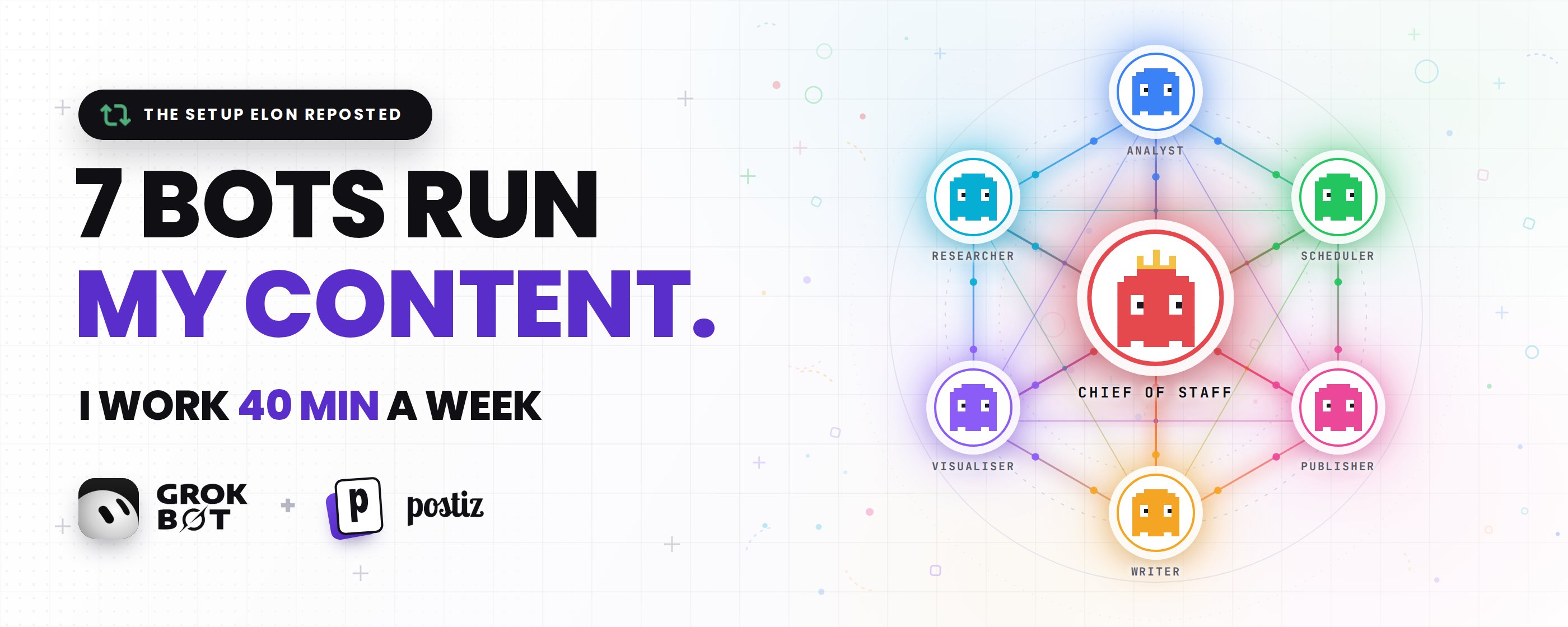
Two weeks ago I posted a breakdown of how I run my content with Grok Bot agents. I wrote it in about twenty minutes, expecting the usual couple hundred likes from people who follow me for AI stuff.
Then Elon Musk reposted it.
The post did numbers I have never done before, and my mentions turned into one long queue of the same question: okay but how do I actually build this?
So this is that answer. The full setup, the exact prompts I use, how the agents hand work to each other, and how everything ends up scheduled and published without me touching a calendar.
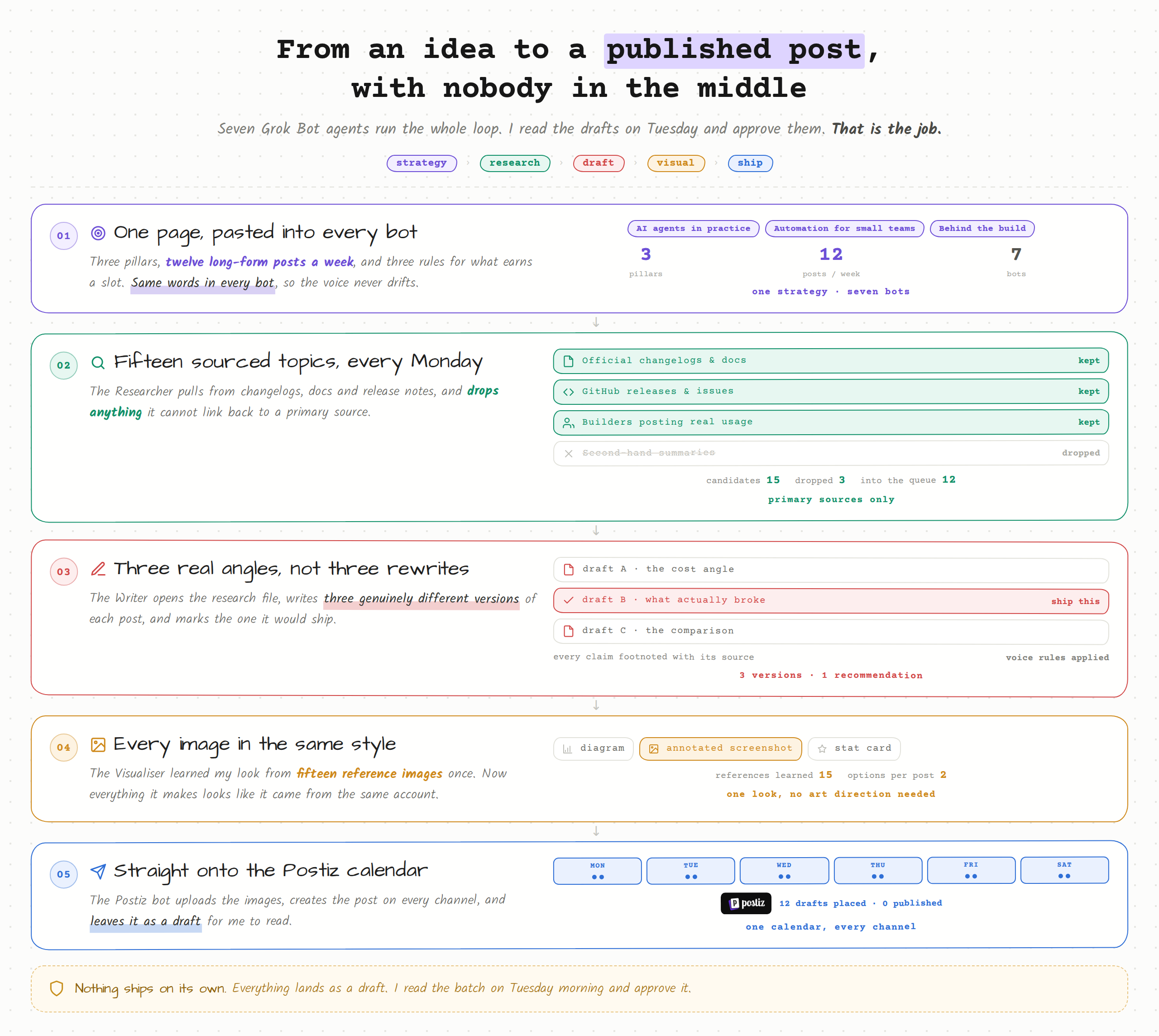
Here is the original post, for context:
Start with the strategy, not the tools
I want to be honest about something before I show you a single prompt. Agents do not fix a bad content plan. They just execute a bad plan faster and more consistently, which is arguably worse.
So here is my actual strategy, written out the way I gave it to my agents. It is boring on purpose.
What I post about. Three pillars, nothing else:
-
AI agents in practice – what people are actually building, what breaks, what it costs.
-
Automation for small teams – workflows a one or two person team can run without hiring.
-
Behind the build – my own setups, my own mistakes, visuals included.
How much. Twelve long-form posts a week on X, one article every two weeks, and the same core ideas reshaped for LinkedIn and Threads. I am not trying to be everywhere. X is the main channel and everything else is a repackage.
The rules. Every post has to pass three checks:
-
It comes from something real that happened in the last seven days, or from my own build.
-
It contains one idea, not four.
-
Somebody who reads it can go do something with it today.
What good looks like. Saves, retweets and replies over likes. If a post gets a lot of likes and no replies or retweets, it was a nice sentence and nothing more.
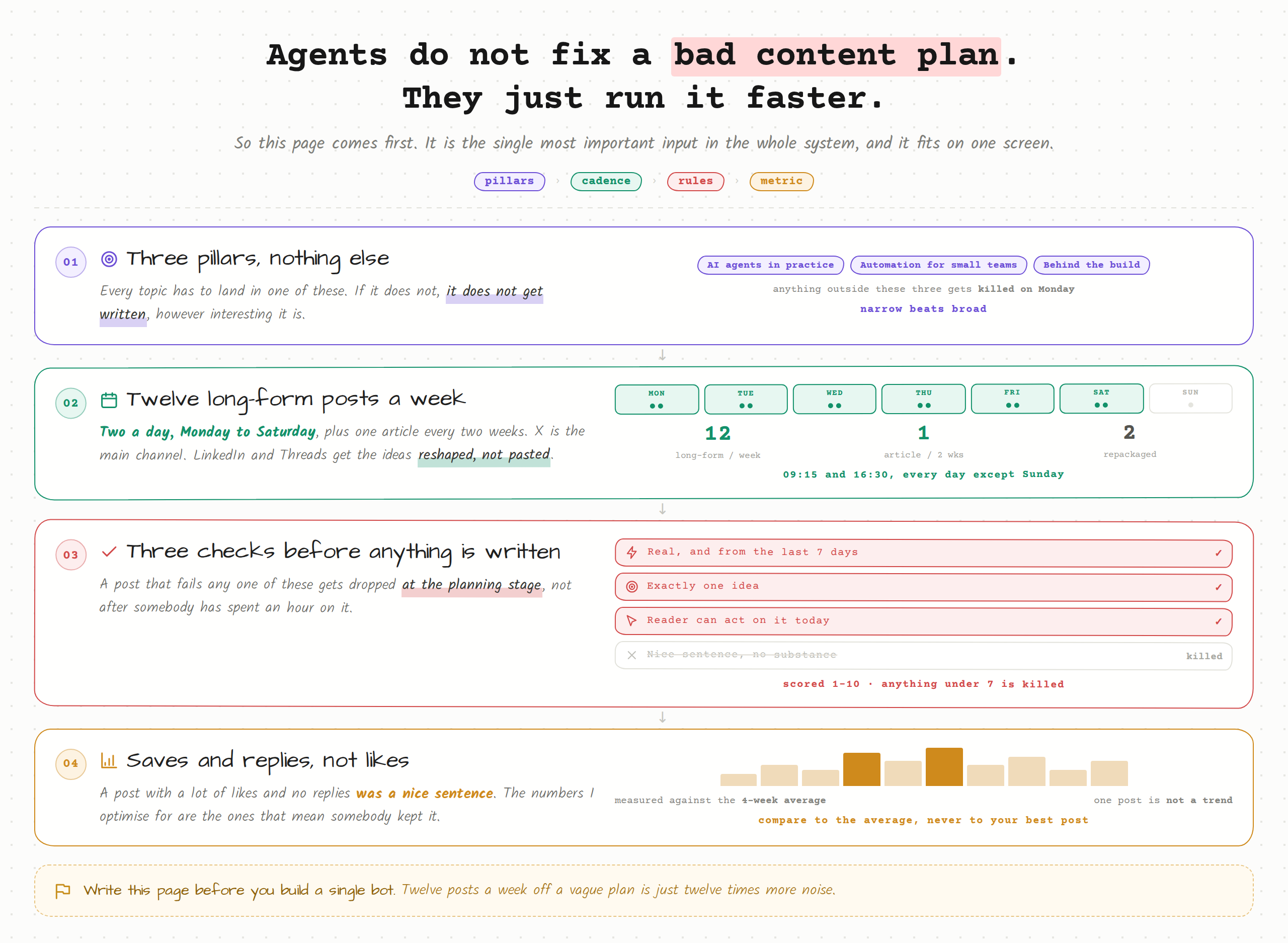
That whole thing fits in a paragraph, and it is the single most important input in this entire system. Every agent below is holding a copy of it.
The team
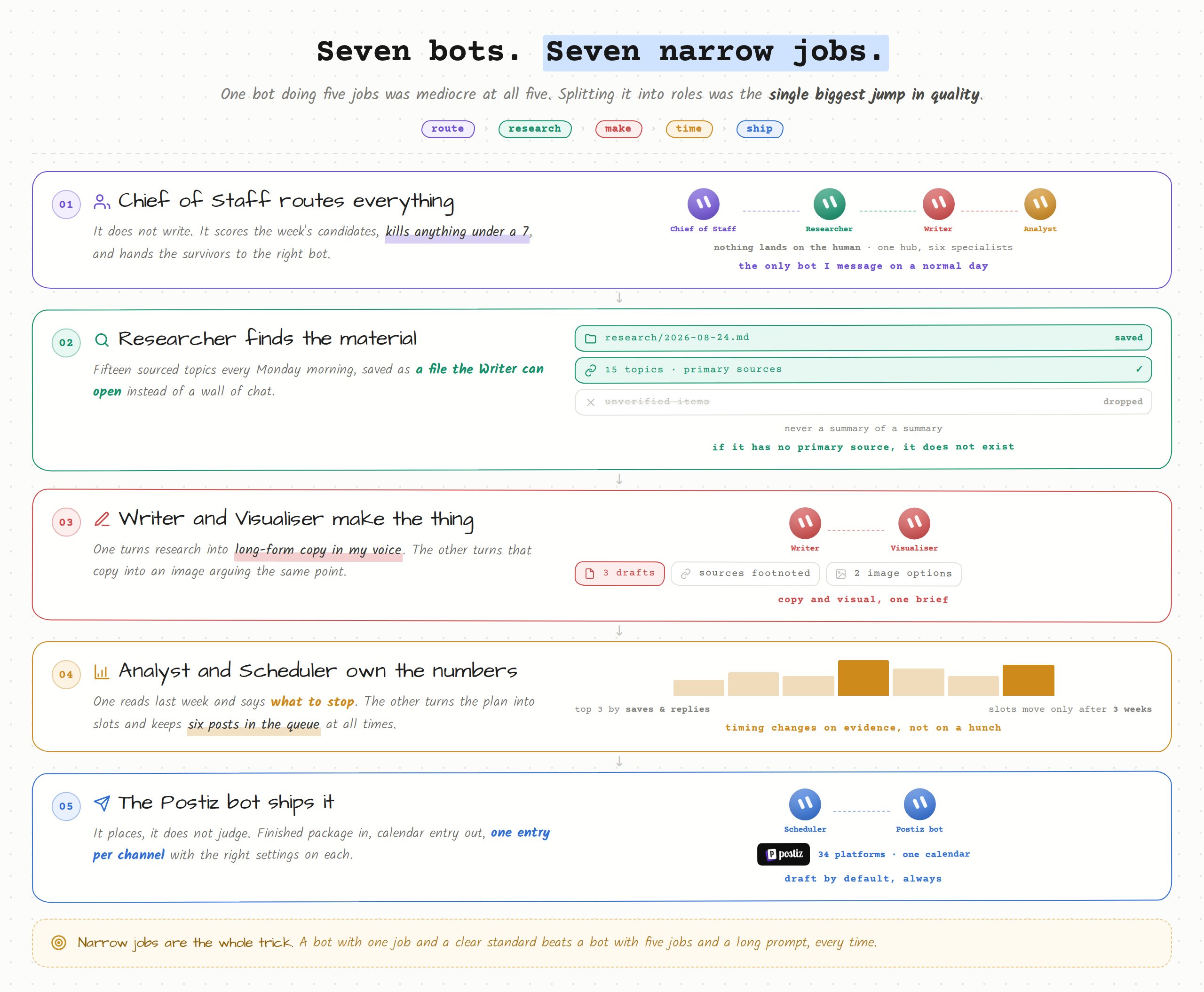
Seven Grok Bot agents. Each one has a narrow job. That is the trick – narrow jobs are the reason the output stays good.
Why Grok Bot specifically
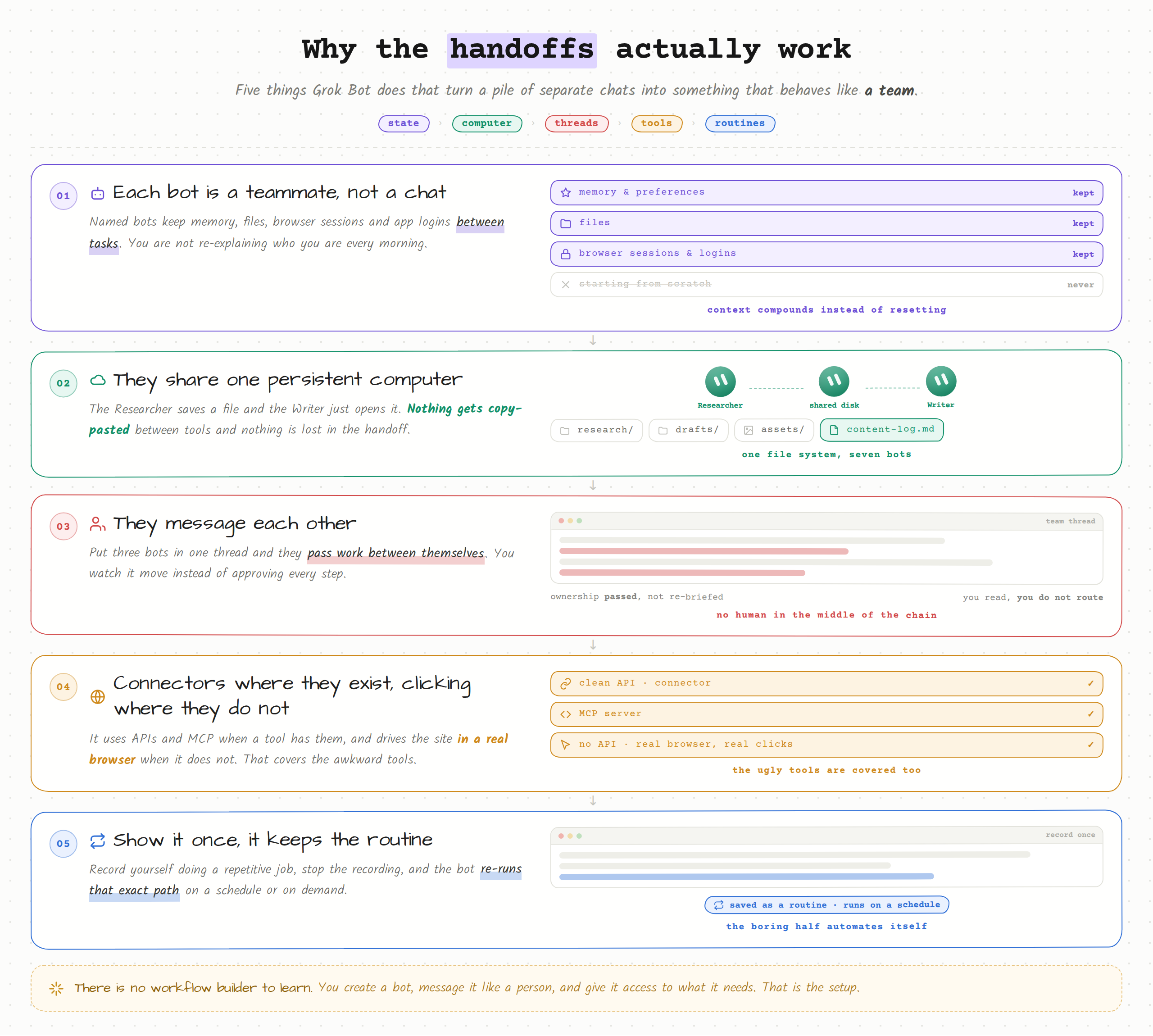
A few things about how Grok Bot works make this possible, and they are worth understanding before you copy the prompts.
Each Bot is a named teammate with durable state. It keeps memory, files, browser sessions and app logins between tasks. You are not starting a fresh chat every morning and re-explaining who you are.
The Bots share one persistent cloud computer. So when my Researcher saves a file, my Writer can just open it. Nothing gets copy-pasted between tools, and nothing gets lost in the handoff.
They can message each other in threads and pass ownership of a task. Put three Bots in one thread and they hand work back and forth while you watch instead of approving every step.
They use connectors and MCP where they exist, and plain computer use where they do not. That is the part people underestimate. A Bot can log into a site with no API and click through it like you would.
And they learn routines. Record yourself doing something once, stop the recording, and the Bot can re-run that path on a schedule.
You create a Bot, message it, and give it access to what it needs. There is no workflow builder to learn.
The prompts
These are the actual system prompts I have on each Bot, cleaned up a little. Copy them, swap my pillars for yours, and you have the same setup running today.
- Chief of Staff
This Bot is the only one I message directly on a normal day.
-
Researcher
-
Writer
This is the one that took the longest to get right. The voice section is the part that matters.
- Visualiser
I fed this one about fifteen of my own images once. Now everything it makes looks like it came from the same account, because it did.
-
Analyst
-
Scheduler
Then everything has to actually get published
This was the part that stayed manual the longest, and it was the part that kept breaking the whole thing.
I had six agents producing finished, reviewed content, and then me, a human, opening five different apps and pasting it in one channel at a time. Which meant that on a busy day nothing went out. All that machinery upstream and the bottleneck was still me with a clipboard.
So I gave the last job to a tool instead: Postiz
So I gave the last job to a tool instead: Postiz
Postiz is one calendar that publishes to 34 social platforms. You connect your accounts once, write a post, tailor it per platform if you want, pick a time, and it goes out. It has a real public API, which is the part that mattered for me, because that is how my agents talk to it.
Setting it up
Honestly it took me about ten minutes.
Sign up at postiz.com and you land on the calendar.
-
Sign up at postiz.com and you land on the calendar.
-
In the left sidebar, hit Add Channel and connect your accounts. X, LinkedIn, Threads, Instagram, Discord, whatever you use. Most go through a normal OAuth redirect. The channel shows up in the sidebar with its avatar when it is connected.
-
Click Create Post, or click any empty slot on the calendar to start a post at that exact time.
-
Write once in the Global tab and it goes to every selected channel. If you want to change one of them, switch to that channel's tab and unlock it. This is how I keep the X version punchy and the LinkedIn version a bit more explained, without writing two posts.
-
The preview column on the right renders the post the way each platform will show it. That has caught more bad line breaks and truncated first lines for me than any review process.
-
Pick a date and time, then Add to calendar.
Connecting Postiz to Grok Bot
This is where it clicks together. I made a seventh Bot and called it Postiz. Its entire job is to take finished packages from the other agents and put them on the calendar.
Getting the key takes about fifteen seconds: Settings → Developers → API key. Copy it. (There is also an MCP config on that same tab if you would rather connect that way. I went with the plain API because I wanted the Bot to see the raw response when something fails.)
Then I gave the Bot this:
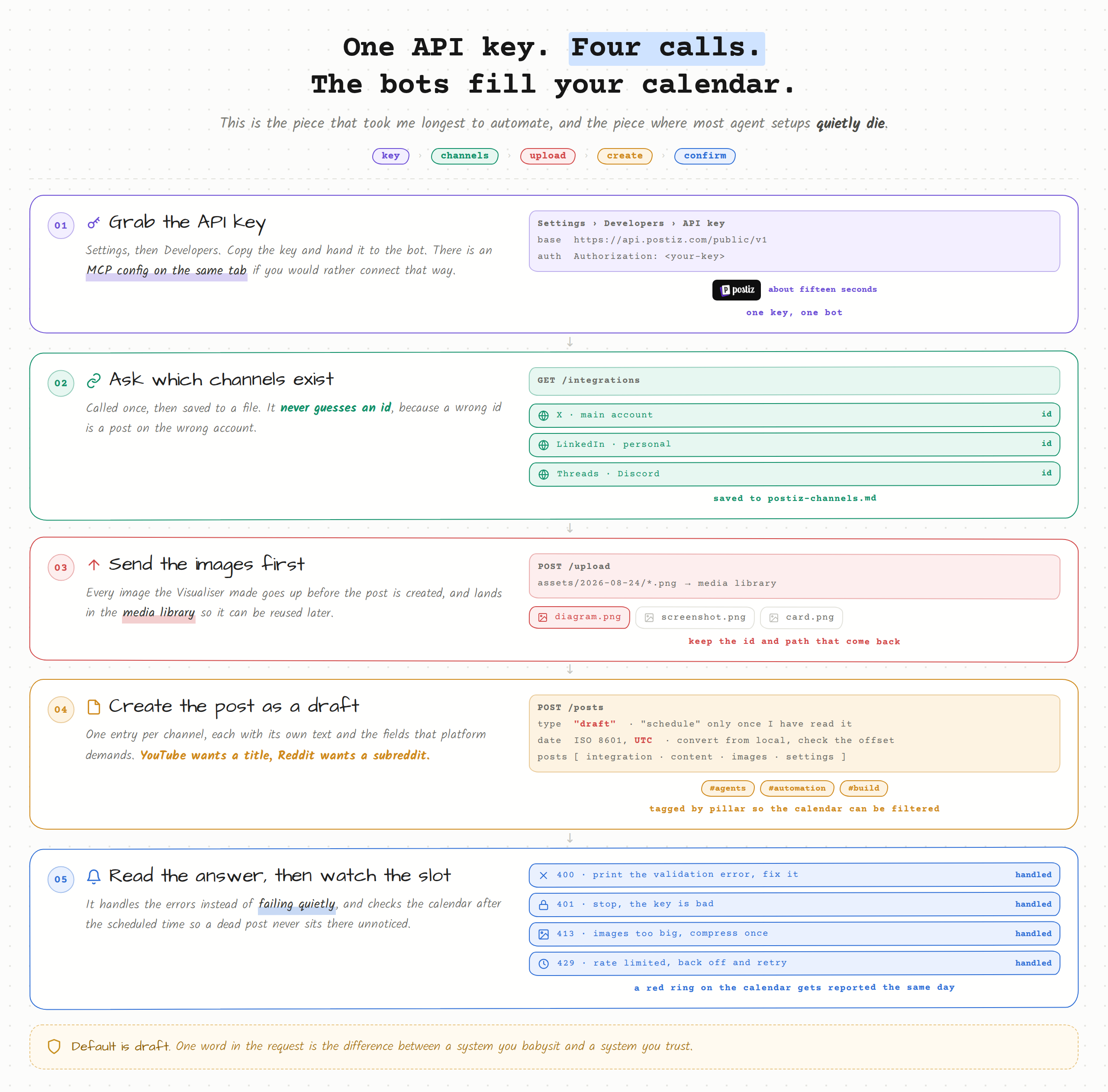
Since I set that up, I have not opened a social app to post anything.
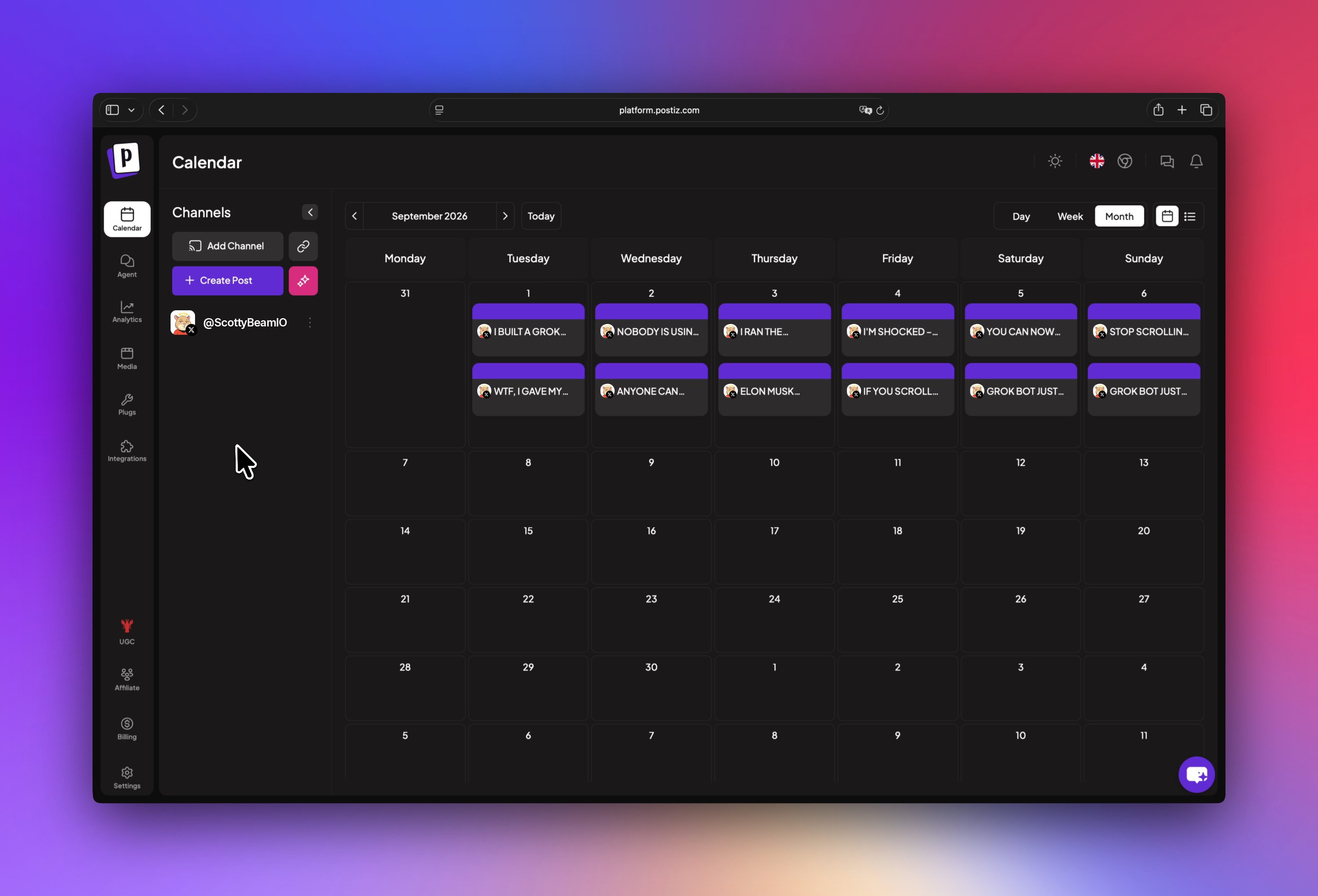
That screenshot above is what the whole system looks like from my side. I did not place a single one of those. The Researcher found the topics, the Writer wrote them, the Visualiser attached images, the Scheduler picked the slots, and the Postiz bot dropped them onto the calendar as drafts. My job is to open it in the morning, read five posts, and approve them.
The Postiz parts I ended up using more than I expected
I came for scheduling. I stayed for a handful of things that quietly replaced other tools I was paying for.
-
Generating posts from the calendar. There is an AI button in the calendar sidebar that generates whole posts, not just images. You give it a subject and it researches, picks an angle, writes, optionally makes pictures, and finds a time. You choose the output format (short post, long post, a thread of short posts, or a thread of long ones) and the tone (personal voice or company voice). It streams what it is doing and drops the results onto the calendar as drafts, so nothing publishes without you looking at it. I use this for the repackage layer – taking a post that worked on X and getting a LinkedIn version without pulling the Writer bot back in.
-
AI images. In the composer there is an AI Image button. Prompt plus style, and the image lands straight in the post and in your media library, so you can reuse it later. Good for the times when a post needs one visual and it is not worth a round trip to the Visualiser.
-
AI video. Same place, AI Video. It offers whatever generators are available on your instance, including Veo3 for prompt-driven video and an image-and-slides option that turns images plus narration into a video. Pick your orientation correctly the first time, vertical for stories and reels, horizontal for everything else, because regenerating costs another credit. Video generation is slow, and if it takes longer than your composer session it just shows up in the media library when it is done.
-
The Agent page. There is a full AI chat inside Postiz at /agents that can schedule posts, generate media, and open the composer prefilled. When I am on my phone and want one thing out right now, that is what I use.
-
Analytics. Per-platform account metrics, which is where my Analyst bot gets a chunk of its weekly numbers.
-
Tags and previews. I tag every post by pillar, so I can look at the calendar and see instantly that I have written four posts about agents and nothing about automation this week. And hovering a post gives you Preview, which generates a shareable link – built for client approval, but I use it to send a post to a friend before it goes out.
A couple of things I do not use much but should mention because people ask: Plugs does auto-repost and auto-comment on a few platforms, Auto Post turns an RSS feed into scheduled posts, and Webhooks fire an HTTP callback when a post publishes. That last one is on my list – I want my Analyst bot to get pinged the moment something goes live instead of polling.
One thing worth knowing so it does not surprise you: Postiz renders every time in your browser's timezone, and there is no timezone setting on the account. If you work with someone in another country, the slot you see is your local time, not theirs. That is exactly why my Postiz bot has that loud line about UTC conversion in its prompt.
What a week actually looks like now
Monday 07:30. Analyst posts last week's numbers.
Monday 08:00. Researcher drops ten sourced topics into the thread and saves the file.
Monday 09:00. Chief of Staff scores them, kills the weak ones, picks five, and posts the slate.
Monday 09:20. I read the slate on my phone. Usually I change one thing. Sometimes nothing.
Monday through Tuesday. Writer writes, Visualiser makes images, Scheduler assigns slots, the Postiz bot puts everything on the calendar as drafts.
Tuesday morning. I open Postiz, read five drafts and their previews, fix a line or two, and flip them to scheduled.
The rest of the week. Nothing. It publishes.
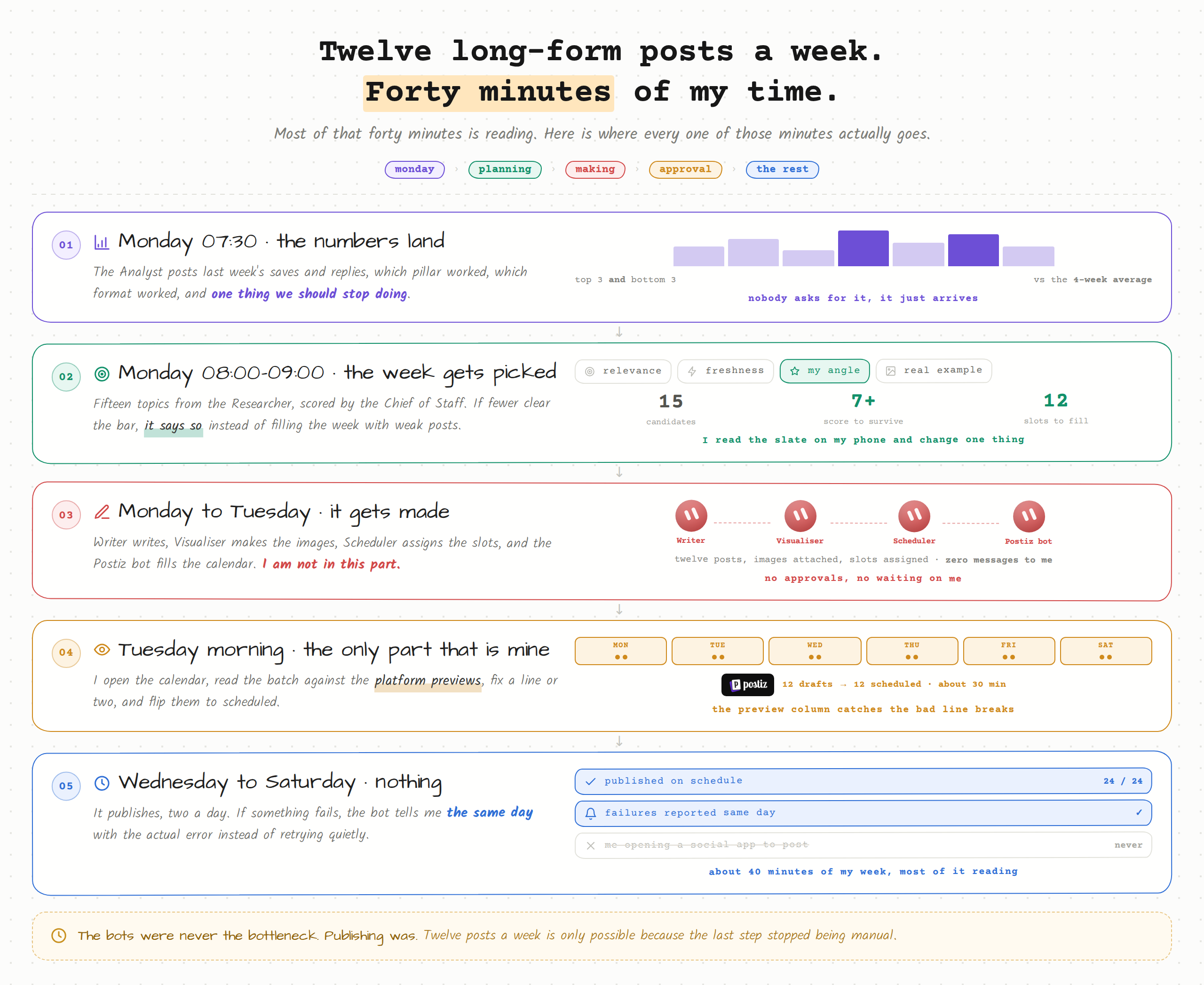
Total time from me: about forty minutes a week, and most of that is reading.
Three things I got wrong first
-
I gave one agent too many jobs. My first version had a single "content agent" that researched, wrote and scheduled. The output was mediocre at everything. Splitting it into narrow roles was the single biggest quality jump, and it is not close. A Bot with one job and a clear standard beats a Bot with five jobs and a long prompt every time.
-
I let it publish straight away. For about a week everything went out on schedule with no review, and two posts went out that I would not have sent. Now everything lands as a draft. That one word in the API call is the difference between a system I trust and a system I babysit.
-
I did not write the strategy down properly. For the first few days I described my pillars differently to each agent, and I got posts that did not sound like they came from the same person. Once I wrote the strategy once and pasted the same block into every Bot, the voice locked in. Same words, every agent.
The point of all of this
I am not more creative than I was three months ago. I have the same ideas I always had.
What changed is that the distance between having an idea and having it published dropped from about forty steps to about two. Read the slate, approve the drafts.
That is the whole thing. The agents did not make me a better writer. They deleted the part of the job that was never writing.
And publishing is the step where most of these setups quietly die, because it is the one part that is pure admin and pure friction. Six agents making great content that never leaves a folder is not a content system. It is a very expensive notes app.
Try the publishing half today
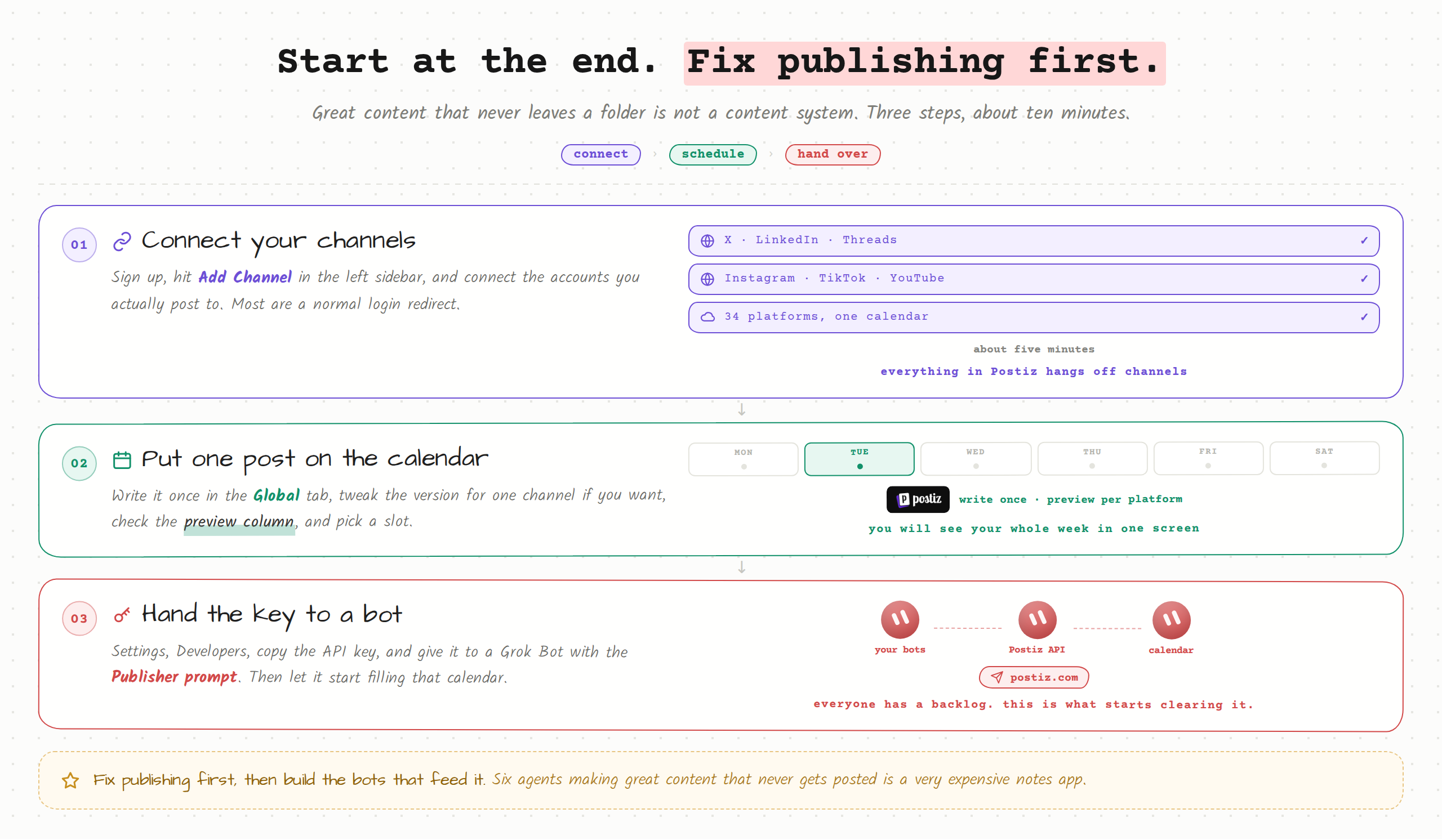
If you want to start somewhere, start at the end. Fix publishing first, then build the agents that feed it.
Go to postiz.com, connect your channels, and put one post on the calendar. It takes about five minutes and you will immediately see why the calendar view is what makes this workable – you can look at your whole week in one screen instead of guessing.
Then grab your API key from Settings → Developers, hand it to a Grok Bot with the Publisher prompt above, and let it start filling that calendar for you.
Everyone has a backlog of things they have meant to make for months. This is what starts clearing it.
If this was useful – bookmark it. You'll want to come back to it.
For more breakdowns like this follow @ScottyBeamIO
For more breakdowns like this follow @ScottyBeamIO
No fluff, just what actually works.
Published on grokbot.sh. Cite the public log, not a prompt pack.