
Grok Bot gives you a team of AI staff. They all share one computer.
It is in the FAQ, the launch post and the docs. It is still the thing nobody acts on. Here is what to change before you connect a single account. The pitch doing the rounds this week is that Grok Bot
Article
Job breakdowns
It is in the FAQ, the launch post and the docs. It is still the thing nobody acts on. Here is what to change before you connect a single account.
The pitch doing the rounds this week is that Grok Bot makes you an instant one-person company. The pitch is not wrong.
Grok Bot went live on 11 August. You message a named bot like you would message a colleague, it works on a cloud computer of its own, and it signs into your actual tools rather than handing you a draft to paste somewhere.
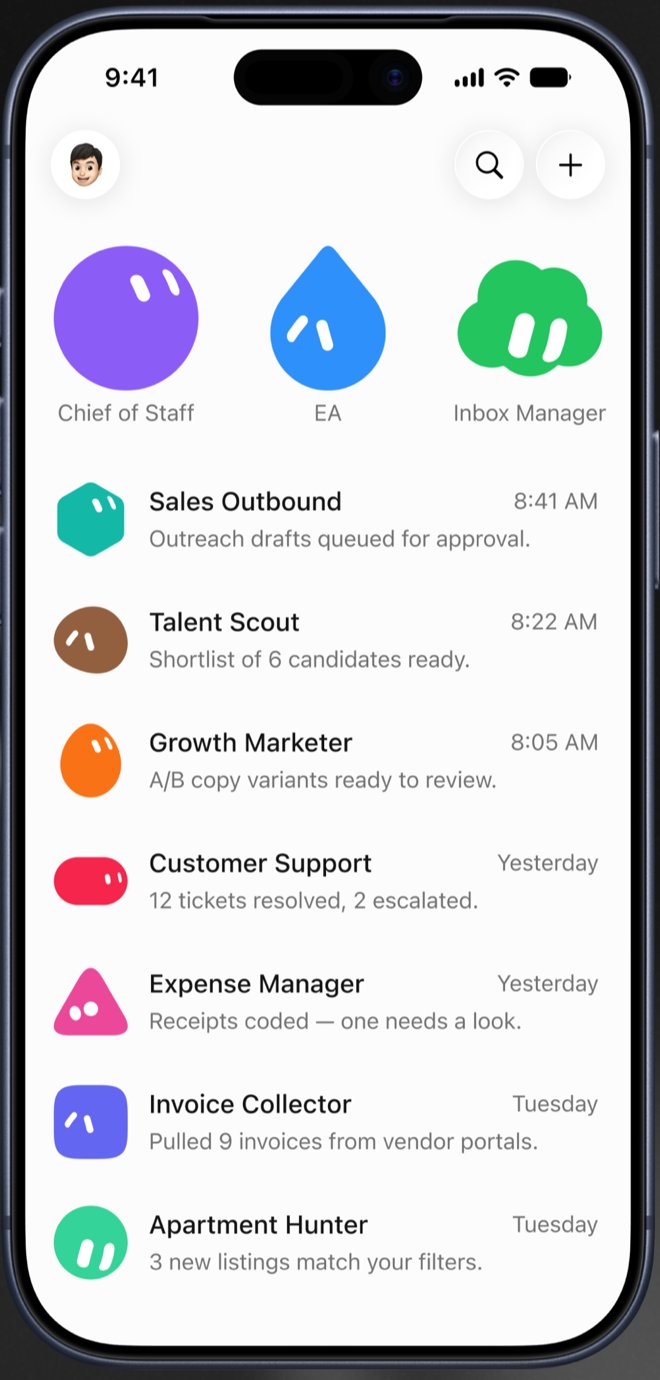
Open the app and you get a roster. Ten named teammates, each with its own coloured face: Chief of Staff, EA, Inbox Manager, Sales Outbound, Talent Scout, Growth Marketer, Customer Support, Expense Manager, Invoice Collector. Each one reports in with a line of its own. Outreach drafts queued for approval. Shortlist of 6 candidates ready. Pulled 9 invoices from vendor portals.
It looks like a team. That is the part everyone is posting about.
Here is the part almost nobody is posting about, and it is sitting in xAI's own documentation.
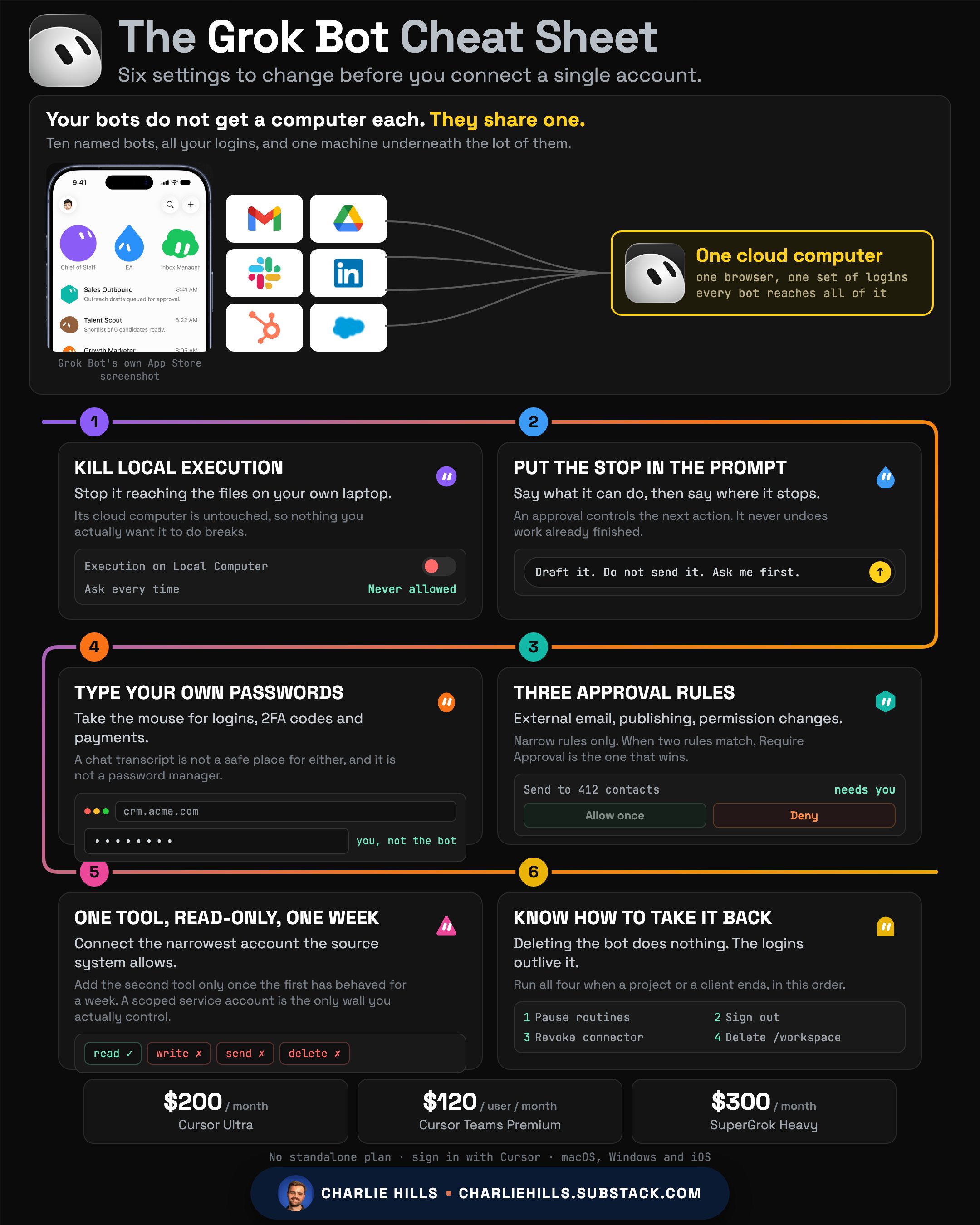
All of your bots share one computer.
Not one each. One, total, for your whole account.
The line in the docs
From the Grok Bot security page, published the day it launched:
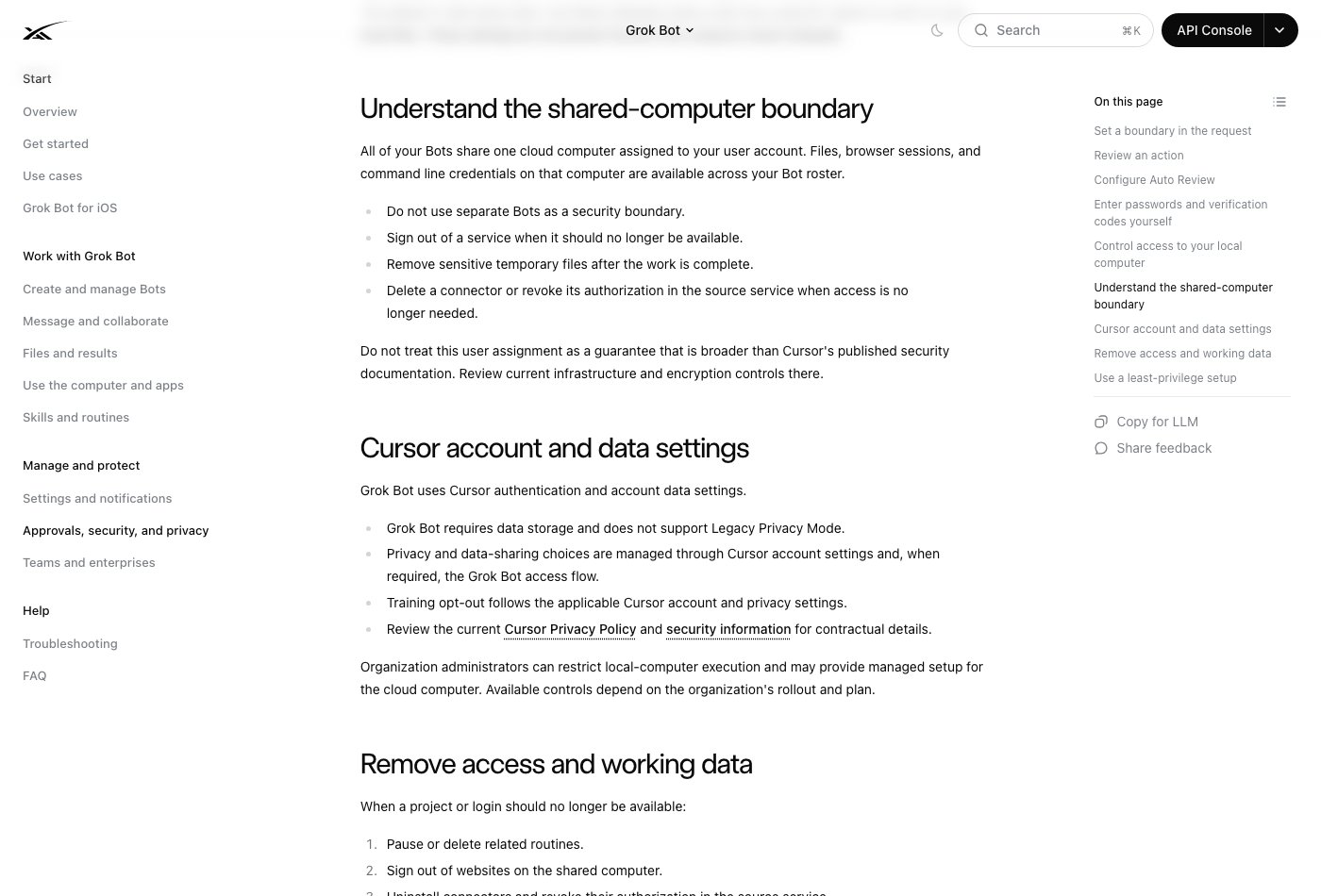
"All of your Bots share one cloud computer assigned to your user account. Files, browser sessions, and command line credentials on that computer are available across your Bot roster."
Then, as a bullet point, in xAI's own words:
"Do not use separate Bots as a security boundary."
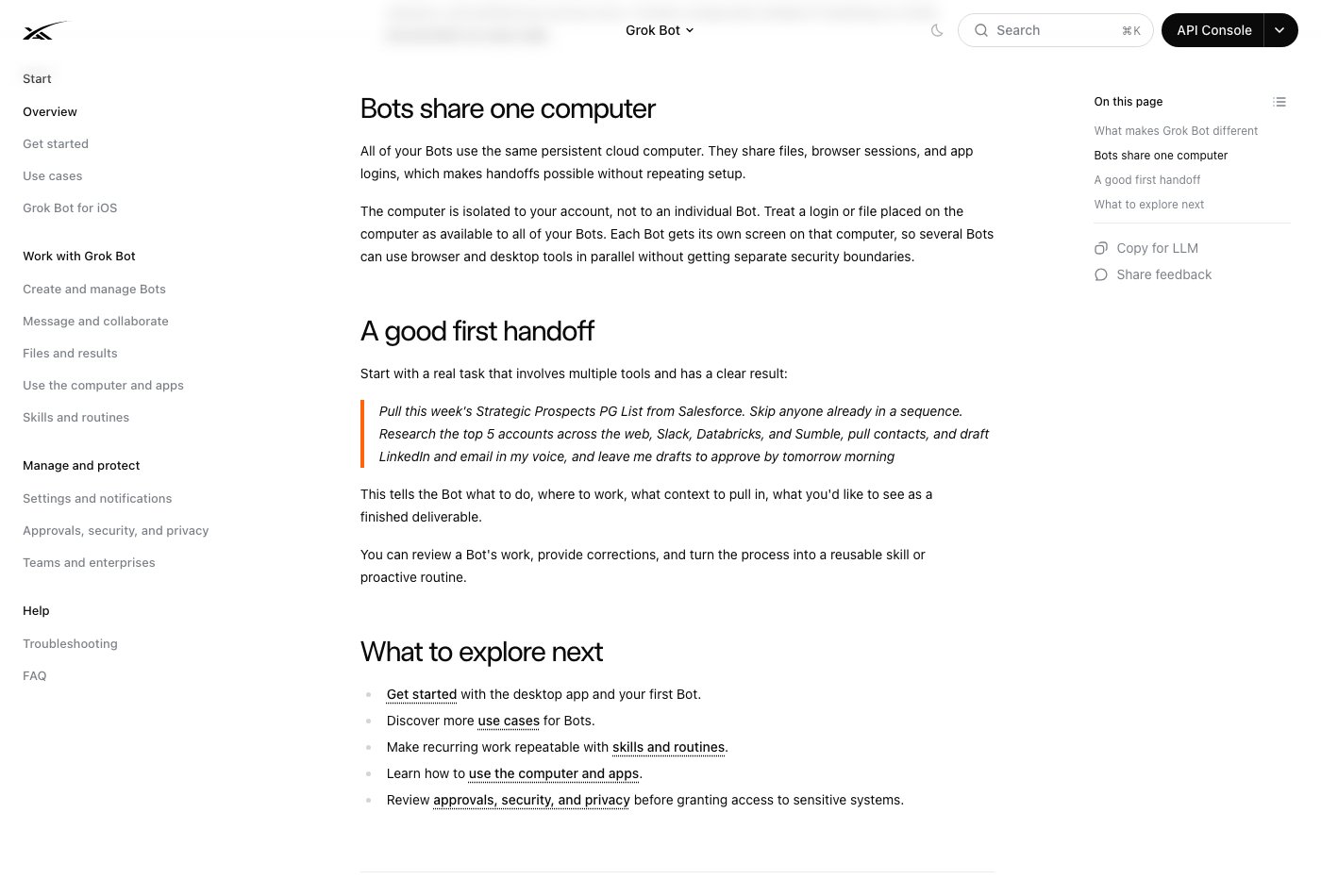
The overview page says the same thing more plainly. Each bot gets its own screen on that machine, so several can work at once, but they do so "without getting separate security boundaries".
That is the vendor telling you, on their own site, that the wall you assume is there is not there.
What people are actually pointing it at
The App Store listing names the jobs, and they are not toys:
Sales outbound, research and CRM updates queued for approval. Talent scout, sourcing candidates and skipping anyone already in the ATS. Inbox manager, triaging and drafting but never sending. Expense manager, chasing receipts across portals. Invoice collector, logging into vendor portals and pulling documents. Account health, risk flags and next-step drafts. Bug reproduction. Competitive intelligence, watching overnight for launches.
Every one of those needs a login. That is the whole point, and it is also the problem.
The feature that makes it stick
Most of the coverage stops at "you can message an agent". The thing that changes how you work is one line further down the docs.
"Ask a Bot to follow along once through a multi-step or multi system path. It persists that path as a routine and can re-run it on a schedule or on demand."
You do the job once, with it watching. It keeps the path. Next week it runs the path itself.
That is a different proposition to prompting. A prompt describes what you want and hopes. A demonstrated routine copies what you actually did, including the bits you would never have thought to write down: which tab you check first, which field you skip, what you do when the export is empty.
The bots also hand work between themselves. From the docs: they "message each other, share context in threads or group chats, and pass ownership so you are not the router between tools." One bot researches, another drafts, a third files it, and you are not the glue.
This is genuinely good. It is also exactly why the next section matters.
Why this actually matters to you
Picture the setup everyone is being encouraged to build this week.
A content bot, signed into your LinkedIn and your Buffer. A sales bot, signed into your CRM. An admin bot, signed into your Gmail and your accounting tool. A client bot, signed into a client's Google Drive.
Four named teammates. Four separate jobs. It feels like four separate desks.
It is one desk. One browser. One set of logins, all live, all reachable by all four.
So the client bot can open your Gmail. The content bot can open the client's Drive. Not because anything went wrong, but because that is how the product is built, and the docs say so.
There is a second line worth reading twice: "Deleting a Bot does not remove shared-computer files or browser sessions." Removing the teammate does not remove its access. You have to go and sign out yourself.
None of this makes Grok Bot bad. Shared state is exactly what makes the handoffs work, and the handoffs are the good bit. It just means the setup you do in the first ten minutes matters far more than it looks like it does.
Six things to do before you connect anything
These come straight from xAI's own security page. It reads like a compliance document, so almost nobody has.
- Turn off local execution.
Settings → General → Agent → Execution on Local Computer. The default is Ask every time. Set it to Never allowed unless a bot has a specific reason to touch files on your actual laptop. The cloud computer is a separate thing and this does not disable it.
- Put the boundary in the request, not in your head. The docs give the shape. Adapt this one:
Reconcile the campaign data and draft a recommended budget change. Do not change the campaign and do not message the agency. Ask for approval after showing the current value, the proposed value and the expected impact.
Say what it can do, then say where it stops. An approval only controls the action in front of it. It does not undo work already finished.
The docs list seven things they think deserve an explicit boundary every time: sending messages or invitations, publishing content, purchases and financial transfers, deleting or overwriting data, changing permissions, production changes, and accepting legal terms. That last one is worth sitting with. An agent with a browser can accept terms on your behalf.
- Write narrow Auto Review rules.
Settings → General → Auto-review. Two kinds of rule, and when both match, Require Approval wins. Start with these three:
Require approval before sending any external email.
Require approval before publishing or posting anything. Require approval before changing permissions on any account.
Avoid anything shaped like "allow everything in the browser". Sites change, and a broad rule ages badly.
There are two caveats on Auto Review that the docs state plainly and nobody quotes.
The first: it is model-based. In xAI's words, it "should complement, not replace, least privilege and explicit approval boundaries." It is a model reading a proposed action and deciding. It is not a firewall.
The second is the one that will catch people out: your rules live on the desktop you wrote them on. "Personal Auto-review rules are stored on the current desktop and synced to its Grok Bot computer. Verify them separately on another desktop installation." Write your rules on the laptop, then work from the desktop, and you are running without them.
- Type your own passwords.
For passwords, two-factor codes and payment confirmations, open 7 of 11
Agent Computer, take control, do the step yourself, hand control back. Never put a password or a one-time code in the chat. The bot is not a password manager and the transcript is not a safe place for either.
One nuance worth knowing. If a bot presents what the docs call a secure secret request for a supported connection, that field is safe: the value is masked, kept out of the transcript, and never shown to the model. That is the only place a credential should ever be typed into the app. Everywhere else, take the computer.
- Connect one tool at a time, read-only first.
Give it the narrowest account the source system will let you make. Start on tasks that read and draft, not tasks that send and publish. Add the next tool once the first one has behaved for a week.
- Have a way to take access back.
When a project ends: pause the routines, sign out of the websites on the shared computer, uninstall the connector and revoke it in the source service, and delete the files from /workspace. Deleting the bot on its own does nothing.
If you are doing this with a team
Two things change. Organisation administrators can restrict local computer execution centrally and can provide a managed setup for the cloud computer, so the first setting on this list may not be yours to choose. And the shared-computer boundary is per user account, not per organisation, so every person you roll this out to has their own single machine with their own pile of live logins on it.
Which means the six settings below are not a one-off task you do. They are the thing you write down and hand to everyone before they connect anything.
What it costs, honestly
There is no standalone Grok Bot plan. You get in through one of three subscriptions, and you sign in with a Cursor account.
Checked on cursor.com today: Cursor Ultra is $200 a month, and Cursor Teams Premium is $120 per user per month, which lists Grok Bot access on the plan itself. The third route is SuperGrok Heavy at $300 a month. xAI does not publish that figure on any page I can read, so treat it as the widely reported number rather than a first party one.
Worth knowing who you are actually buying from. The app is a free download published by Anysphere, the company behind Cursor, and it carries Cursor's terms and Cursor's privacy policy. Free to install, and it does nothing at all without one of those three subscriptions.
Two more things worth knowing before you sign up. Grok Bot requires cloud data storage and does not support Legacy Privacy Mode, so an account on that setting has to move before it will start. And it is a macOS, Windows and iOS product. There is no Linux desktop app.
Where I have landed
The product is genuinely good, and "a teammate that finishes the job in the real tool" is the right idea. The shared computer is not a bug, it is the design, and it is the reason the handoffs feel effortless.
What I would not do is build four bots, connect four accounts, and assume the names on them mean anything. They do not. There is one machine, one browser and one set of logins behind all of it.
Spend ten minutes on the six settings above first.
Then go and build your one-person company.
— Charlie
Published on grokbot.sh. Cite the public log, not a prompt pack.